



Choosing an enterprise proxy provider by use case

Hannah

The proxy with the largest IP pool is not necessarily the right choice for an enterprise. When choosing a proxy provider for enterprise workloads, match the proxy type and session behavior to the task, then compare reliability, location coverage, controls, support, and account management. A service suited to high-volume data collection may not fit workflows that require a persistent IP or mobile connectivity.
Performance and scale matter, but headline claims alone do not show how a network will behave under your workload. This guide explains how residential, datacenter, ISP, and mobile proxies differ, and how to assess rotation, session control, API access, reporting, and support. It also offers a practical way to compare providers against your use case, test the factors that matter, and make a decision based on operational fit rather than one metric.
Key Takeaways
- Start with the workflow: its location needs, traffic volume, and session length help determine which proxy type and rotation approach fit.
- Compare providers on more than IP count. Reliability, latency consistency, location options, session controls, protocols, and reporting all affect operational fit.
- Assess billing structure against how your workload uses data and concurrent connections, then test performance with representative tasks before committing.
- Look for support and account management that help your team handle integration, usage oversight, and changes in demand.
- For workflows that call for mobile connectivity, compare dedicated 4G and 5G mobile proxies with residential and datacenter options.
Which enterprise proxy solutions should you compare?
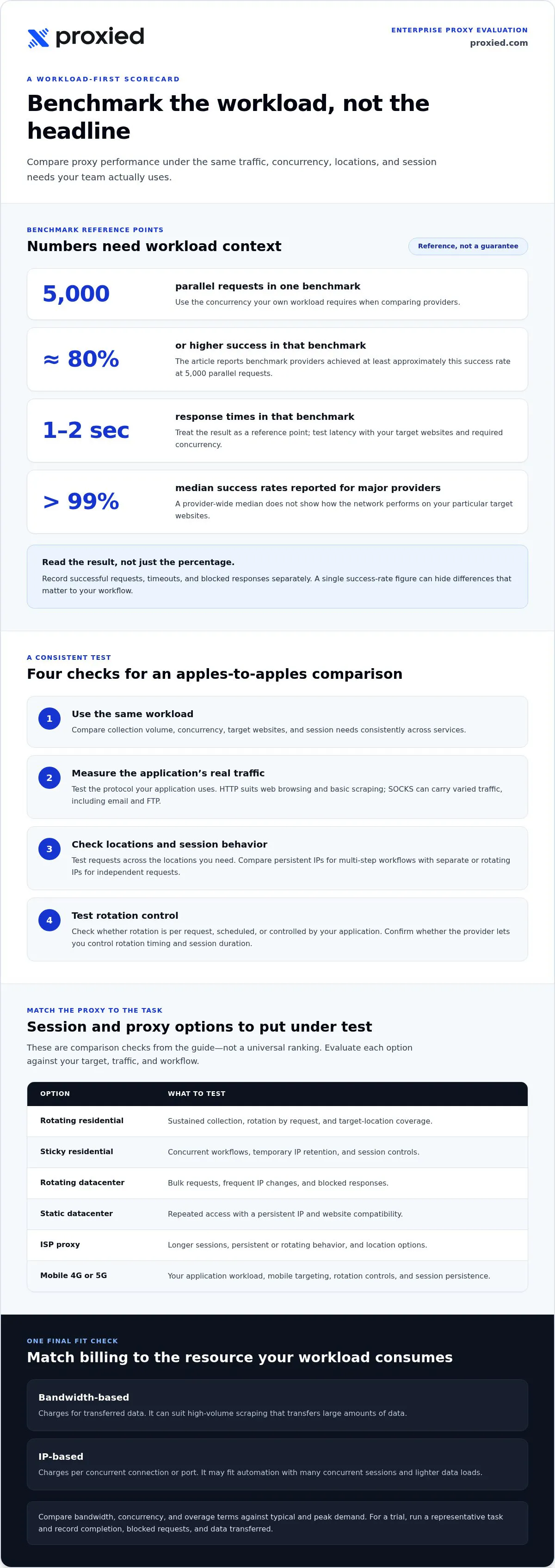
Compare each proxy service against the same workload: collection volume, concurrency, target websites, and session needs. For enterprise teams, choosing a proxy provider starts with consistent tests of bandwidth, location targeting, and blocked-request handling.
Bandwidth, Sessions, and Protocols
Compare usable bandwidth, simultaneous sessions, and supported protocols separately. A large collection transferring substantial page data needs a different setup from a workflow opening many lightweight sessions. HTTP proxies suit web browsing and basic scraping; SOCKS can carry different traffic types, including email and FTP. Test the protocol your applications actually use, not just the one listed among the features.
Success Rate and Concurrency
Measure successful responses and latency under the same concurrency your workload requires. In one benchmark, providers achieved at least approximately 80% success and response times of 1-2 seconds at 5,000 parallel requests. Major proxy providers have median success rates above 99%, but a median alone won’t describe performance on your target websites. Record successful requests, timeouts, and blocked responses separately.
Location Targeting and Session Management
Match location targeting to the data you need. Country-level access may suit broad collection, while city or US state targeting can help compare local search results or regional content. Test the same request across locations to assess consistency. Also compare session controls: an authenticated workflow may need a persistent IP, while independent page requests may work better with separate IPs.
Rotation Controls and Session Persistence
Check whether rotation happens per request, on a schedule, or through a setting controlled by your application. Rotating after each request can suit scraping tasks where IP reuse is undesirable. Sticky sessions retain an IP for a defined period and can support multi-step account or checkout workflows. If a provider offers no control over rotation timing or session duration, it may not suit your workflow.
- Rotating residential — Bandwidth and concurrency: Test sustained collection; Session behavior: Rotation by request; Protocol or targeting check: Confirm target locations
- Sticky residential — Bandwidth and concurrency: Test concurrent workflows; Session behavior: Retains IP temporarily; Protocol or targeting check: Check session controls
- Rotating datacenter — Bandwidth and concurrency: Test bulk requests; Session behavior: Frequent IP changes; Protocol or targeting check: Check blocked responses
- Static datacenter — Bandwidth and concurrency: Test repeated access; Session behavior: Persistent IP; Protocol or targeting check: Check website compatibility
- ISP proxy — Bandwidth and concurrency: Test longer sessions; Session behavior: Persistent or rotating; Protocol or targeting check: Check location options
- Mobile 4G — Bandwidth and concurrency: Test application workload; Session behavior: Review rotation controls; Protocol or targeting check: Check mobile targeting
- Mobile 5G — Bandwidth and concurrency: Test application workload; Session behavior: Review session persistence; Protocol or targeting check: Check mobile targeting
- HTTP — Bandwidth and concurrency: Test web request volume; Session behavior: Set rotation separately; Protocol or targeting check: Web traffic protocol
- SOCKS — Bandwidth and concurrency: Test mixed traffic needs; Session behavior: Set session behavior; Protocol or targeting check: Supports varied traffic types
When choosing a proxy provider for enterprise workloads, select an option that matches your protocol, target location, concurrency, and session behavior.
How should you evaluate an enterprise proxy provider?
Compare the billing model with your actual traffic pattern, then test the network on representative tasks. Review trial access, bandwidth limits, and refund terms before committing.
Bandwidth-Based and IP-Based Pricing
Bandwidth-based billing charges for transferred data; IP-based billing charges per concurrent connection or port. The first model can suit high-volume scraping that transfers large amounts of data. The second may fit automation with many concurrent sessions and lighter data loads. Estimate both requests and data transfer for a typical workload, then compare how each model handles peaks.
For example, a collection job that downloads complete pages can use far more bandwidth than one checking short status responses. A session-heavy workflow may need several simultaneous connections while transferring little data. Match the billing unit to the resource your application consumes, and account for limits that could affect success as usage grows.
Pay-As-You-Go and Committed Pricing
Pay-as-you-go models can tie spending more closely to actual usage, which helps with variable workloads or an initial test. A committed arrangement may suit steady traffic, but its value depends on how closely the commitment matches real demand. Compare included bandwidth, concurrency, and overage rules rather than judging either model by its label.
Use a sample month of internal request logs to estimate typical and peak demand. Then compare those patterns with each provider’s billing terms. Check whether unused traffic rolls over or expires at the end of the month. This can affect the effective cost of a commitment when collection volume changes.
Trials, Billing, and Refunds
Test a provider against your real workload before signing a contract. Run the same scraping task on the trial and production configuration, then record completion, blocked requests, and data transferred. A trial that cannot reproduce your intended workflow offers limited evidence of operational performance.
Read billing and refund terms before starting the test. Identify when billing begins, how usage is measured, and what happens if a workload stops early. Treat the refund policy as a separate decision criterion, not an assumed extension of trial access. A provider without a testing option is a warning sign during evaluation.
Scalability and Bandwidth Limits
Compare how each model responds when request volume rises. Identify when included bandwidth runs out, what happens next, and whether concurrency changes alongside usage. Claims of “unlimited traffic” or steep blanket discounts may mask poor network quality, so test actual performance instead of relying on headlines.
Use three workload scenarios: normal collection, a planned traffic increase, and a temporary peak. For each, estimate data transferred and active sessions, then compare billing outcomes and network performance. This can expose limits before growth turns them into operational problems.
- Measure request volume, transferred data, and concurrent sessions from a representative workload.
- Compare those needs against each model’s billing unit, usage limits, and rollover terms.
- Use a trial to assess the network under your own tasks, then review the written billing and refund terms.
To compare proxy service options against those workload requirements, explore proxy connectivity options.
Support and account management
Support affects how quickly teams diagnose traffic interruptions, authentication failures, and integration issues. Compare response channels, technical resources, escalation paths, and written service commitments with your operational needs.
Support Availability and Channels
Assess support availability alongside the channels offered, such as email, live chat, or ticketing. Proxy providers should offer 24/7 working hours for enterprise needs. A team running sessions across time zones can compare this coverage with its own incident schedule and escalation process.
Test the support process before deployment. Submit a sample issue about a failed request or sticky session, then note how clearly the response explains the diagnosis and next steps. Compare response quality across channels, not just speed. A useful answer should identify the logs or request details needed to resolve the issue.
Provider Reputation and Customer Support
Assess reputation through evidence related to service operations, not broad claims. Compare customer feedback on support responsiveness, recurring outages, and issue resolution. Look for consistent examples across multiple reviews rather than treating one positive or negative account as representative.
Ask how support handles a network disruption affecting active sessions. A clear process should explain incident updates, escalation, and recovery steps. Compare it with your monitoring workflow, including who on your team receives updates and how requests are recorded. This makes reputation relevant to day-to-day operations.
API Support and Technical Documentation
For application-managed traffic, assess API maturity, authentication methods, and transparent reporting. Documentation should explain how to configure credentials, select locations, manage sessions, and interpret usage data. Test one integration path, such as changing a session setting, before connecting multiple internal applications.
Check whether examples cover errors as well as successful requests. Practical documentation should help developers identify authentication failures, invalid parameters, and connection issues. Compare documentation updates with the API behavior your team observes. Clear version notes and consistent examples reduce guesswork during deployment.
SLA Guarantees and Enterprise Support
Read the written service-level agreement for defined uptime, measurement windows, exclusions, and remedies. Do not treat a general uptime statement as an SLA. Compare how the agreement describes failover and incident communication, then map those terms to your service monitoring and continuity plans.
Enterprise support should also clarify account ownership and escalation steps. For example, document who handles a persistent authentication fault, how it is escalated, and where status updates appear. Compare the written process with your internal incident runbook so teams know how to respond during a disruption.
Use this checklist to compare support operations:
- Confirm support hours and available channels.
- Test a technical question about requests or sessions.
- Review API documentation and reporting examples.
- Match SLA terms to monitoring and escalation procedures.
These checks show whether support fits your team’s workflows, not just its proxy traffic volume.
Proxy provider types and common enterprise use cases
Enterprise proxy services include residential, datacenter, ISP, and mobile proxies, each suited to different IP networks and workloads. Choose based on the task: data collection, account workflows, and bulk automation place different demands on a proxy type.
Proxy Types by Enterprise Use Case
Residential proxies route traffic through household IP addresses and can suit market research, ad verification, and public website collection. Datacenter proxies prioritize speed and affordability for bulk automation where occasional detection is less concerning. ISP proxies combine datacenter speed with residential IP credibility, while mobile proxies use cellular networks and can suit platforms with aggressive anti-bot systems.
Proxy Types by Business Workload
Match infrastructure to traffic behavior, not just department labels. A team checking 50 local search results each week may need only a static proxy or modest rotating pool. Large-scale data collection may call for residential or datacenter options, depending on target-site behavior and the need to prioritize speed, IP credibility, or volume.
For social media management or app testing, mobile proxies may suit workflows that need mobile-network addresses. Long-running account processes can benefit from sticky sessions, which retain the same IP for a defined period. Independent scraping requests, by contrast, may use rotating IPs to avoid reusing one address. Match session behavior to each workflow.
Consider the trade-offs before standardizing on one proxy type across your enterprise:
- Residential: Household IP addresses support market research and access to public websites, but residential networks can be slower and less predictable than datacenter networks.
- Datacenter: Data-center infrastructure suits high-volume tasks that prioritize speed, although these IPs can be detected because they aren’t affiliated with an internet service provider.
- ISP: ISP proxies combine datacenter speed with residential IP credibility, making them a possible fit for ecommerce automation and long-running sessions.
- Mobile: Cellular connections can suit social or app workflows, but mobile proxies are typically slower than residential or datacenter options.
Use a workload map to avoid assigning every team the same network. For example, separate public-page collection from account management, then record each task’s target websites, location needs, request pattern, and session duration. This helps teams select distinct pools and apply appropriate rotation settings. It also gives operations staff a practical basis for monitoring traffic and investigating blocked requests.
Test the chosen proxy type against a representative task before expanding it across the platform. Check location accuracy and whether sample IP addresses appear residential or datacenter, then compare the result with the task’s access needs. This can reveal a mismatch between the intended network and the addresses actually used.
Residential, datacenter, ISP, and mobile proxies
Choose a proxy network based on the origin of its IP addresses and the workload’s requirements. Residential, datacenter, ISP, and mobile proxies differ in speed, predictability, and how websites recognize their traffic.
Residential proxies
Residential proxies route requests through IP addresses associated with physical devices and provided by an internet service provider. They suit web scraping, market research, ad verification, and access to public websites. Their address origin can fit tasks where datacenter traffic is often blocked, but residential networks can be slower and less predictable than datacenter networks.
Use residential proxies when a task needs household IP addresses more than consistently high speed. For example, a market research team collecting public product listings can test whether the locations and addresses meet its collection needs. Check sample IP locations before expanding the workflow.
Datacenter proxies
Datacenter proxies come from cloud hosting services and data centers, rather than internet service providers. They prioritize speed and affordability, making them suitable for bulk automation and high-volume tasks where occasional detection is not a major concern. Websites may detect or flag them because their addresses are not associated with an ISP.
Choose datacenter proxies for workloads that value throughput, such as processing public pages at scale. Do not assume speed alone makes them a better fit. If a target blocks datacenter addresses, faster requests will not solve the access problem. Test against the actual websites and task pattern.
ISP proxies
ISP proxies combine datacenter speed with residential IP credibility. They can suit ecommerce automation, account management, and other workflows that need longer-running sessions. Compare them with residential proxies when session continuity matters, then assess whether the workflow needs that combination rather than household addresses or datacenter throughput alone.
For example, a multi-step ecommerce workflow may need the same IP across related actions. Match session behavior to the sequence, and evaluate the connection using the application’s own steps.
Mobile proxies
Mobile proxies use real cellular networks, including 4G and 5G connections. Businesses often prefer them for platforms with aggressive anti-bot systems; social media management and app testing are common use cases. Mobile connections are typically slower than residential or datacenter proxies, so test the application’s response times before assigning large workloads.
Choose mobile proxies when a task specifically benefits from mobile-network IPs, not simply because the option sounds more robust. A team testing an app can compare key actions over mobile and residential connections, then assess performance and access behavior.
Before deployment, test sample IPs for location accuracy and whether they appear residential or datacenter. This can reveal network-quality problems before a larger collection begins. Do not call a proxy type “expensive” or “cheap” without comparing the workload, billing model, and operational fit.
Compare proxy options for your workload and choose the network type that matches your use case.
Proxied: Dedicated 4G Mobile Proxies
Proxied offers Dedicated 4G Mobile Proxies for enterprise workflows that call for mobile-network connectivity. They may fit tasks such as social media management or app testing, where mobile proxies can suit platforms with aggressive anti-bot systems. Compare the connection with your application’s needs, including response behavior and session requirements, before selecting a proxy type.
If your workload needs a different mobile generation, Proxied also offers Dedicated 5G Mobile Proxies. Residential and Datacenter proxy plans are available on the Proxied marketplace. Teams managing their own proxy infrastructure can consider the Proxy Hosting Platform. These options serve different operational requirements, so base the decision on your workflow rather than treating them as interchangeable.
Contact Proxied to discuss whether Dedicated 4G Mobile Proxies fit your enterprise use case.
Turn your proxy evaluation into a practical next step
Make the decision operational by documenting which teams need proxy access, what each workflow must accomplish, and who will monitor usage. Then assign a small, representative workload for testing before expanding access across your organization. This gives technical and procurement teams a shared basis for reviewing results and deciding what to scale.
A practical approach to choosing a proxy provider for enterprise workloads starts with that fit, not a broad feature list. Proxied offers Dedicated 4G Mobile Proxies and Dedicated 5G Mobile Proxies, plus Residential and Datacenter proxy plans on the Proxied marketplace. These options address different needs, so connect each one to a specific business task when planning your next step.
Use your evaluation criteria to prepare a focused discussion about your requirements and workflows. Contact Proxied about enterprise proxies to discuss your needs and explore a suitable direction for your proxy setup.
With a clear use case and a measured evaluation plan, your team can make a more confident decision.
Frequently Asked Questions
What makes a proxy service enterprise-grade?
An enterprise-grade proxy service supports controlled, observable use across business workflows. Look for authentication options, API access, transparent usage reporting, and controls for sessions and IP rotation. For example, an operations team should be able to associate proxy activity with internal users and review requests by application. Resilience matters too: network diversity and backup capacity can help reduce disruption when an IP range or route becomes unavailable.
Do enterprise proxies require a monthly commitment?
No single contract period applies to every enterprise proxy service. Some providers offer pay-per-use models, while others require a commitment. The right arrangement depends on workload stability and the flexibility your team needs. A pilot with variable traffic may benefit from usage-based billing; a steady production workflow may be easier to plan under a defined commitment.
How Do Enterprise Proxy Contracts and SLAs Work?
Contracts set commercial and operating terms, while a service-level agreement describes service commitments and how performance is measured. Review the covered service, measurement method, exclusions, incident notifications, and remedies. For example, confirm whether an uptime measure applies to the proxy gateway, individual IPs, or both. Align these terms with your monitoring and escalation procedures so teams know how to record and handle service interruptions.
How important is GDPR compliance when choosing a proxy provider?
GDPR compliance matters when your organization’s activities involve personal data within its scope. Assess what data passes through the proxy, how the provider handles it, and which roles each party performs. For example, a workflow collecting public pages may still encounter personal information in page content or logs. Include data handling and retention in your assessment, and have legal specialists review the use case and relevant obligations.
Per-GB or committed pricing: which model fits enterprise use?
Per-GB billing may suit data collection that transfers large volumes, while a commitment can fit workloads with predictable demand. Compare the models using actual request and transfer patterns, not a general estimate. For example, teams retrieving full pages should include response size in their usage forecast. Also account for peak activity, unused traffic rules, and any usage thresholds that change billing or service access.
Should I run a proof-of-concept before signing a proxy contract?
Yes. A proof of concept can show how the service performs with your application, target websites, and operating controls before a full rollout. Use representative requests, authentication, and session behavior rather than a simple connection check. Record successful responses, latency, blocked requests, and integration issues. Keep the test scope limited, document the results, and use them to decide whether the service fits the intended production workflow.
What compliance questions should enterprises ask a proxy vendor?
Review how IP addresses are sourced, what data the service logs, how long records are retained, and how sensitive traffic is protected. Also assess the provider’s stated compliance standards and how its service use aligns with target websites’ terms. For example, document whether a collection task accesses public information and what data it stores. Have legal specialists assess relevant laws and regional requirements before deployment.
How to evaluate enterprise proxy providers for reliability, speed, and geographic coverage?
Run the same representative workload across the required proxy locations, then compare successful responses, latency consistency, and connection failures. Test at the concurrency your application expects, and repeat the test at different times to reveal variation. Review network diversity across autonomous systems and subnets, along with failover options. For geographic coverage, validate that observed IP locations match the regions your business process needs.