



CURL with rotating proxy example for requests and setup

David
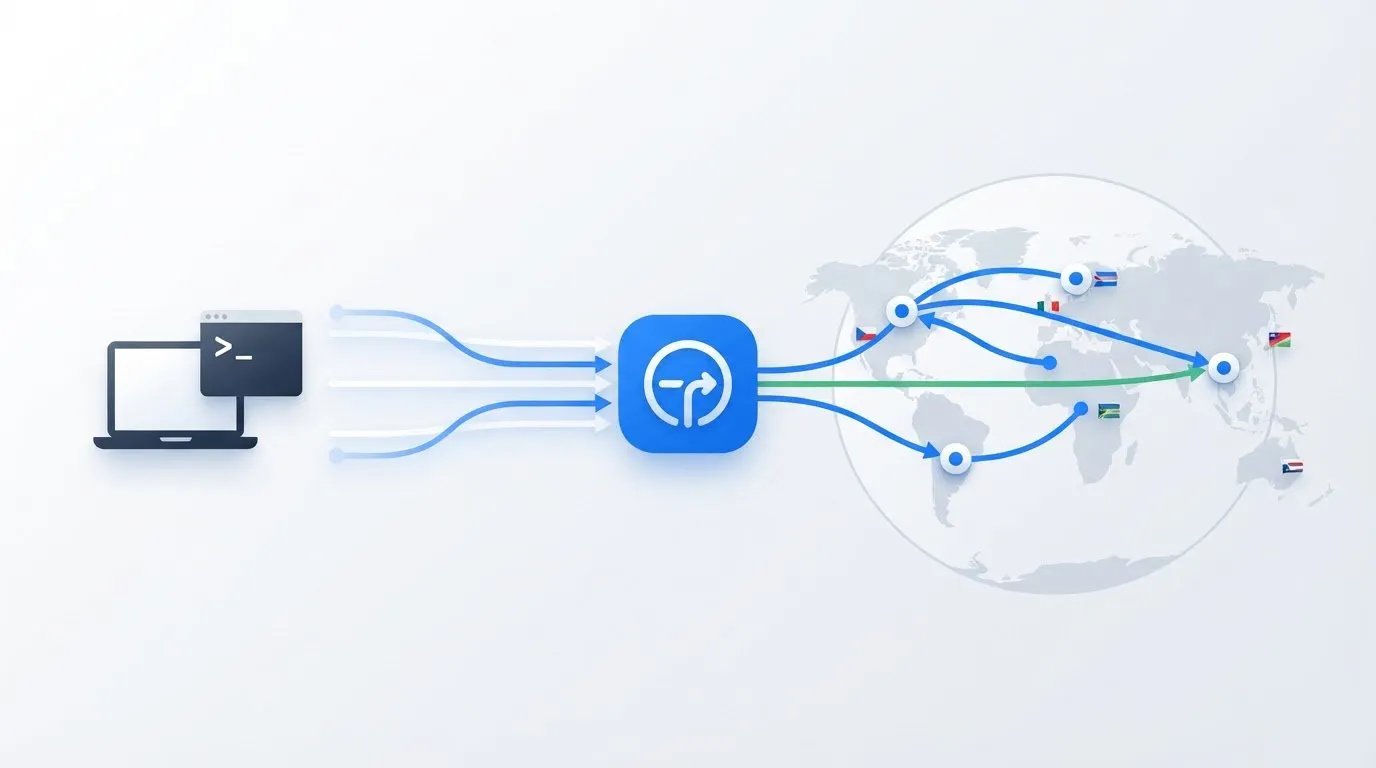
A cURL with rotating proxy example sends requests through a gateway that can assign a new IP address to each connection or at set intervals. The gateway manages rotation, so cURL uses one proxy endpoint rather than choosing a new address for every request. To keep the same IP throughout a session, use a sticky session instead.
The distinction matters: changing IPs can suit independent requests, while keeping one IP can help maintain continuity during a login or other multi-step workflow. The right setup depends on how the proxy provider handles rotation and how your task manages sessions.
This guide explains how rotating proxies work and how to send cURL requests through an HTTP proxy, configure credentials, and troubleshoot proxy errors. It also compares time-based rotation with sticky sessions to help you choose a setup that fits your request pattern.
Key Takeaways
- Compare a proxy list you rotate yourself with a gateway that manages IP changes, and choose the approach that fits your request volume.
- Use cURL’s proxy options to route HTTP requests through a gateway, then add sensible timeouts and delays for more controlled requests.
- Recognize authentication failures: HTTP 407 points to proxy authentication, while HTTP 401 indicates an authentication error.
- Choose time-based rotation for changing IPs or a sticky session when a workflow needs to keep the same IP across requests.
- Keep cookies and proxy session identifiers aligned with your workflow so multi-step requests maintain the intended session behavior.
How rotating proxies work?
A rotating proxy changes the exit IP assigned to a connection, either for each request or after a set interval. With cURL, you can use a gateway that rotates automatically or choose proxy addresses yourself.
The key choice is how requests share connections and sessions. That affects IP changes, destination DNS lookup, and continuity during scraping.
IP Assignment Across Requests
IP assignment means routing a request through an exit address selected from a proxy pool. A rotating gateway can choose a new address for each connection, while a static proxy keeps the same address. For example, separate cURL requests may exit through different IPs even when each command targets the same gateway.
When scraping, the destination sees the proxy’s exit IP, not your direct address. Request-based pools often change IPs when a new TCP connection is opened, potentially for each HTTP request. Because a reused connection can affect rotation, use separate cURL processes or connections when each request needs a fresh IP.
Manual Rotation from a Proxy List
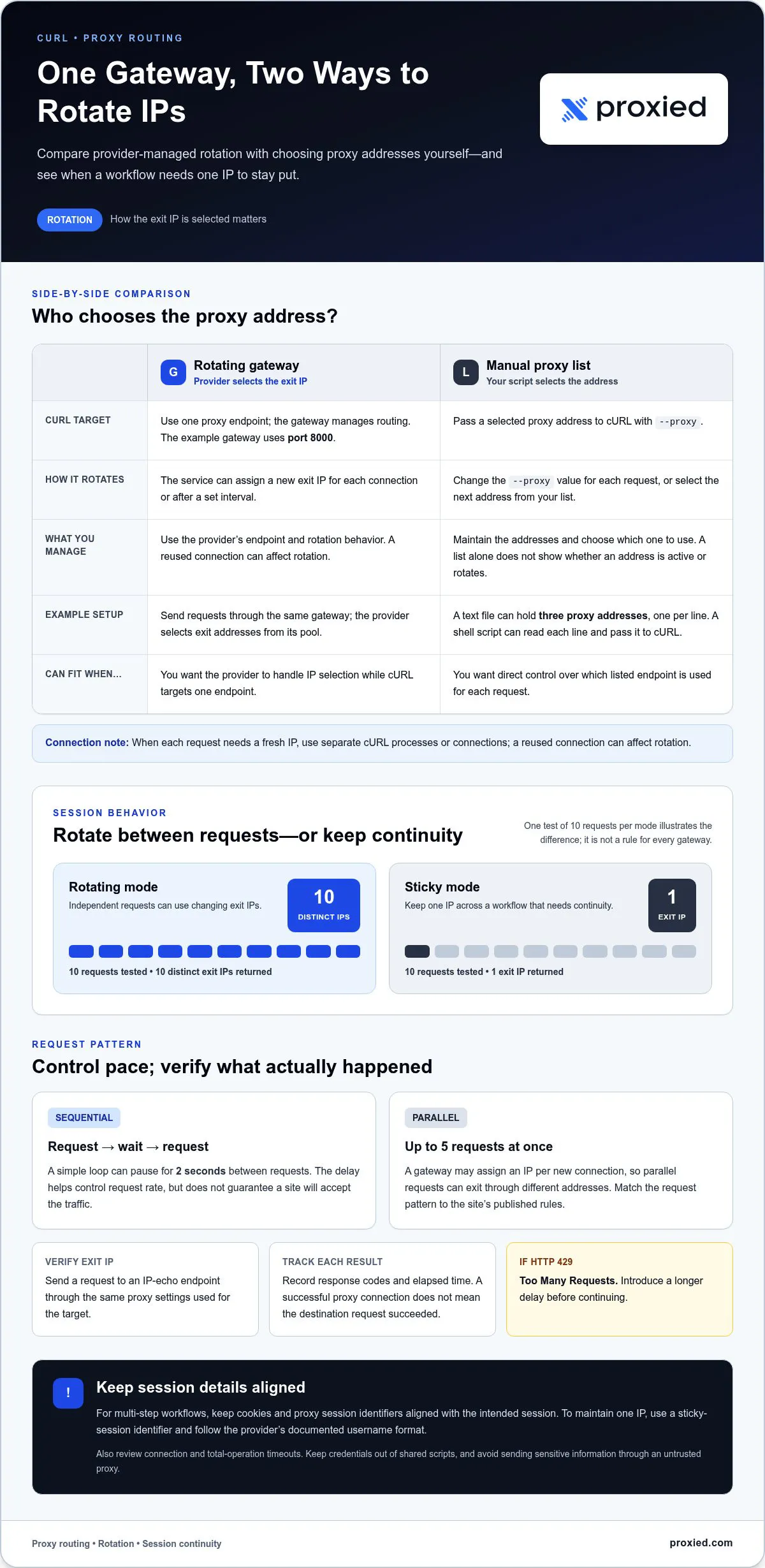
Manual rotation means selecting an endpoint for each request from a list you maintain. A text file can hold three proxy addresses, one per line; a shell script can read each line and pass it to cURL with --proxy. This gives you control over selection without an automatic gateway.
For example, a loop can read the file, send one cURL request through each proxy, then pause before the next request. Add authentication in the format the proxy requires, and keep credentials out of shared scripts. A list alone does not show whether an address is active or rotates.
To rotate proxies between cURL requests, change the --proxy value for each request or send requests through a provider’s rotating gateway. SOCKS5 connections can use socks5h:// to resolve the destination hostname through the proxy; the socks5:// scheme uses local hostname resolution instead. Some services offer SOCKS5 when they support that protocol.
For HTTPS, cURL can connect to an HTTPS proxy on port 443 and use CONNECT to reach an HTTPS destination on port 443. Keep certificate verification enabled. If the proxy uses a private certificate authority, provide its certificate with --proxy-cacert rather than disabling verification.
Residential IP addresses are assigned by internet service providers, while datacenter addresses are associated with a data center or proxy pool. Mobile proxies use mobile-network IP addresses, a distinct category from residential and datacenter proxies.
Proxy use is legal in the vast majority of countries, but laws can differ when accessing banned websites. Check the target website’s terms, especially its rules on automated access, scraping, and account use.
Proxy prices and bandwidth limits depend on the service model, traffic volume, and proxy type. Before choosing a plan, compare how data is billed and what usage limits apply.
Free proxies can expose cURL traffic to operators who monitor it, misuse or sell transmitted information, or distribute malware. Avoid sending passwords, financial information, or website login details through an untrusted proxy.
CURL requests through a rotating HTTP proxy
A rotating HTTP gateway gives cURL one endpoint while the proxy service selects exit IP addresses from its pool. The gateway example uses port 8000; cURL sends each request through it, and the service handles the routing. This differs from a manual list, where your script chooses an address before each request.
Send requests sequentially or in parallel
For sequential traffic, send a request through the gateway, wait, then send the next. A simple rotation loop can pause for 2 seconds between requests. That delay helps control request rate, but it doesn’t guarantee a site will accept the traffic.
For parallel work, cURL can run up to 5 requests at once. Keep in mind that a gateway may assign an IP per new connection, so parallel requests can leave through different addresses. If the destination links activity across requests, concurrency can change how it interprets the traffic. Match the request pattern to the site’s published rules.
Check exit IPs and response timing
Verify the actual exit address by sending a request to an IP-echo endpoint through the same proxy settings used for your target. In a test of 10 requests per mode, one rotating proxy returned 10 distinct exit IPs; a sticky mode returned one exit IP. These results illustrate the modes, not a rule that every gateway follows.
Track response codes and elapsed time alongside each result. A successful proxy connection doesn’t mean the destination request succeeded. HTTP 429 means Too Many Requests; introduce a longer delay before continuing. Also review connection and total-operation timeouts, so a slow endpoint doesn’t hold up later requests.
Choose rotation or continuity
Rotating addresses can suit independent requests, such as collecting public pages that do not rely on a shared login. Keep the same IP when a workflow needs continuity across requests. A proxy gateway may support a sticky-session identifier; follow the provider’s documented username format to keep requests in that session.
IP type also affects the connection context. Datacenter addresses are associated with a data center or proxy pool, residential addresses are assigned by internet service providers, and mobile IP addresses use mobile-network connectivity. Choose a type to fit the task and the target site’s access terms, not simply because rotation is enabled.
Use proxy configuration consistently across requests, and avoid raising parallel traffic to bypass a site’s controls. If your workflow needs mobile-network connectivity, explore mobile proxy options as a possible fit.
How do proxy authentication and credentials work?
To use a rotating proxy provider’s endpoint, give cURL the gateway address and port, then pass the assigned username and password with --proxy-user. The provider authenticates the connection and routes the request through its proxy pool, managing rotation at the gateway.
Use --proxy to define the proxy server and --proxy-user for its credentials. For example, an authenticated HTTP proxy on port 8080 uses this pattern:
curl --proxy http://proxy.example:8080 --proxy-user 'username:password' https://example.com/
Replace the example endpoint and credentials with the values for your proxy service. Keep the scheme, hostname, port, username, and password in the correct positions. A malformed endpoint or credentials string can prevent authentication before cURL reaches the destination.
Read proxy authentication errors
HTTP 407 means the proxy requires authentication. Check that --proxy-user contains the correct username and password, and confirm the endpoint and port match the provider’s settings. A 401 response means Unauthorized, but inspect the response source: the destination server may reject its own login credentials, separately from proxy authentication.
If cURL reports a connection failure instead of an HTTP status, check the proxy hostname, port, scheme, and network access. For example, sending SOCKS5 credentials to an HTTP proxy endpoint uses the wrong protocol, even when the username and password are valid.
Set up SOCKS5 authentication
For a SOCKS5 proxy, use the SOCKS scheme in the proxy argument and pass credentials separately. A SOCKS5 endpoint commonly uses port 1080 in the example syntax:
curl --proxy socks5h://proxy.example:1080 --proxy-user 'username:password' https://example.com/
The socks5h scheme sends destination hostname resolution through the proxy. Use it when the proxy should resolve the hostname; the proxy must support SOCKS5 and its authentication method.
Authenticated residential proxy syntax can use port 3128, while an HTTP proxy example may use port 8080. These are example ports, not interchangeable defaults. Match the port and protocol to the endpoint you received.
Avoid putting active credentials in scripts shared with others or in commands saved to shell history. Store them in a protected configuration file or load them from a controlled environment, and restrict access to that source. For repeat requests, keep the gateway endpoint and authentication format consistent so cURL uses the intended proxy service.
Protocol choice matters beyond the credential format. SOCKS4 supports TCP traffic, while SOCKS5 adds UDP traffic and authentication. Rotating proxy providers commonly offer one proxy port or API endpoint and manage request routing across their proxy pools, so a single configured gateway can handle requests without changing the endpoint for each route. Rotating proxy services can expose SOCKS5 when the provider supports the protocol; confirm that support before choosing a SOCKS5 scheme.
The proxy test made about 120 requests across syntax, DNS, environment, and failure checks. A local DNS failure with SOCKS5 occurred in about 0.04 seconds. When local DNS could not resolve a test hostname, SOCKS5h failed after about 3.7 seconds when the proxy closed the connection. These outcomes distinguish a hostname-resolution problem on the local side from a failure after the proxy receives the request, and can help narrow down whether to check local DNS or the proxy connection.
Configuring a rotating proxy with cURL
To use a proxy with cURL, add the proxy endpoint to the command and specify a target URL. A rotating gateway handles IP selection; cURL continues to connect through that endpoint.
CURL Proxy Command Syntax
The --proxy option, also written as -x, tells cURL which proxy server to use. For an HTTP gateway on port 8000, run:
curl --proxy http://proxy.example:8000 https://example.com/
Replace the example host with the endpoint supplied for your proxy service. Keep the target URL separate from the proxy address so cURL knows where to send the request after connecting.
Proxy Configuration for cURL
Proxy configuration sets the endpoint and request controls cURL should use. For a gateway that requires authentication, add --proxy-user 'username:password' to the command. Keep credentials private, and use the protocol and port assigned to the endpoint.
For a repeatable workflow, store the endpoint in a shell variable and reuse it:
PROXY='http://proxy.example:8000'
curl --proxy "$PROXY" https://example.com/
Test the setup against an IP-echo target before scraping. Its response shows the exit IP visible to that target, helping you confirm that the request went through the proxy rather than directly. Use the same endpoint and authentication settings planned for your workflow.
For HTTPS targets, cURL tunnels through an HTTP proxy using CONNECT to the destination hostname and port 443. Keep certificate verification enabled so cURL validates the destination certificate. If the request fails, inspect the proxy hostname, port, scheme, and response status before changing other settings.
Set time limits for slow responses. For example, --connect-timeout 10 --max-time 30 limits the connection attempt to 10 seconds and the complete operation to 30 seconds. These controls help prevent one stalled request from holding up a scraping run.
Retries can help with transient connection failures, but they shouldn’t replace sensible request pacing. A cURL failure-handling pattern can retry up to 3 times and wait 5 seconds between attempts. Respect the target’s access rules, and add a longer delay if it returns HTTP 429, Too Many Requests.
Rotation depends on how the gateway assigns IPs to connections. Send separate cURL requests through the configured endpoint and compare their exit IPs; the gateway may rotate per connection or keep an IP for a session. For multi-step tasks that need continuity, use the provider’s sticky-session settings instead of assuming each request gets a new address.
Time-based rotation and sticky sessions
Time-based rotation changes the proxy IP after a set interval, while a sticky session keeps requests on one assigned IP. Choose according to whether your workflow needs separate exit addresses or continuity between steps.
Time-based proxy sessions typically keep the same IP for 30 seconds to 30 minutes. During that window, requests through the proxy server use the assigned address; after it expires, the service can select another. This suits tasks where the same IP is useful briefly, but long-term continuity isn’t required.
A sticky session keeps one IP for a session, such as a login or checkout flow. Sticky-session gateways typically keep requests with the same session identifier on one IP for 1 to 30 minutes. If the workflow spans multiple requests, this can reduce IP changes mid-session. The assigned IP remains subject to the session window.
Some proxy services use a session identifier in the proxy username. For example, a provider may accept a username pattern with a unique session label. Reuse that exact label in each cURL request to route them through the same upstream IP until the session expires. Change the label to start a different session, following the provider’s required format.
Cookies manage a separate part of session continuity. cURL can save cookies from an initial request with -c, then send them on later requests with -b. For example, curl -c cookies.txt https://example.com/login saves cookies, and curl -b cookies.txt https://example.com/account sends them. Cookies preserve website session data; they do not select or hold a proxy IP.
For a multi-step workflow, coordinate the proxy session and cookie handling. Reuse the same proxy username identifier and cookie file for requests in one login session. If the script changes identifiers or the sticky session expires, a later request may use another IP while still sending saved cookies. That mismatch can interrupt the website session.
Rotating residential proxies can support changing addresses or session-based continuity, depending on the gateway’s options. A manually rotated proxy list differs from a sticky gateway: your script selects each address rather than keeping requests on one upstream IP. Choose the mode based on the target’s session requirements and the task’s duration.
Set up your proxy workflow with proxy options for session-based tasks.
In a multi-request exchange, use cURL’s -c option on the first request to save cookies, then use -b on later requests to send them. This carries cookie data between requests without changing how the proxy session is selected. The two controls have separate roles: cURL stores and sends the website’s cookies, while the proxy session identifier determines whether requests use the same upstream IP.
Proxied: Dedicated 4G Mobile Proxies
Proxied offers Dedicated 4G Mobile Proxies for workflows that need mobile proxy connectivity. Choose this option when your cURL setup requires a mobile proxy endpoint, then apply the provider’s endpoint and authentication details in your command.
For other requirements, Proxied also offers Dedicated 5G Mobile Proxies, plus Residential and Datacenter Proxies, on the Proxied marketplace, and the Proxied Hoster Dashboard for hosting your own devices and listing them on the marketplace. The right fit depends on whether you need mobile connectivity or infrastructure management, rather than simply changing IPs between requests.
Visit the Proxied marketplace to explore Proxied’s options or contact the team about your proxy workflow.
Build a proxy workflow that fits your next step
A cURL with rotating proxy example is a useful starting point, but a reliable workflow also depends on the task. Before expanding automation, decide whether you need mobile connectivity, proxy infrastructure management, or another supporting service. This keeps the configuration aligned with your needs without adding unnecessary complexity.
Proxied offers Dedicated 4G Mobile Proxies and Dedicated 5G Mobile Proxies for workflows that call for mobile proxy connectivity. Consider which option supports your use case, then plan how its endpoint and credentials will fit your cURL setup.
For a practical next step, describe the workflow you’re building and explore the available options with Proxied. Contact Proxied to discuss your proxy needs, and take the next step with a setup shaped around your requirements.
Frequently Asked Questions
What is a rotating proxy?
A rotating proxy assigns requests different exit IP addresses from a pool, either per connection or on a schedule. In a cURL with rotating proxy example, one gateway can remain the endpoint while the exit address changes between requests. This separates the address your script connects to from the address the destination sees.
How to configure proxy authentication in cURL?
Pass proxy credentials separately from the destination website’s login details. In cURL, --proxy-user 'username:password' supplies proxy authentication, while --proxy sets the proxy endpoint. Keep credentials out of scripts others can access; load them from a protected environment or configuration file instead. If access fails, check whether the response came from the proxy or the destination server.
How to test which proxy IP cURL is using?
Send a cURL request through the configured proxy to an IP-echo service, then read the address in its response. A cURL with rotating proxy example can repeat the check across requests and record each returned address alongside its response status. Use the same endpoint and authentication settings as your main script so the result reflects its actual proxy route.