



Dedicated Proxy for Sneakers: Compare Providers and Locations

Hannah
For sneaker releases, plan one proxy per bot task, plus a few spares, and look for sticky sessions of at least 30 minutes when connection continuity matters. A dedicated proxy for sneakers routes activity through a separate IP connection, while proxy type and location shape how well it fits a marketplace or brand workflow.
It’s easy to focus on speed or IP pool size when choosing a dedicated proxy for sneakers. But the right option also depends on the marketplace, how your checkout tasks are configured, and whether you need changing residential IPs or a dedicated mobile connection. These details can matter more than a headline feature.
This guide explains what sneaker proxies do and compares proxy options and location considerations for sneaker marketplaces and brands. Learn how to assess coverage, targeting, integration, response times, and task requirements, then use a practical decision guide to narrow down what suits your workflow.
Key Takeaways
- Match proxy type to the job: rotating residential IPs and dedicated mobile connections serve different sneaker workflows.
- For major releases, compare residential pool size alongside location coverage and precise targeting; the guide explains why a 50M+ pool may matter.
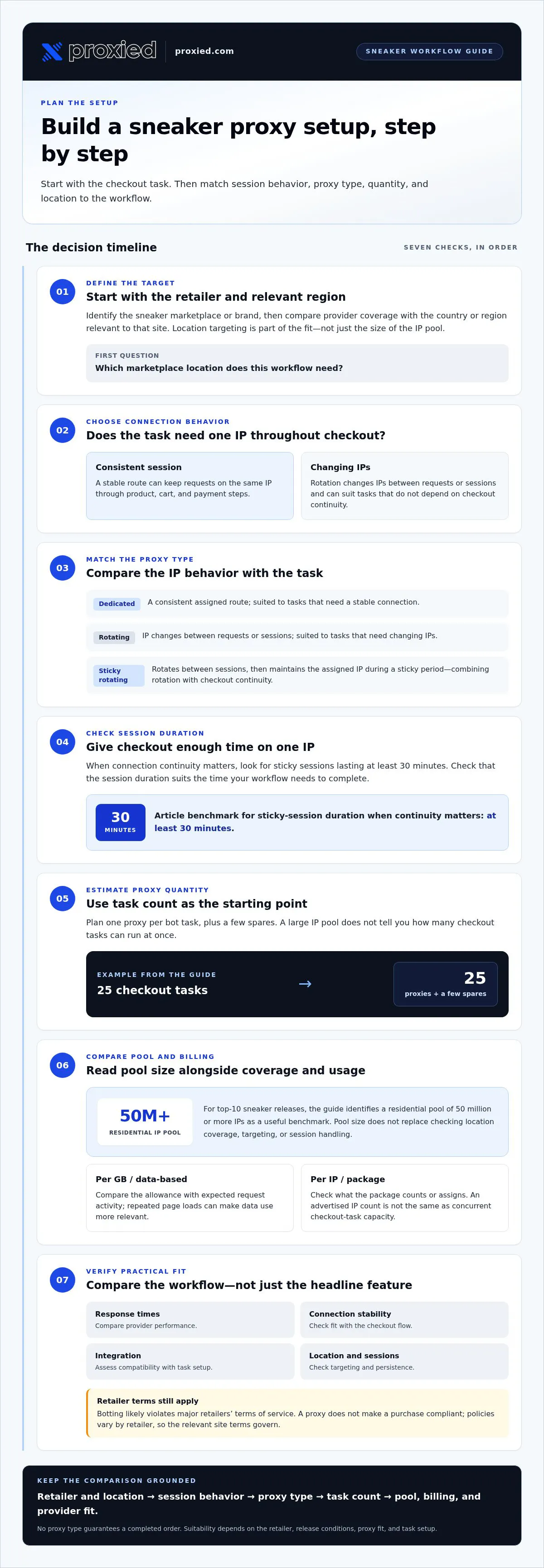
- Use task count to estimate proxy needs. A bot running 25 checkout tasks calls for 25 proxies, plus a few spares.
- Compare providers on practical fit, including integration, response times, session persistence, and the locations relevant to your marketplace.
- Learn when dedicated 4G or 5G mobile proxies can support your workflow, and how location choices can affect connection performance.
What are sneaker proxies?
Sneaker proxies route requests through proxy IP addresses instead of your direct connection. For automated checkout, the key decision is whether each task keeps a consistent session or changes IPs during activity.
Checkout Consistency and Session Persistence
Session persistence keeps requests on the same proxy IP for a defined period. That continuity can help a checkout flow maintain its connection across product, cart, and payment steps. A dedicated proxy for sneakers suits workflows that need a consistent route for a task. Rotating proxies, by contrast, change IPs and can suit requests that don’t depend on a continuing session.
Provider Targeting and Session Features
Provider targeting determines which locations an operator can select for proxy traffic. Compare coverage against the marketplace’s relevant country or region, then review whether the provider supports sticky sessions. A sticky session holds an IP for a set period; for sneaker workflows, look for sessions lasting at least 30 minutes. This is different from rotation, where requests use changing IPs rather than one maintained connection.
Proxy and Automated Purchasing Restrictions
Sneaker botting is not illegal in most countries, but it likely violates major retailers’ terms of service. Retailers can enforce those terms against automated orders, so using a proxy doesn’t make a purchase compliant. Policies vary by retailer, and the relevant site terms govern the risks of using bots or proxies.
Sticky and rotating sessions address different connection needs. With a sticky session, a checkout task can keep the same IP as it moves through its steps. With rotation, IPs change between requests, which can suit workflows that need varied connections rather than checkout continuity. Choose based on how the task works, not just the proxy label.
A rotating proxy service can also offer sticky sessions. It rotates IPs between sessions, then keeps an assigned IP stable during each sticky period. For example, one task can use the same IP throughout checkout, while a later session receives another. Check that the session duration suits the time your workflow needs to complete.
- Dedicated proxy — IP behavior: Consistent assigned route; Session continuity: Supports continuity; Useful fit: Tasks needing a stable connection
- Rotating proxy — IP behavior: IP changes between requests or sessions; Session continuity: Less consistent by default; Useful fit: Tasks that need changing IPs
- Sticky rotating proxy — IP behavior: Rotation between sessions; Session continuity: Stable during a sticky session; Useful fit: Workflows balancing rotation and checkout continuity
Choose the session behavior first, then compare location targeting and session duration with the retailer’s checkout flow.
Which proxy is the strongest for sneaker sites?
Compare response times, connection stability, location coverage, and compatibility with your checkout workflow. Success depends on the retailer, release conditions, proxy fit, and task setup, so no proxy type guarantees a completed order.
For top-10 sneaker releases, a residential pool of 50 million or more IPs is a useful benchmark. Pool size matters because it indicates the breadth of available addresses, but it doesn’t replace checking location coverage, targeting, or how the service handles sessions.
Rotating Residential Proxy Pricing
Rotating residential proxies use residential IPs that change across requests or sessions. Billing may be based on transferred data or a package, so compare the billing unit with your actual workflow. A task that loads product pages, images, and checkout steps may use data differently from one that makes fewer requests. Pool size and available locations also affect whether a plan suits the target retailer.
Package Pricing and IP Counts
Packages may bundle access around a defined allowance or a set of IPs. Read the package details alongside its pool size: an advertised count describes available addresses, not how many checkout tasks you can run at once. For example, a large residential pool may suit broad release coverage, while a smaller task set may prioritize specific locations. Compare what the package measures before comparing options.
Per-IP and Per-GB Pricing
Per-IP models focus on the number of addresses assigned or available, while per-GB models charge by transferred data. Match the billing unit to the workload. Repeated page loads can make data use more relevant; a setup organized around separate tasks may make IP allocation easier to assess. Track both task count and expected request activity before choosing a model.
Static ISP Proxy Pricing
Static ISP proxies use an IP that stays consistent instead of rotating across requests. Compare their pricing with the value of a stable address, not just the total IP count in a residential pool. For example, a workflow that prioritizes one persistent connection differs from release monitoring across several locations. Consider the intended use, allocation method, and session behavior.
Datacenter proxies offer another point of comparison. Assess them using the same practical criteria: response times, connection stability, location fit, and compatibility with the target site. A lower-cost billing structure alone doesn’t establish suitability for sneaker checkout. Check how the proxy type fits the task’s connection pattern and retailer requirements.
Use this sequence to compare options: identify the retailer and relevant location, estimate task and traffic needs, then compare pool size, billing unit, targeting, and connection stability. That process makes a 50-million-IP pool meaningful only when its coverage and operating model fit the release workflow.
Proxy provider rankings and comparisons
For US sneaker buying, compare providers by dedicated IP allocation, US location coverage, session controls, and bot integration. No provider is the best fit for every workflow; the right match depends on the retailer and task setup.
Sneaker Proxy Provider Rankings
A useful ranking measures proxy types against the same requirements rather than treating a provider’s marketing position as proof. For example, a US checkout task may prioritize dedicated IP assignment and session stability, while monitoring several US locations may need broader coverage. Score each option against your needs, then rank the best fit first.
Use this order for a practical comparison: confirm the proxy type, match its locations to the retailer, review session controls, then assess integration. Apply the same criteria to every provider. An option with a wider choice of locations may not be as compatible with your bot, so an overall ranking can hide important differences.
Sneaker Bot Compatibility
Bot compatibility means you can configure the proxy connection within the bot’s supported workflow. Compare setup steps, authentication, and whether the bot can assign a proxy to each task. For example, if a bot separates product monitoring from checkout, assess both processes instead of assuming one successful connection proves full compatibility.
Test with a low-impact workflow before a release task. Confirm that the bot accepts the proxy format, maintains the intended session, and routes requests through the selected location. These checks assess practical integration, not purchase outcomes, which also depend on the retailer’s release process and checkout requirements.
Reliable Dedicated Proxies in the US
For a US sneaker workflow, prioritize dedicated proxies with relevant US locations and clear session controls. Match the location selection to the retailer’s target market. A dedicated connection can suit tasks that need a consistent route, while rotating residential proxies are more appropriate when the task calls for changing IPs.
“Reliable” should describe observable fit, not promise a successful checkout. Compare response times in your workflow, connection stability, and how easily the proxy integrates with your bot. A proxy that suits one US retailer may not suit another, because location needs, bot configuration, and checkout behavior can differ.
Build a comparison sheet with one row per provider and columns for proxy type, US locations, IP assignment, session controls, bot integration, and response-time observations. Use the same test workflow for each option. Rank providers by the criteria that matter most for your sneaker task, not by a broad label or headline claim.
Proxy location and proximity to marketplace servers
Choose a proxy location that matches the marketplace and target region, then assign connections to the bot’s tasks. Location can affect the route requests take, while the bot’s configuration determines whether each task uses the intended proxy.
A sneaker bot with 25 checkout tasks needs 25 proxies, plus a few spares. Assign one proxy to each task so the configuration is clear and a failed connection doesn’t leave another task without its assigned route.
Dedicated proxies don’t eliminate release risks. Sneaker botting likely violates major retailers’ terms of service, so retailers may reject automated orders or take action under their account policies.
Proxy Location and Server Proximity
Proxy location describes where your connection exits onto the internet. Server proximity describes how directly that route reaches the marketplace’s infrastructure. A more direct route can reduce network delay, but geography alone doesn’t determine response time. Network routing, congestion, and the retailer’s systems also affect performance.
Start with the marketplace’s target region, then compare proxy locations that serve it. For example, if a retailer limits a release to a particular market, a proxy in that market may better match the workflow than one in a distant region. Don’t assume a location label means faster checkout.
Configuring Proxies in Sneaker Bots
In the bot’s proxy settings, enter the required connection details and select the intended location. Assign each proxy to a specific task, then test that task before a release. Confirm that the bot routes through the assigned connection and preserves the session behavior the checkout flow needs.
Keep a simple task map: task, assigned proxy, target region, and connection status. This makes mismatches easier to spot. If a task shows the wrong location or fails to connect, correct the assignment before launching other tasks.
Dedicated ISP Sneaker Proxies
Dedicated ISP proxies provide a consistent connection associated with an internet service provider. Their fixed assignment differs from rotating proxies, which change IPs across requests or sessions. ISP proxies are worth comparing for workflows that need a steady route, though location and bot compatibility still matter.
Choose proxies for sneakers according to the retailer’s target region and the bot’s task design. Compare available locations, assignment methods, and response times in the same workflow. A dedicated ISP connection can suit a task that values consistency, but it doesn’t override retailer restrictions or guarantee an order.
Proxy selection for sneaker marketplaces and brands
Choose proxies based on the work, not a generic “sneaker” label. A marketplace checkout task has different requirements from a brand monitoring product availability across regions. Start by naming the target sites, locations, and workflow, then compare proxy options against those needs.
For sneaker copping, rotating residential proxies are a common fit when compatible with the relevant sneaker websites and bots. For a brand tracking public product listings, location coverage and precise geotargeting may matter more. In both cases, assess integration, response times, and how the proxy setup supports the specific task.
- Location coverage: Match available locations to the marketplace or region being monitored.
- IP pool: Compare pool size with the geographic and workflow coverage required.
- Geotargeting: Check whether location selection can be precise enough for the target market.
- Integration: Confirm the proxy setup fits the bot or data workflow you use.
- Performance: Compare response times and observed task completion across the same workflow.
- Session behavior: Use sticky sessions when checkout needs continuity, and rotating proxies when tasks need changing IPs.
Keep marketplace purchasing separate from brand research. A checkout workflow may assign a proxy to each bot task, while a monitoring workflow may organize requests by site, region, or product page. For example, a brand comparing listings across markets should prioritize relevant locations and repeatable data collection, not checkout-specific session settings.
Use a practical selection sequence. First, list the retailer or marketplace and target locations. Next, define whether the task checks listings, monitors availability, or proceeds through checkout. Then match proxy type, targeting, session behavior, and bot integration to the workflow. Finally, compare response times using the same task setup so the results are meaningful.
For sneaker bot tasks, allocate one proxy per task, plus a few spares. If the setup has 25 checkout tasks, plan for 25 proxies and a few spares. For marketplace or brand work, base allocation on the actual tasks and locations rather than copying a checkout configuration.
Make terms of service part of the decision. Retailers may restrict automated purchasing, and proxies don’t override those rules. Select an approach that fits the site’s policies and the intended use. Explore proxy options for your workflow after defining its target locations, integration needs, and session requirements.
Proxied: Dedicated 4G Mobile Proxies
Proxied offers Dedicated 4G Mobile Proxies for workflows that need a dedicated mobile proxy connection. They give sneaker marketplace operators another option to compare against rotating residential proxies, based on target locations, bot integration, and session requirements.
For tasks where a dedicated mobile connection fits, compare the 4G option with Proxied’s Dedicated 5G Mobile Proxies. Proxied also offers Residential and Datacenter Proxies on the Proxied marketplace. The Proxy Hosting Platform is relevant for teams managing and scaling their own proxy infrastructure. Choose according to your workflow, rather than assuming one connection type suits every marketplace or brand task.
Review your proxy requirements and contact Proxied to discuss the next step.
Put Your Proxy Plan Into Practice
Turn proxy selection into a clear operating plan. Define the marketplaces and brand workflows you support, identify the locations each task needs, and document how your setup handles integration and sessions. A dedicated proxy for sneakers can be part of that plan when a consistent connection suits the task, but configure it according to the marketplace’s requirements and your intended use.
Keep the plan practical. Record the proxy type assigned to each workflow, why you chose it, and how you’ll assess performance. This makes future changes easier to evaluate as marketplace needs evolve, without relying on a generic ranking or headline claim.
If you’re ready to discuss how your workflow maps to available proxy options, contact Proxied for proxy advice. A thoughtful setup starts with clear requirements, and you can take that next step with confidence.
Frequently Asked Questions
Can I target a specific city or ASN?
City targeting and ASN targeting are different controls. City targeting narrows the apparent connection location; ASN targeting selects traffic associated with a network operator. Choosing a city can help align a workflow with a local release market, while an ASN filter addresses network identity. Treat them as separate criteria: selecting a city does not specify an ASN.
Do sneaker sites block datacenter IPs?
Some sneaker sites may restrict, challenge, or block datacenter IP traffic, but there’s no universal rule across retailers. A request may be evaluated alongside account behavior, request patterns, and the site’s own controls. For example, a datacenter connection might work for public product-page checks but not for another site’s checkout flow. Choose a proxy type according to the task and retailer policy, not an assumption.
What is the most popular proxy for sneaker botting?
Rotating residential proxies are a common choice for sneaker botting because they provide residential IPs and support changing connections across tasks. But popularity doesn’t make them right for every release: a workflow requiring consistent account and checkout sessions may need different session handling. Compare bot compatibility, location coverage, and session controls for the specific retailer before choosing.
What is a dedicated proxy for sneaker bots?
A dedicated sneaker-bot proxy is an IP connection reserved for a particular user or task rather than shared with unrelated users. In a bot workflow, it can provide a consistent route for product checks and checkout activity. “Dedicated” describes allocation, not guaranteed retailer acceptance or a successful purchase. Its practical value depends on task assignment, location fit, and bot settings.
How do dedicated sneaker proxies differ from residential, datacenter, and ISP proxies?
Residential IPs route traffic through residential networks; datacenter IPs use hosting infrastructure; ISP proxies are associated with internet service providers. “Dedicated” describes how access is allocated, not the network category. These labels can overlap: a dedicated connection may use a mobile, ISP, residential, or other network type. Compare network category and allocation separately when planning a setup.
Which proxy types and locations work best for major sneaker retailers and launches?
Rotating residential proxies are commonly used for sneaker copping, while the location should reflect the retailer’s launch market and your task. For example, a US-only release calls for a US-targeted setup; a brand reviewing multiple markets needs relevant locations for each. Prioritize retailer compatibility and precise location targeting over choosing a city just because it seems close to a server.
How much do dedicated sneaker proxies cost, and what plans are available?
Proxy costs and available plans depend on proxy type, IP allocation, location, and billing model. Providers may organize access around IPs, transferred data, or a set access period, so compare what each plan measures with your bot’s activity. A set of steady checkout sessions may differ from frequent product-page monitoring. Match the plan allowance to your workflow instead of judging by pool size alone.
How do you configure dedicated proxies in popular sneaker bots?
Configuration varies by bot, but the steps are consistent: add the proxy endpoint and authentication details, select the required protocol, assign a proxy to each task, then test the connection before launch. Use the bot’s proxy settings and confirm that the selected location and session behavior fit the task. Review connection logs for authentication or routing errors before running the workflow.