



Developer Guide to Proxy Integration: Setup, Testing, and Scaling

Hannah
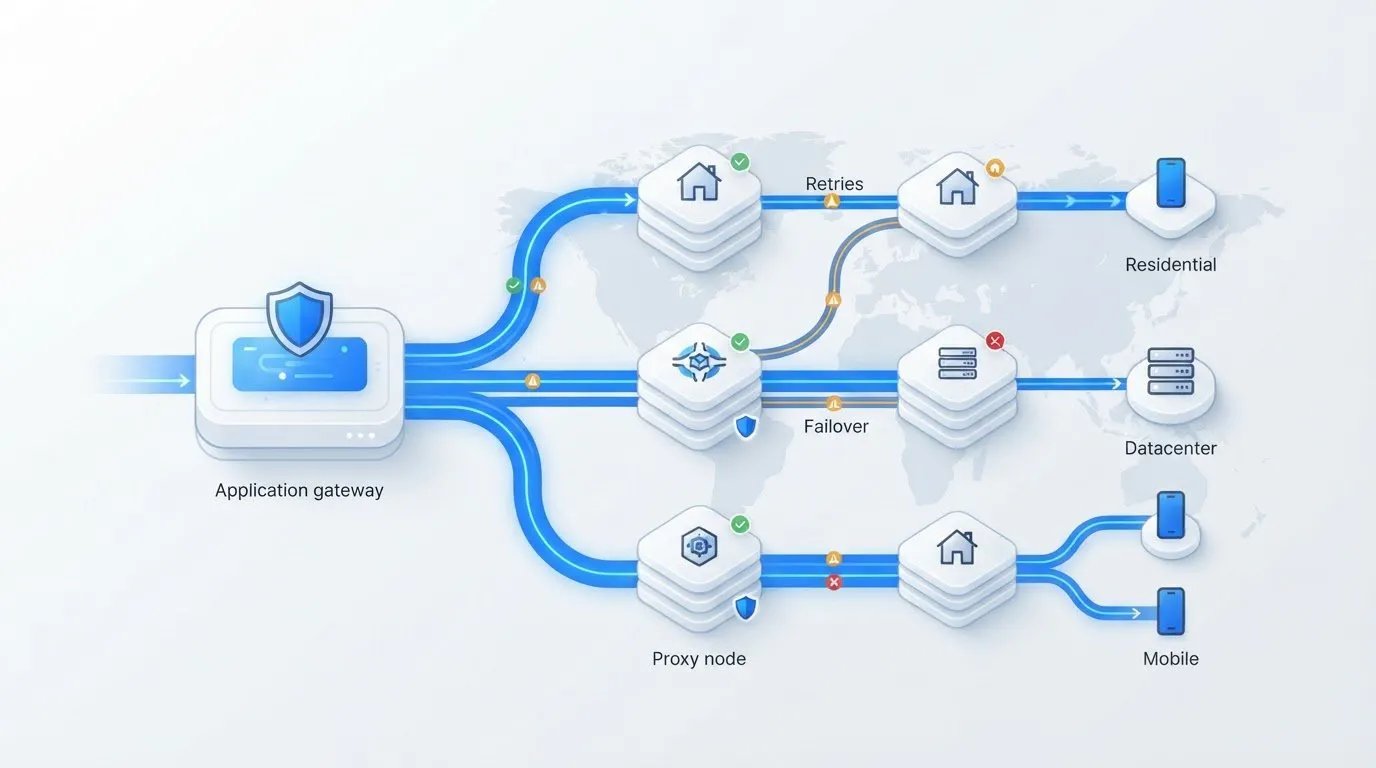
A proxy URL is only the starting point. Reliability depends on the workflow around it. This developer guide to proxy integration explains how to choose an endpoint and protocol, configure authentication, and decide where credentials should live. Routing traffic is one step. Your application also needs a clear way to handle timeouts, retries, and errors.
You’ll learn a reusable setup pattern based on your provider’s documented endpoint, supported protocol, and authentication requirements. Then you’ll see how to test routing, credentials, and failure handling before deployment without relying on assumptions about a specific library or service.
The guide also explains how to choose between residential, datacenter, and mobile proxies based on workload requirements. Finally, it covers the operational basics that help an integration scale, including credential protection, request visibility, and proxy management. The goal is a setup your team can understand, validate, and maintain.
Key Takeaways
- This developer guide to proxy integration shows how to follow provider documentation for endpoint, protocol, and authentication settings.
- Use a controlled test to identify whether failures come from authentication, destination reachability, timeouts, or routing.
- Choose residential, datacenter, or mobile proxies by weighing your target environment, geography, session needs, and scale.
- Protect credentials and plan for monitoring, rotation, and failure response before expanding proxy traffic.
- Compare providers by how well their documented requirements and operational processes fit your engineering practices.
What Does Proxy Integration Mean for an Application?
A proxy sits between an application and the destination it contacts. Instead of sending a request directly, the application routes it through an intermediary, which forwards it onward. This changes the request path, not the security posture of the entire application. A proxy doesn’t automatically protect stored data, secure other network connections, or replace sound application security practices. For a broader overview of the concept, see Proxy server.
In a developer guide to proxy integration, the first decision is scope. Application-level settings can route requests from a particular service, client, or workflow through a proxy. Operating-system or network-wide routing can affect multiple processes or devices, including traffic unrelated to the application. Choose the narrowest scope that meets the requirement. It makes testing clearer and helps avoid routing unintended traffic.
Which application traffic should pass through a proxy?
Identify the specific outbound requests that need proxy routing. For example, an application might proxy requests to a particular external service while leaving internal API calls and health checks on their existing routes. Don’t assume that configuring one HTTP client changes traffic from every browser, background worker, or system process. Each component may have separate network settings.
Before selecting an approach, record the destinations involved, any required geography, whether the workflow needs a consistent session, and the expected request volume. These requirements help distinguish a testing task from a sustained application workload. They also give your team a basis for assessing whether the proxy type and configuration are appropriate.
What must developers confirm before writing code?
Start with the provider’s current documentation. Confirm the endpoint format and supported connection protocols rather than assuming a familiar URL or a library’s default behavior will work. Check how authentication is supplied, what credential format is expected, and whether the provider documents session controls. These details vary, so don’t copy settings from another provider or environment without verifying them.
Write down expected behavior before implementation. What should the application do if it can’t connect to the proxy? How should it handle a timeout, and which failures are safe to retry? Also establish how you’ll respond if provider settings change. Keep credentials out of source code and logs, and make proxy configuration explicit enough that the team can review which requests use it. This groundwork makes proxy routing a deliberate application decision, rather than a setting that’s difficult to diagnose later.
How to Configure Proxy Integration in an Application
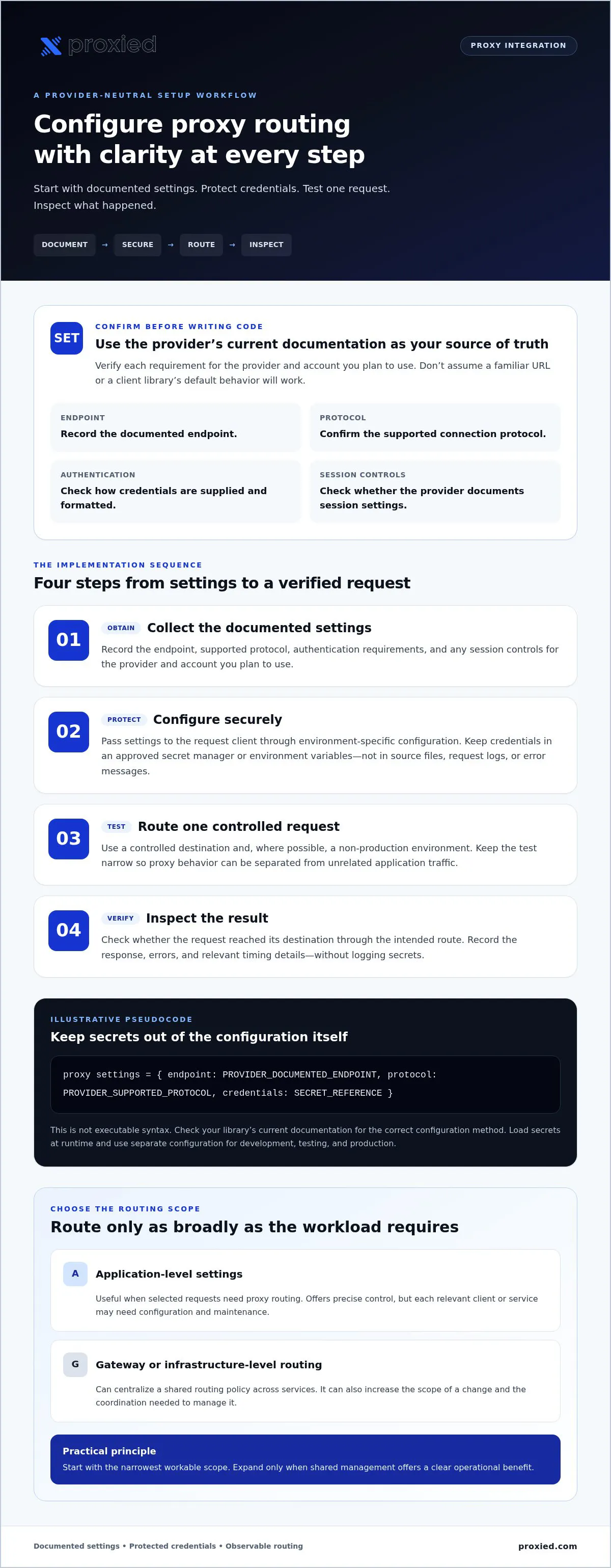
Keep the first implementation small and observable. This developer guide to proxy integration uses a provider-neutral workflow because endpoint formats, protocols, authentication, and client-library syntax vary. Treat the provider’s current documentation as the source of truth, and confirm that your chosen library supports the documented configuration before writing production code.
- Obtain the settings. Record the documented endpoint, supported protocol, authentication requirements, and any session controls for the provider and account you plan to use.
- Configure securely. Supply settings to the request client through environment-specific configuration. Keep credentials in an approved secret manager or environment variables, not in source files.
- Route one test request. Use a controlled destination and a non-production environment where possible. Keep the test narrow so you can isolate proxy behavior from unrelated application traffic.
- Inspect the result. Check whether the request reached its destination through the intended route. Record the response, errors, and relevant timing details without logging secrets.
Configure a client library without hard-coding secrets
Configure the HTTP client that sends the requests you intend to proxy. The following is illustrative pseudocode, not executable syntax. Check your library’s current documentation for the correct configuration method:
proxy settings = { endpoint: PROVIDER_DOCUMENTED_ENDPOINT, protocol: PROVIDER_SUPPORTED_PROTOCOL, credentials: SECRET_REFERENCE }
Replace each placeholder with a value confirmed in provider documentation. Load the secret at runtime from an approved source, and use separate configuration for development, testing, and production. This keeps credentials out of source control and lets you update environment settings without changing application code. Avoid placing credentials in request logs or error messages.
Choose application, gateway, or infrastructure-level routing
Application-level configuration suits workloads where only selected requests need proxy routing. It offers precise control, but each relevant client or service may need configuration and maintenance. A gateway or infrastructure-level approach can centralize routing policy when multiple services share it. That may simplify consistency while increasing the scope of a change and the coordination needed to manage it.
Choose based on the traffic you need to route, how broadly the policy should apply, and who will maintain it. Start with the narrowest workable scope, then expand only when shared management provides a clear operational benefit. If you’re comparing proxy access and infrastructure options, review Proxied’s proxy offerings alongside your documented technical requirements.
Compare Proxy Types and Integration Approaches for Your Workload
Choose a proxy category by matching it to the traffic you need to route, not by assuming one type is always faster or more suitable. This part of a developer guide to proxy integration connects workload requirements with the provider details you’ll need to verify. Start with the target environment, required geography, session behavior, and expected operational scale.
How do mobile, residential, and datacenter proxies differ?
These categories describe different kinds of proxy access, but the label alone doesn’t confirm that a service meets your application’s requirements. Mobile proxies may be relevant when a workload specifically calls for mobile network context. Residential proxies may suit tasks where the required location or connection context aligns with the provider’s residential offering. Datacenter proxies are another option to assess for workloads that can use datacenter-based access.
Compare the categories against your use case, then verify the provider’s actual capabilities. Before implementation, confirm:
- Target environment: What type of connection does the destination or test require?
- Geography: Are the locations you need available for the service and account you’ll use?
- Session behavior: Does the workflow require a consistent session, and how does the provider handle it?
- Access and scale: Which protocols, authentication options, and capacity details are documented?
Don’t infer protocol support, location coverage, session controls, compatibility, performance, or outcomes from a proxy category. Confirm each detail in current provider documentation.
When should teams use a managed integration approach?
Direct client configuration can be a good fit when one application, or a clearly defined set of requests, needs proxy routing. The application team can keep the configuration close to the code that uses it. The trade-off is that teams may need to maintain settings and operational practices in more than one place as usage expands.
A shared gateway or managed infrastructure approach may be worth evaluating when multiple applications or teams need consistent routing policy. Central management can support shared ownership and configuration practices, but it also creates a broader point of coordination. Consider who maintains settings, monitors behavior, manages credentials, and responds to failures before choosing where routing belongs.
Teams that run their own devices as proxies can also look at Proxied’s proxy hosting platform, the Proxied Hoster Dashboard, where devices are added, managed and listed on the Proxied marketplace. It is for hosting devices, not a routing gateway for application traffic. The best fit is the approach your team can operate consistently while keeping routing scope clear.
Test Proxy Routing, Handle Failures, and Protect Credentials
A request returning a response doesn’t prove it followed the intended route. Test the routing path and failure behavior separately before relying on the integration in production. The goal of this developer guide to proxy integration is to make failures diagnosable without exposing credentials or silently changing where application traffic goes.
What should a proxy integration test verify?
Use a controlled request and approved diagnostics to confirm it uses the expected proxy configuration. Compare a direct request with a proxied request where appropriate, and verify the observed route using a method permitted by your organization and provider. Keep the destination and test data safe for the environment.
Test failure cases independently so one result doesn’t obscure another:
- Authentication: Check that valid credentials work, then test invalid credentials safely in a non-production environment.
- Endpoint and destination: Confirm the proxy endpoint is reachable and the intended destination responds.
- Timeouts: Simulate or configure a reasonable timeout, then verify the application fails in a controlled way.
- Fallback: Confirm a proxy failure won’t silently send sensitive requests directly unless that behavior is explicitly intended and approved.
- Provider errors: Check how the application handles errors described in the provider’s documentation.
Retries should be bounded. Retry only failures that may be temporary, use backoff between attempts, and stop after a defined limit. Indefinite retries can increase load, delay error reporting, and hide persistent configuration or authentication problems. Make the final failure visible to the calling workflow.
How can teams troubleshoot common proxy errors?
Find the failing layer before changing settings. A DNS failure differs from a connection refusal; an authentication error differs from a TLS problem; and a successful proxy connection can still be followed by an error from the destination. Check the provider’s current documentation and review sanitized logs to narrow down the cause.
Log useful context, such as the request identifier, failure category, timing, and relevant status or error code. Redact credentials, authorization headers, and sensitive request data. Never include a full credential-bearing endpoint in logs. This gives engineers enough detail to trace a failure without turning diagnostic records into another place secrets can leak.
Once you’ve documented the route, protocol, authentication, and session requirements for your workload, compare available proxy options from Proxied as part of your provider evaluation.
Plan a Maintainable Proxy Integration and Select a Provider
A proxy setup should fit the way your team configures, monitors, and maintains application traffic. Use this final part of the developer guide to proxy integration to check whether a provider’s documented capabilities align with your workload and engineering practices. Separate the need for proxy access from the need to host and manage proxy infrastructure. They’re related decisions, but they aren’t the same requirement.
What should developers ask a proxy provider?
Request implementation details before committing to a design. A clear provider checklist helps surface gaps before they become production issues. Confirm:
- Connection details: What endpoint format and protocols are documented?
- Access requirements: Which authentication methods, credential formats, and session controls are supported?
- Workload fit: Which locations and proxy categories are available for your intended use?
- Operational information: How are usage, errors, service changes, and technical support handled or communicated?
- Integration evidence: Are implementation details available for your client or framework, or will your team need to validate compatibility independently?
Don’t assume a familiar library, framework, or configuration pattern is compatible. Check the provider’s current documentation and test the documented setup in your environment. Also map configuration, monitoring, credential rotation, and failure response to named owners and existing team processes. A workable integration needs more than connection settings; it needs an operational plan your team can sustain.
When is proxy hosting worth evaluating?
With managed proxy access, the provider supplies proxy access while your team integrates and operates the application-side configuration. Hosting and maintaining proxy infrastructure directly can offer a different level of operational ownership, but it also means assessing your team’s expertise, deployment model, scaling responsibilities, monitoring needs, and maintenance capacity.
Consider proxy hosting when managing infrastructure is part of your requirement, not simply because an application needs outbound proxy routing. Proxied’s proxy hosting platform, the Proxied Hoster Dashboard, is for hosting your own devices and listing them on the Proxied marketplace, where mobile, residential, and datacenter proxies are available to buy. Evaluate the platform against confirmed needs and its published capabilities. Verify which management functions it supports rather than assuming they’re included.
Use your checklist to compare documented requirements with the way your team builds and operates services. To take the next step, explore Proxied connectivity options and assess which proxy access or hosting option fits your workload.
Build a Proxy Integration You Can Maintain
A reliable proxy integration is more than a configured endpoint. Define which requests need routing, follow the provider’s documented requirements, and keep credentials outside source code. Test the intended route, authentication, timeout behavior, and failure handling before deployment. Choose a proxy category and integration model to fit your workload, geography, session needs, and team’s capacity to operate it.
This developer guide to proxy integration gives you a practical foundation for making those choices and maintaining them as your application evolves. Provider details still matter, so verify supported protocols, endpoints, authentication, and session controls before committing to an implementation.
Proxied offers dedicated 4G and 5G mobile proxies, as well as residential and datacenter proxy pools, on the Proxied marketplace, and you manage them in the Proxied Client Dashboard. Its proxy hosting platform, the Proxied Hoster Dashboard, is a separate product for hosting your own devices and listing them on the marketplace. Compare each against your confirmed requirements rather than assuming features that haven’t been documented.
Explore Proxied proxy options and identify an approach that fits your application and your team’s operating practices. Start with a controlled test, document what works, and build from there with confidence.
Frequently Asked Questions
How do I integrate a proxy into an application?
To integrate a proxy, obtain the endpoint, supported protocol, authentication requirements, and session settings from your provider’s documentation. Configure the application’s relevant HTTP client with those values, and load credentials from environment variables or an approved secret manager rather than source code. Send a controlled test request, then verify it used the intended route. In this developer guide to proxy integration, the key is to check exact syntax against both the client library and provider documentation.
Can I configure a proxy with Python Requests or Node.js?
Python Requests and Node.js HTTP clients may offer options for proxy configuration, but available syntax and protocol support depend on the library and its version. Check current documentation for your selected client and compare its requirements with the provider’s supported settings. Before using live credentials, test the configuration with placeholders in a safe environment. Confirm the request is routed as intended, and don’t assume an example for one library or provider applies to another.
What is the difference between a proxy and a VPN for application integration?
A proxy can route requests from a configured application or client through an intermediary, while a VPN commonly establishes a broader network tunnel. The practical difference is scope: an application proxy may affect selected requests, whereas VPN routing can apply more widely depending on the setup. Products and configurations vary, so choose based on which traffic needs routing, the controls your team requires, and the capabilities documented by the provider.
How do I test whether my application is using a proxy?
Send a controlled request to an appropriate test destination, then use approved diagnostics to verify the observed route and intended configuration. Review sanitized logs for connection, routing, and authentication errors, but don’t expose credentials, sensitive headers, or private payloads. Compare direct and proxied behavior only when it’s safe and useful for your test. Also check fallback settings to ensure a proxy failure won’t send traffic through an unintended route.
Why does my proxy connection return an authentication or timeout error?
An authentication error can point to incorrect credential formatting or settings, while a timeout may involve endpoint configuration, network reachability, or the destination’s response. Check each layer separately against the provider’s documentation. Use sanitized logs to identify where the request fails, and test credentials, connectivity, and destination behavior independently. Set a limit on retries and use backoff where appropriate. Repeated retries without a stopping point can obscure a persistent configuration problem.
Which proxy type should developers choose for an application?
Choose based on the workload, not a universal ranking. Assess whether mobile, residential, or datacenter proxy access aligns with the target environment, required location, and session behavior. Then verify that the provider documents the protocols, access details, and controls your application needs. For example, a workflow with specific geographic or session requirements needs a provider that confirms those capabilities. Validate requirements before implementation instead of relying on category names alone.
Is a proxy integration secure by default?
No. Routing requests through a proxy doesn’t automatically secure the application or its other network traffic. Protect credentials with an approved secret manager or environment-specific configuration, and follow documented transport settings. Keep secrets and sensitive request data out of logs. Define whether requests can fall back to a direct connection if the proxy fails, and review both application and provider security requirements. Test these controls before deployment so routing behavior is deliberate and visible.