



DIY Mobile Proxy Server: Build One or Use a Platform

Hannah

A mobile connection alone doesn’t make a dependable proxy endpoint. A DIY mobile proxy server also needs compatible hardware, proxy software, secure access, and a data plan that supports your intended use. Getting a basic prototype online may be straightforward; keeping it stable and useful as demand grows takes more work.
If you’re considering a Raspberry Pi, modem, or Android phone, it’s reasonable to ask what the minimum setup requires and whether one device or SIM will be enough. This guide explains the core components and configuration choices, then covers the network, security, and maintenance tasks to plan for before you build.
You’ll also see where a DIY setup can fall short on capacity and control, and how to compare self-hosting with a proxy hosting platform or managed mobile proxy service. The goal is a practical decision: understand what you can test yourself, what you’ll need to operate, and when a different approach may better fit your workload.
Key Takeaways
- A DIY mobile proxy server depends on three distinct parts: a mobile connection, proxy software, and a client that sends requests.
- Follow a request from client to destination to see where hardware, carrier connectivity, and software configuration affect traffic.
- Assess control, maintenance, and scaling needs alongside hardware, connectivity, hosting, labor, and replacement when comparing DIY with managed options.
- Use a safe build-and-test sequence to check compatibility, secure access, and monitor whether the prototype behaves as expected.
- Repeated downtime, manual work, or growing endpoint needs can signal it’s time to compare continued DIY operations with a proxy hosting platform or proxy subscription.
What a DIY Mobile Proxy Server Does, and What It Does Not Do
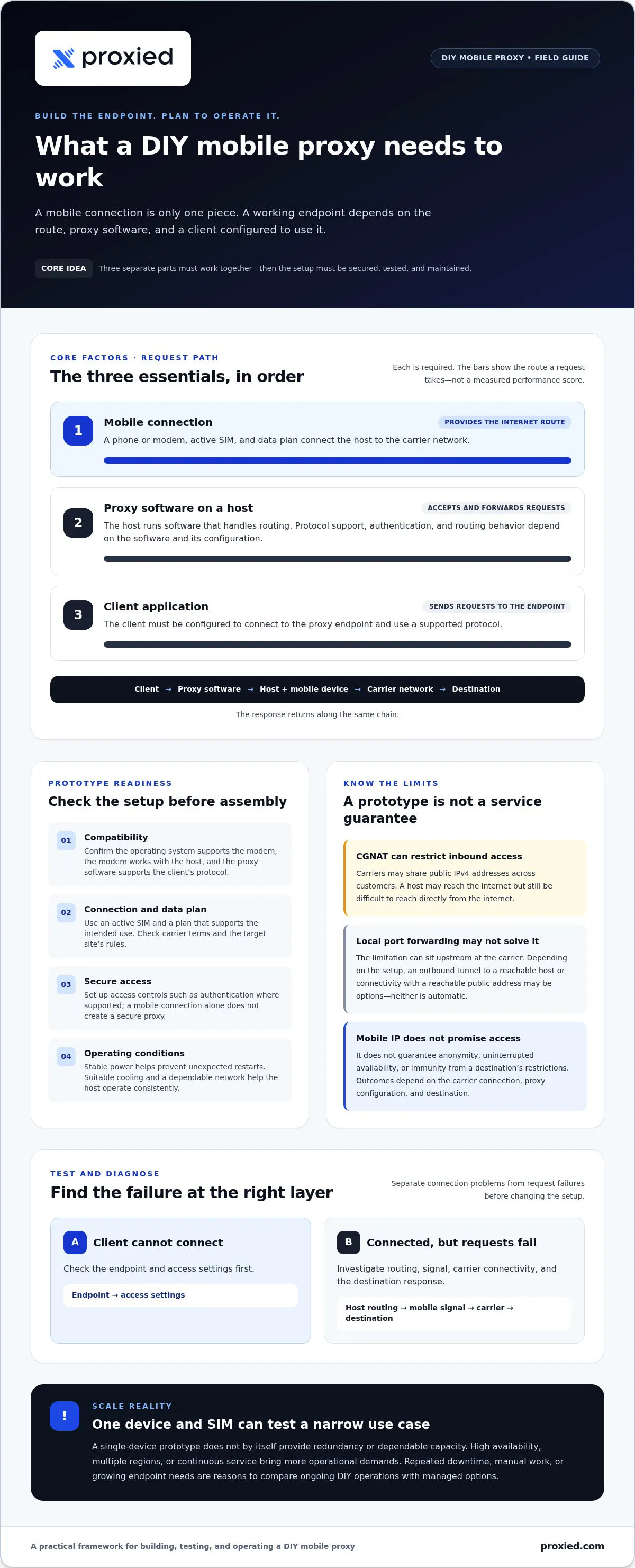
A proxy endpoint routes requests from a client through a host device that connects to the internet over a mobile network. A DIY mobile proxy server therefore combines separate parts: the cellular connection supplies the route to the internet, proxy software accepts and forwards requests, and a client application sends those requests to the endpoint. A phone or modem provides connectivity, but it does not automatically provide a configured, secure proxy.
The proxy software determines how requests are handled, including supported protocols, authentication, and routing behavior. The client application must also be configured to use that endpoint. For a general overview of how a proxy server works, see the foundational explanation of proxy types and uses.
Keep expectations realistic. A mobile IP comes from a mobile carrier’s network, but that alone doesn’t guarantee anonymity, uninterrupted access, or immunity from a site’s restrictions. A destination may still limit requests based on its own rules, traffic patterns, or other signals. Mobile connectivity describes the route, not a promise of access or trust.
How does a mobile proxy differ from a regular proxy?
The key difference is the upstream connection. A mobile proxy sends traffic through a phone or modem connected to a cellular network; another proxy may use a residential or datacenter connection. That distinction does not guarantee better results or a higher level of trust. Outcomes depend on the carrier connection, proxy configuration, and destination.
Mobile operators may use carrier-grade NAT (CGNAT), which lets multiple customers share a public IPv4 address. This can make it difficult to reach the host device directly from the internet. It can also complicate troubleshooting: the public address may not identify one device, and inbound connections may be restricted or unavailable.
When is a DIY mobile proxy a reasonable project?
Start with a prototype if your goal is learning, controlled testing, authorized research, or region-specific quality assurance. A single device can help you understand the components and test a narrow workload. Before using it, check the mobile carrier’s terms, the target site’s rules, and any privacy obligations that apply to your work.
Expect more operational demands if you need high availability, multiple regions, or continuous service. One device and SIM can be useful for a bounded test, but they don’t by themselves provide redundancy or dependable capacity. Treat a prototype as a way to validate a specific use case, then assess whether its limitations fit your actual workload.
How a DIY Mobile Proxy Server Routes Traffic
A request passes through several components before it reaches a website. The client application connects to the proxy endpoint, which is exposed by proxy software running on a host device. That device sends traffic through a mobile modem or phone, then across the carrier network to the destination. The response returns along the same chain. NIST’s official definition of a proxy server describes the intermediary role; the mobile connection is a separate part of the path.
Basic request path:
- Client application: Sends a request to the proxy endpoint.
- Proxy software: Handles request routing and, if configured, access control such as authentication.
- Host device: Runs the software and connects it to the mobile modem or phone.
- Modem or phone and SIM: Provide mobile-network connectivity.
- Carrier network: Carries traffic to the destination, which sends a response back through the path.
Protocol support, authentication options, and routing behavior depend on the selected proxy software and its configuration. Separate the diagnostic steps, too. If the client can’t connect, check the endpoint and access settings first. If it connects but requests fail, investigate the host’s routing, mobile signal, carrier connection, and destination response.
Which components are needed for a basic prototype?
A basic setup needs a mobile-capable modem or phone, an active SIM and data plan, a host computer, and proxy software. Stable power helps prevent unexpected restarts; suitable cooling and a dependable network connection help the host operate consistently. Before assembling anything, verify that your operating system supports the modem, that the modem works with your host, and that the proxy software supports the protocol your client needs.
What changes when the carrier uses CGNAT?
With carrier-grade NAT (CGNAT), a device may initiate outbound connections and reach the internet while remaining inaccessible to unsolicited inbound connections. The carrier shares public IPv4 addressing among customers, so a public address may not map directly to your device. Port forwarding on a local router may not solve that upstream limitation.
Depending on the setup, an outbound tunnel to a reachable host may be one way to make a service accessible; another is using connectivity with a reachable public address. Neither is automatic. Check the carrier’s terms and network configuration, and test the connection path rather than assuming inbound access will work.
If maintaining the host, routing, and access controls becomes a burden, Proxied’s proxy hosting platform lets users add their own devices, manage them in one place and list them on the Proxied marketplace.
DIY Mobile Proxy Server vs. Managed Options: Compare the Real Trade-Offs
A DIY mobile proxy server makes you responsible for the device and its configuration. A proxy hosting platform or proxy subscription addresses a different part of the work: Proxied’s hosting platform is for hosting your own devices and listing them on the marketplace, while residential, datacenter, and dedicated 4G and 5G mobile proxies are available in the Proxied dashboard. Compare the options against your workload, not just the initial setup.
- Control — DIY operation: You manage the device and configuration. Platform or proxy service: A hosting platform supports management of your own proxy network. A proxy subscription provides proxy access instead.
- Setup effort — DIY operation: You select compatible components and configure the system. Platform or proxy service: With a hosting platform, you manage your proxy network through the platform. With a proxy subscription, you use the proxy access provided.
- Ongoing maintenance — DIY operation: You handle updates, troubleshooting, connectivity interruptions, and hardware replacement. Platform or proxy service: A hosting platform helps you manage your network; a proxy subscription provides access rather than hardware for you to maintain.
- Observability — DIY operation: You decide what to monitor and how to investigate failures. Platform or proxy service: Choose the management approach that fits how you need to monitor and maintain your proxy setup.
- Scale — DIY operation: Adding devices increases setup, monitoring, and failure-management work. Platform or proxy service: A hosting platform helps you manage and scale your own proxy infrastructure. Proxy access is a separate option.
What do you gain and take on with DIY?
Building your own endpoint provides hands-on control and a practical way to learn how the components behave together. With a limited setup, there’s less infrastructure to manage, but that simplicity also limits capacity. If the device loses its connection, the endpoint may become unavailable until you diagnose and resolve the issue.
Plan for the full workload: routine software updates, troubleshooting, mobile connectivity interruptions, and replacing faulty hardware. DIY expenses also extend beyond equipment. Consider data connectivity, hosting, your own labor, and future replacements. Without estimating those factors for your situation, it’s not safe to assume self-hosting will cost less.
When does managed proxy hosting make more sense?
Consider another operating model if the work needs to continue reliably, your team lacks time or expertise to maintain the setup, or adding devices would make monitoring and failure response difficult. A single prototype is not the same as operating multiple endpoints; each addition creates more infrastructure to track and maintain.
Hosting and proxy access are distinct options. Proxied provides a proxy hosting platform for hosting your own devices. Residential, datacenter, and dedicated 4G and 5G mobile proxies are available separately in the Proxied dashboard. Choose hosting when you want to manage your own infrastructure through a platform, or consider a proxy subscription when you need proxy access. Neither approach guarantees access to a target site or success for a particular task. Explore Proxied proxy hosting to learn about hosting your own devices.
How to Build and Test a DIY Mobile Proxy Server Safely
Build in stages, and validate each one before relying on the endpoint. A prototype is a controlled test, not proof of production readiness. The right configuration depends on your operating system, host hardware, modem or phone, and proxy software, so avoid copying commands that haven’t been tested for your exact setup.
What should you verify before configuring the server?
Start with the intended use and the pieces that must work together. Confirm the SIM is active, its data allowance fits the test, and the carrier’s terms permit your planned use. Check that the modem or phone is supported by the host, that the host can communicate with its mobile interface, and that the chosen software runs on your operating system and supports the protocol your client requires.
Before sending traffic, write down the client, destination scope, and authorization for the test. Use systems you own or have permission to assess. This keeps the test bounded and makes results easier to interpret.
How can you validate and maintain the setup?
Use this sequence to bring a DIY mobile proxy server online without skipping essential checks:
- Define a permitted use case. Set a clear test goal, destination scope, and expected workload.
- Check compatibility. Verify the SIM, plan, carrier terms, modem or phone, host, operating system, and software.
- Assemble the components. Connect the mobile device to a powered host and confirm the host detects its mobile interface.
- Configure the proxy. Set the endpoint and routing according to the software’s documentation for your specific system.
- Secure access. Require authentication, restrict administrative access, and limit access to the endpoint. Never expose an unauthenticated proxy to the internet.
- Test the path. Check endpoint reachability, authenticated client connections, DNS behavior, and whether requests reach only the authorized destinations. Then interrupt and restore the mobile connection to see whether service recovers as expected.
- Monitor and maintain. Track availability, connection changes, resource use, and authentication failures. Document how to restart and update the system, rotate credentials, and respond to suspected misuse or compromise.
Keep a record of test results and failures. A successful connection at one moment doesn’t confirm stable service; recovery behavior and recurring interruptions matter too.
If maintaining the host and proxy configuration becomes a burden, Proxied’s proxy hosting platform lets users add their own devices, manage them in one place and list them on the Proxied marketplace.
From DIY Prototype to Scalable Proxy Infrastructure
A working prototype proves that your components can route traffic. It doesn’t establish that the setup can meet a larger workload or remain dependable over time. Consider a different operating model when the measured effort or limits of the setup no longer fit the work.
Which operational signals indicate it is time to scale?
Look for patterns, not one-off failures. Track recurring connection drops, time spent recovering the endpoint, and how often maintenance interrupts planned work. Compare your actual endpoint and region needs with what you’ve tested. If demand is growing beyond that setup, decide based on the workload rather than assumptions about how mobile IPs will perform.
There’s no universal endpoint count that marks the point to move on. A narrow test may remain manageable with a small setup, while continuous work can make even routine interruptions costly in staff time. Keep a basic record of availability, recovery effort, and maintenance so your decision reflects operating experience.
How should you assess a proxy hosting platform?
DIY operations, proxy hosting, and proxy access are distinct choices. Continuing DIY means your team remains responsible for the infrastructure and its upkeep. A hosting platform helps you manage infrastructure you operate; a proxy subscription provides access to proxies rather than a platform for managing your own network. Compare these options based on the management work and proxy access your workload requires.
For a fair comparison, weigh any platform fees against the internal work you’ll still retain: configuration, monitoring, troubleshooting, updates, and recovery. Review the platform’s documentation, compare its requirements with your existing setup, and assess how it fits your workflow. Don’t assume that a platform or proxy subscription guarantees uninterrupted connectivity or access to a target site.
- Keep operating DIY if the workload is bounded and your team can handle maintenance and recovery.
- Evaluate hosting if managing your own infrastructure is becoming burdensome and a platform for deploying and managing your network fits your requirements.
- Consider proxy access if you need proxy endpoints rather than infrastructure-management tools.
Map your coverage, endpoint, control, reporting, and support requirements first. Then review Proxied infrastructure options and compare the available choices with the work your team needs to do.
Choose the Proxy Setup That Fits Your Workload
A DIY mobile proxy server can be a useful way to learn, test a controlled use case, or validate a narrow workload. But a working endpoint is only the starting point. Reliable operation also depends on secure configuration, connectivity, monitoring, and the time needed to maintain the setup.
Before expanding, use what you’ve measured: recurring interruptions, recovery effort, and the endpoint coverage your work actually needs. Then compare continuing to manage your own devices with using a proxy hosting platform or choosing proxy access. These options address different needs, so compare the platform’s role in managing your network with the proxy access your work requires.
Proxied’s proxy hosting platform is for hosting your own devices; residential, datacenter, and dedicated 4G and 5G mobile proxies are available in the Proxied dashboard. Review these options against your requirements and choose the approach that fits your workload. Explore Proxied proxy infrastructure options to take the next step.
Frequently Asked Questions
What is a DIY mobile proxy server?
A DIY mobile proxy server is a self-managed proxy endpoint that sends client traffic through a device connected to a mobile network. Proxy software creates and manages the endpoint; a SIM and data plan, modem or phone, and carrier connection provide mobile connectivity. Building one gives you control over configuration and upkeep. It doesn’t guarantee anonymity, uninterrupted service, or access to a particular website, since network conditions and destination rules still apply.
Can I build a mobile proxy server with a phone or Raspberry Pi?
Yes, either may be part of a prototype, but compatibility depends on the specific device and setup. Check whether the operating system supports your chosen proxy software and whether the phone or modem provides a usable network interface or tethering option. Before buying or configuring hardware, confirm carrier terms, power needs, and security requirements. A device that connects to mobile data may still lack the software or network features your proxy endpoint requires.
How does CGNAT affect a DIY mobile proxy server?
Carrier-grade NAT, or CGNAT, may allow a device to make outbound internet connections while blocking unsolicited inbound connections to it. That can make a directly reachable proxy endpoint difficult to set up. Carrier and network behavior varies, so check your connection’s configuration before planning access. Don’t assume router port forwarding will work through the carrier network. Research an appropriate secure connection design for your environment and verify it with authorized testing.
Is a DIY mobile proxy server more reliable than a commercial proxy?
Reliability depends on the connection, hardware, configuration, monitoring, and maintenance, not simply whether a proxy is DIY or commercial. A personal build gives you direct control, but you’re also responsible for detecting outages and restoring service. Compare options against your availability needs, the time your team can spend on upkeep, and the consequences of interruptions. Neither a self-managed setup nor a commercial proxy should be treated as a promise of uninterrupted service.
Will a mobile proxy prevent websites from blocking my requests?
No. No proxy type guarantees that requests will avoid restrictions. Websites set their own access controls, and a mobile IP or shared carrier address doesn’t make an endpoint immune to blocks. Use authorized access, follow the site’s terms, and treat mobile connectivity as one part of a legitimate testing or data workflow. If a destination denies access, don’t assume that changing proxy configuration gives you permission to continue.
What should I check before using a DIY mobile proxy for web scraping?
First, confirm that the target permits your planned activity and that your data collection respects applicable privacy obligations. Test connectivity and authentication only with systems you own or have permission to assess. Monitor request behavior and errors, and stop if access is denied. A proxy provides a route for traffic; it doesn’t grant permission to collect data or bypass a target’s controls. Keep the workload within the scope you’re authorized to use.