



Ensuring Proxy Server Uptime: A Practical Guide to Reliable Operations

David
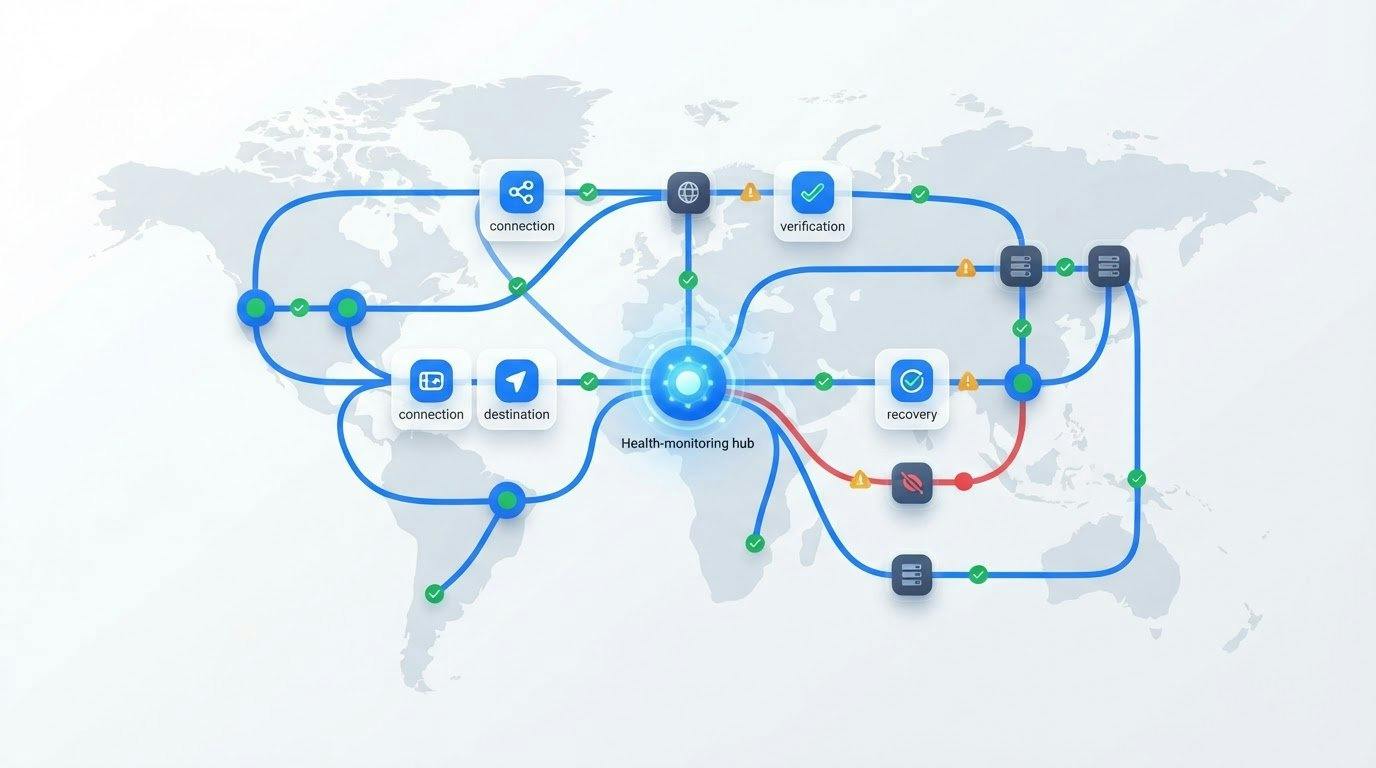
What if your proxy responds to a health check but still can’t complete the job? A reachable endpoint doesn’t guarantee that scraping, automation, or data collection will run reliably. Ensuring proxy server uptime means measuring whether the full workflow succeeds, not just whether a connection can be made.
A slow response, blocked destination, application error, or proxy failure can all look like the same outage. To find the cause and limit disruption, use checks that reflect real tasks and a consistent way to identify where a failure starts.
This guide explains how to monitor proxy availability against workload needs, detect and diagnose problems, and plan recovery controls. It also covers how to match infrastructure to the task, from residential and datacenter proxies to dedicated mobile options and hosted infrastructure.
Key Takeaways
- Measure uptime by whether proxy-dependent tasks complete within acceptable performance limits, not only by whether an endpoint responds.
- Track latency, request errors, and task completion to help distinguish application, network, proxy, and destination failures.
- Compare redundancy, rotation, and failover carefully. Rotating IPs alone won’t prevent every interruption.
- Use a recovery runbook with bounded retries and backoff to contain failures and restore service methodically.
- For ensuring proxy server uptime, match infrastructure to session, location, volume, and recovery needs, then assess it against real workflow results.
Ensuring Proxy Server Uptime Starts With Measuring the Whole Workflow
A proxy can accept a connection and still fail to deliver useful service. A request might time out, take too long, or reach a destination without producing the result an application needs. Ensuring proxy server uptime starts with defining success from the workload’s point of view, rather than relying on a basic “server is responding” check.
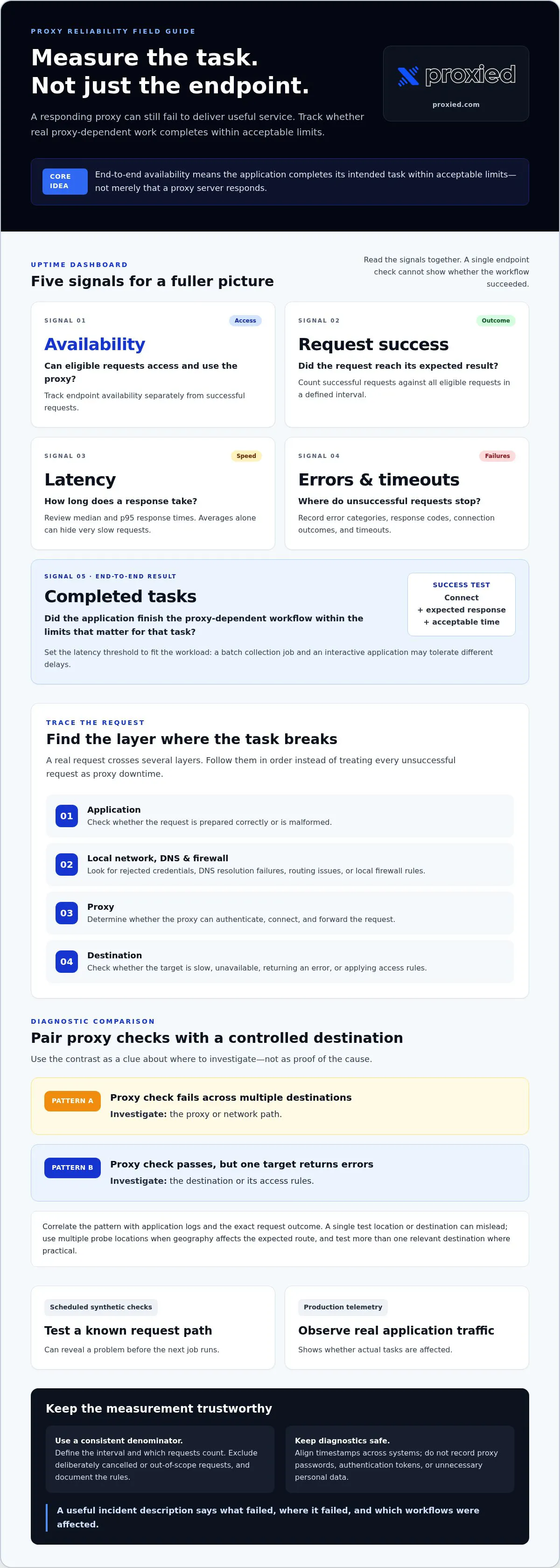
Proxy availability measures whether the proxy can accept and process eligible requests; end-to-end service availability measures whether the application completes its intended task within acceptable limits. Track these measures separately. Availability records whether access works, latency shows how long a response takes, and error rate captures unsuccessful requests. Destination access and completed workflows add further context.
What does proxy server uptime measure?
Choose a measurement period that fits your reporting needs, then define which proxy-dependent requests count. For example, a check might count a request as successful only if it connects through the proxy, receives an expected response from the destination, and finishes within the workload’s latency threshold. The right threshold depends on the task: a batch collection job and an interactive application may tolerate different delays.
Track endpoint availability separately from request success, latency, and destination response. This prevents a fast but unusable connection from appearing healthy, or a slow connection from being treated as fully available simply because it eventually responded. For foundational context on how a proxy server handles requests between clients and other servers, see the overview on Wikipedia.
Why proxy uptime must include the application
A real request passes through several layers. The application prepares it, the local network and DNS resolve the route, the proxy authenticates and forwards it, and the destination processes it. A fault at any step can interrupt the task. Incorrect credentials, DNS resolution failures, local firewall rules, destination errors, and proxy connectivity problems can all look similar to an application user.
Basic connectivity tests are useful, but they don’t prove that a real job can finish. Record results from representative application paths too: whether the request completed, how long each step took, and what error occurred. Compare those results with direct endpoint checks. If the endpoint responds but the application task fails, you have a narrower place to investigate than a basic uptime figure provides.
How Proxy Failures Happen and Which Signals Reveal Them
Once you’ve defined a successful task, monitor the points where it can fail. A useful diagnosis separates application errors from proxy problems instead of treating every unsuccessful request as downtime. Check the layers in order: the application may send a malformed request; credentials may be rejected; DNS, routing, or a firewall may disrupt the network path; the proxy may fail to connect; or the destination may be slow, unavailable, or returning an error.
Which proxy uptime metrics should teams track?
Measure successful requests against all eligible requests in a defined interval, and keep the denominator consistent. Exclude requests deliberately cancelled or outside the monitored workflow, but document those rules. Track availability alongside latency distributions, such as median and p95 response times, timeouts, request errors, and completed tasks. Averages alone can conceal a smaller set of very slow requests that disrupt a workload.
Use synthetic checks to test a known request path on a schedule, then compare them with production telemetry from real application traffic. Synthetic checks can reveal a problem before the next job runs; production data shows whether actual tasks are affected. Log useful diagnostic details, such as timestamps, error categories, response codes, and connection outcomes. Don’t record proxy passwords, authentication tokens, or unnecessary personal data.
How can monitoring separate proxy errors from destination errors?
Pair proxy health checks with requests to a controlled, stable destination. If the proxy check fails across multiple destinations, investigate the proxy or network path. If it passes but one target returns errors, the destination or its access rules may be the cause. Treat this comparison as a clue, not proof, and correlate it with application logs and the exact request outcome.
Keep timestamps aligned across monitoring and application systems. Compare response codes, DNS results, connection errors, and timeouts to see where the request stopped. A single test location or destination can mislead: local routing may be impaired, or one target may have an isolated issue. Use multiple probe locations when geography affects the expected route, and test more than one relevant destination where practical.
These signals turn “the proxy is down” into a more useful incident description: what failed, where it failed, and which workflows were affected. As part of ensuring proxy server uptime, review those patterns against each task’s connectivity needs. Explore proxy infrastructure options for workloads that use mobile, residential, or datacenter connections.
Proxy Uptime Strategies Compared: Redundancy, Rotation, and Failover
Resilience comes from matching the recovery design to the task. A workflow that can pause and retry may need a simpler setup than one that depends on a consistent session or must finish within a narrow time window. No proxy type or routing strategy guarantees that every request will succeed, so test the complete workflow and decide how much disruption it can tolerate.
- Single endpoint: Simple to configure, but a failure can stop requests until the endpoint recovers.
- Multiple endpoints: Gives the application alternatives, provided it can detect an unhealthy endpoint and select another.
- Rotation: Distributes requests across IPs, but selecting a new IP doesn’t itself restore a failed connection or task.
- Controlled failover: Switches to a configured alternative after a defined failure signal. It can shorten disruption, but requires clear checks and recovery rules.
Plan around session needs, workload tolerance, and recovery objectives. For example, a batch job that can resume may use retries and another endpoint, while a workflow with a login session may need to preserve its connection identity during recovery. Additional endpoints also add configuration and monitoring work. More options help only if the application can use them safely.
When do rotation and sticky sessions affect reliability?
Rotation changes which IP handles a request. That can distribute traffic, but a changing identity may disrupt workflows that rely on a consistent session. Sticky sessions keep requests associated with the same proxy identity for a period or session, which may suit login-based tasks. The tradeoff is that a sticky route can remain tied to a problematic endpoint, so define how the application detects failure and recovers.
How should teams compare proxy types for resilience?
Start with the task’s connectivity requirements, not a general ranking. Datacenter proxies may fit workloads where speed and scale matter; residential proxies can suit location-sensitive tasks; mobile proxies are relevant when a workflow needs mobile connectivity. Dedicated 4G and 5G mobile options, residential proxies, and datacenter proxies address different needs, but none removes the need for endpoint monitoring and recovery planning.
Redundancy can span endpoints or, where the setup supports it, different proxy infrastructure. Test failover with real application requests, including session handling, rather than assuming a backup route behaves identically. For a closer look at choosing between two common options, consult the guide to mobile versus residential proxy selection. The right choice supports the workload; it doesn’t guarantee uninterrupted service.
A Practical Proxy Uptime Runbook for Detection and Recovery
A runbook turns an alert into a controlled response. Define who acts, what evidence they check, and how the application returns to service before an incident occurs. This makes ensuring proxy server uptime a repeatable operational process, rather than a scramble to guess which layer failed.
What should happen when proxy requests start failing?
Alert on sustained changes in errors or timeouts, or a drop in completed workflows. Avoid paging on a single failed request if it could be transient. Then follow a consistent sequence:
- Detect: Confirm the alert against monitoring data and identify affected workflows.
- Classify: Check application logs, credentials, network reachability, proxy responses, and destination behavior to narrow down the failing layer.
- Contain: Pause or limit affected work if continued requests could create duplicate actions, corrupt state, or add load to a struggling service.
- Recover: Apply documented fallback rules, such as switching to an approved endpoint, while preserving session and data integrity.
- Verify: Confirm recovery through successful application requests, not just a responding proxy endpoint.
- Review: Record the timeline, impact, cause, and follow-up actions so the same failure is easier to recognize and address.
Retries should be bounded and use backoff, which spaces attempts apart rather than sending them continuously. Set a maximum attempt count and stop when the limit is reached. This helps prevent a failing proxy or destination from receiving a surge of repeated requests. A circuit breaker can temporarily stop traffic to a route after repeated failures, then allow a limited test when it’s ready to recover. Test health checks against meaningful request paths and failover rules.
How can teams prevent repeated proxy downtime?
Assign incident ownership in advance. Document escalation steps, fallback conditions, and who can pause or resume jobs. After an incident, compare alerts with production logs, identify blind spots, and test the recovery procedure in a controlled setting. Update the runbook when a test reveals unclear steps or unsafe retries.
For teams managing their own proxy infrastructure, a proxy hosting platform can help organize and operate that environment. Consider how the platform fits your management needs, including how you will monitor the infrastructure and respond to issues. A practical uptime plan also depends on infrastructure that fits the workload, whether using mobile, residential, or datacenter proxy access. Explore proxy access and hosting options as part of your resilience planning.
Choosing Proxy Infrastructure That Fits Your Uptime Requirements
The right infrastructure depends on what your application needs to complete and how quickly it must recover when a connection fails. Before comparing proxy options, document the workflow requirements. This gives you a practical basis for assessing options against your own results, rather than treating a general performance statement as proof of fit. No proxy type alone guarantees availability or successful requests.
What should an uptime-focused proxy evaluation include?
Turn your requirements into a short evaluation checklist:
- Sessions: Does the task need a consistent identity across related requests, or can it use different connections?
- Geography: Which locations must the workflow reach, and do results need to reflect a particular region?
- Volume: What request patterns and workload levels should the setup handle?
- Recovery: How much interruption can the task tolerate, and how quickly should it resume?
- Measurement: What counts as success for this application, including acceptable response time and completed work?
Set availability and recovery expectations for the workflow, then test each option through the same application path. Compare successful task completion, errors, latency, and recovery behavior under representative conditions. Review monitoring and operational information too, including how you’ll observe service health and who is responsible for responding to issues. Evaluate measured results alongside service information, not claims alone.
Choose infrastructure based on connectivity needs. Proxied offers dedicated 4G and 5G mobile proxies, as well as residential and datacenter proxy options. These serve different use cases, so assess each against the sessions, geography, and workload your application requires. Treat results as evidence for your own operating conditions, not a promise of identical performance in every scenario.
When can proxy hosting support infrastructure control?
A proxy hosting platform can support teams that manage their own proxy infrastructure by providing a place to host and manage it. That can suit teams seeking more control over their operational setup, while making infrastructure management their responsibility. Hosting control is not the same as end-to-end application availability: the application, network path, credentials, and destination can still affect whether a task succeeds.
As part of ensuring proxy server uptime, choose the approach that fits both technical requirements and your team’s capacity to operate it. Consider how proxy hosting fits your infrastructure management and recovery processes. Reassess the setup as workflows, session requirements, or recovery expectations change. The goal is not simply to select a proxy category, but to establish a measurable fit between the infrastructure and the work it must support.
Build a Proxy Uptime Plan That Fits Your Workflow
Reliable proxy operations start with a clear measure of success: whether the application completes its work, not just whether a proxy endpoint responds. Track request outcomes and latency, use monitoring to locate failures, and follow a tested recovery plan with bounded retries and suitable fallbacks.
Ensuring proxy server uptime also means choosing infrastructure to match session needs, geography, workload, and recovery expectations. Proxied offers dedicated 4G and 5G mobile proxies, residential and datacenter proxy options for different connectivity needs, and a platform for managing and scaling your own proxy infrastructure. These options belong within a broader resilience plan, not in place of measuring end-to-end results.
Explore Proxied proxy and hosting solutions to find infrastructure options relevant to your workflow. With practical monitoring, clear ownership, and a recovery process your team has tested, you can make proxy-dependent operations more dependable and respond to interruptions with confidence.
Frequently Asked Questions
What does proxy server uptime mean?
Proxy server uptime is the proportion of a defined period during which proxy access meets your operational success criteria. A responding endpoint shows availability at one layer, but it doesn’t confirm that requests authenticate, reach their destination, or complete the intended task. For a useful measure, define which requests count, what response time is acceptable, and whether success requires completing an application workflow.
How can I monitor proxy server uptime?
Combine scheduled synthetic checks with telemetry from real application requests. Track successful eligible requests against total eligible requests, response-time distributions, timeouts, error categories, and completed workflows. Use checks that follow a representative route through the proxy to a relevant destination, not just a connection test. Compare results across probe locations where geography affects the route, and record diagnostic details without storing credentials or unnecessary user data.
Can proxy rotation improve uptime?
Rotation can distribute requests among IPs and provide another selection when a particular route encounters trouble, but it doesn’t automatically prevent interruptions. A rotating request can still fail because of network issues, proxy availability, authentication, or destination behavior. Rotation may also disrupt workflows that depend on a consistent session identity. Match the approach to the task, and monitor completed requests to confirm whether rotation is helping.
What happens if a proxy server goes down?
Requests using that route may fail, time out, or leave dependent tasks incomplete until the connection recovers or the application uses a suitable fallback. The impact depends on the workflow: a resumable data collection job may pause, while a session-dependent process could lose continuity. Check application logs, credentials, network reachability, proxy responses, and destination behavior to identify the failing layer before retrying or switching routes.
How much proxy server uptime does a business need?
Set an uptime target based on the consequences of interrupted work, the time available to recover, and the application’s performance requirements. A task that can pause and resume may tolerate a different level of disruption than one with a strict completion window. Define success criteria first, including acceptable latency and completed tasks, then measure real application results over a consistent period. There isn’t one target that fits every workload.
Is a residential or mobile proxy more reliable for uptime?
Neither category is universally more reliable for every workload. Reliability depends on the required connectivity, session behavior, location, application, and destination, as well as how the setup is monitored and recovered. Residential proxies and dedicated mobile proxies, including 4G and 5G options, support different connectivity needs. Test candidate infrastructure through your intended application workflow, then compare task completion, latency, and failure patterns.
How do retries and failover affect proxy uptime?
Retries can recover from transient errors, while failover can direct requests to an alternate endpoint when a route is unhealthy. Uncontrolled retries may amplify an outage or create duplicate actions, so set a maximum attempt count and use backoff between attempts. Document when failover should occur and protect session and data integrity. Test the full recovery path, then verify success through application requests rather than endpoint checks alone.