



Geo-targeting proxies for accurate local SEO SERP checks

Hannah

A proxy showing the right city doesn’t prove that a local search check is accurate. Reliable geo-targeting proxies for local SEO require the request’s IP location and explicit search location to align, with results that reflect the target area rather than a broader fallback. A ranking without its location is incomplete.
It’s easy to focus on a proxy’s exit location, but search results can also reflect device type, session history, account profiles, and shipping ZIP codes. This guide explains how residential, mobile, and datacenter proxies can affect local SERP checks, when country-, city-, or ZIP-level targeting matters, and how geo drift can undermine comparisons. You’ll also learn what to assess in a provider, from location consistency to reliable results on the search pages and destinations you need to monitor.
Key Takeaways
- Choose proxy types based on the search task: local rank checks may need a different setup from broad, high-volume collection.
- Match location granularity to the decision you’re making, from country-level visibility to neighborhood-sensitive results.
- Look beyond an IP lookup: compare the proxy location with the search results and destination behavior to spot geo drift.
- Keep device type and location signals consistent so changes in rankings are easier to interpret.
- Assess how mobile proxy options and proxy infrastructure fit your SEO monitoring workflow and scale.
Do residential IPs produce different SERP results than datacenter IPs?
Yes. Search engines can respond differently to residential and datacenter IP addresses, so the same query may return different SERPs. Residential proxies are generally a better fit for checks involving consumer traffic patterns, stronger bot controls, or personalized content. Datacenter proxies often suit broad, high-volume checks where exact local identity matters less.
Proxy type affects what your tracking represents. Residential proxies route requests through IP addresses associated with residential networks. Mobile proxies use mobile-network IPs, while datacenter proxies use server infrastructure. ISP proxies are associated with internet service providers, though their routing and behavior depend on the provider’s setup. These labels alone don’t establish that a result reflects a specific neighborhood. Match the IP type to your research question, then assess the returned SERP.
Integration starts with the request path. Configure the proxy endpoint and authentication in your SEO tool, crawler, or automation framework, then send a test query before starting a monitoring job. For a browser workflow using Playwright or Selenium, set the proxy at browser startup so page requests use the intended connection. For a command-line crawler, apply the proxy in its network configuration. Log the query, target location, proxy session, device type, and timestamp for each result. This helps you identify whether a ranking change followed a location, session, or configuration change.
Session persistence affects comparisons. A sticky session keeps requests on the same IP for continuity, which can help when a workflow spans multiple pages. Rotating sessions assign different IPs and suit broader collection or one-request checks. For a clean local SERP comparison, keep the session stable across the query set. Rotating too quickly within a narrow target can produce inconsistent content or additional checks. Keeping one IP indefinitely can also concentrate requests and increase block risk.
Local rank-tracking tools and Google’s location simulation options can set a search location without routing traffic through a proxy. Proxies add an IP-location signal, which helps test results when both the connection and query target represent a market. Compare the methods using the same query, device type, and location, and record where their SERPs differ.
Pool size and geographic coverage affect how consistently a workflow can repeat its checks. A large pool with broad country coverage may support general monitoring, while a narrow city or ZIP target can limit available IPs and increase retries. More IPs don’t automatically mean more accurate results. Test the requested location against actual search output, and track mobile and desktop separately so device differences don’t obscure location effects.
Can I target specific cities for SERP tracking?
Yes, city-level targeting can help compare local search visibility across markets. But a city setting alone doesn’t guarantee that results represent every neighborhood.
City-Level SERP Targeting
City-level SERP targeting sets a search location to a city, helping teams track localized queries and compare visibility between markets. It matters when customers search with local intent, or when a business serves separate locations. For example, a local business could track 50 keywords across 10 cities, keeping each city’s results distinct instead of blending them into one national average.
City targeting is useful for directional comparisons, not a complete view of every searcher’s results. Proximity can influence local rankings within the same city, so a city-level result may not represent a business’s full service area. For map-pack monitoring, treat the city as a reporting unit and consider sampling several locations within it.
Verifying City-Level Accuracy
Verification means testing whether the search engine returns genuinely local results for the requested city, rather than trusting the proxy’s exit location alone. Run the same query in a clean session with the intended location, then inspect local businesses, map results, and other location-specific details. Repeat with a query that clearly reflects the city, such as a service combined with its city name.
Compare those results with a broader-location request and note whether local signals change as expected. Test the pages and actions your workflow depends on, too, because an IP lookup cannot show how a search engine or destination site interprets the request. Record the city, query, device, and session alongside each result. This gives you a clearer basis for diagnosing location mismatches.
IP Pool Depth and City Consistency
Pool depth describes how many usable IP addresses are available for a target area, affecting how consistently a provider can serve city-level requests. A deep pool can support repeated monitoring without relying on one address, while limited city coverage may lead to retries or broader-area fallbacks. More addresses alone don’t prove precision: the location returned in search results still matters.
During a trial, repeat the same city-targeted queries across sessions and compare the local businesses shown. If results regularly shift to a neighboring market, the requested city may not be consistently represented. Keep the target city and session details in your tracking records to distinguish unusual changes from genuine ranking movement.
City-level SEO reporting is more useful when rankings connect to local outcomes. Track keyword positions by city or region, Google Business Profile insights by location, and organic visits or conversions for each location page. These measures show whether a visibility change aligns with engagement, instead of treating a single SERP position as the whole picture. For teams seeking to strengthen those profile signals and convert search visibility into customer trust, WhoRatesMe helps businesses ethically manage their online reputation.
For workflows that need proxy-based location testing, explore proxy connectivity options as part of your tracking setup. Match the connection type and location coverage to the markets and queries your reporting needs to represent.
Country, city, region, ZIP code, ISP, and ASN targeting
Location targeting ranges from broad country selection to neighborhood-level signals, but each level answers a different SEO question. Choose the narrowest location that matches the search intent and reporting decision.
Targeting by Country, Region, and City
Country, region, and city targeting set the geographic scope for a proxy connection or search request. Country targeting is generally more widely available and stable than state- or city-level targeting, making it useful for comparing national SERPs across markets.
For Google SEO monitoring, country or metro coverage often works unless queries have local intent or involve map packs. A campaign comparing “plumber” results in two countries needs country-level separation; a business measuring nearby service visibility needs city-specific checks. Keep language and device settings consistent across markets so these differences don’t obscure geographic patterns.
ZIP Code, ISP, and ASN Targeting
ZIP-code or district targeting narrows a test toward a neighborhood, while ISP and ASN targeting identify a network provider or its autonomous system. These network filters can support controlled comparisons, but they don’t replace a location signal in the search request.
For example, a retailer checking local inventory may need city-level or ZIP-adjacent behavior, while state-level targeting can suit price monitoring. An ISP or ASN comparison can help distinguish network-specific output from a location effect. During scraping, record the target area and network alongside each query. This makes competing SERPs easier to interpret without assuming one IP label proves local relevance.
Location Granularity from Countries to Coordinates
Granularity describes how precisely a test defines its geography, from a country or region down to a city, postal district, or coordinate-based point. Greater precision helps investigate hyperlocal searches, but it can reduce available proxy coverage and make repeated checks less consistent.
Coordinates can define a point for a location-based test, but they don’t guarantee the search engine will return results for that exact point. Pair the location with a suitable search parameter, then assess whether the returned businesses and map results match the intended area. A broad country setting is better suited to market comparisons than a coordinate-level query around one storefront.
For competitive SERP analysis, compare the same query across the intended countries, regions, or cities, keeping each market’s results separate. A national ranking can conceal a city-level difference, while a single neighborhood sample can misrepresent broader coverage. Match location granularity to the decision: country for market entry, state or region for regional campaigns, and ZIP or district for neighborhood visibility.
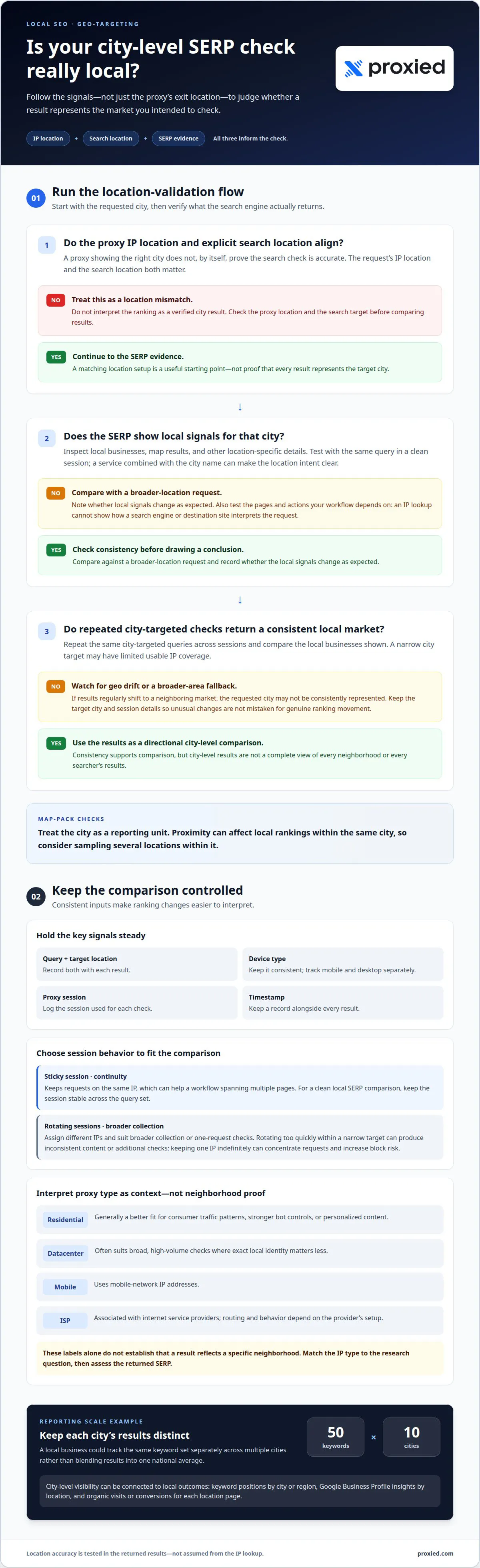
Geo drift and location consistency in local SERP checks
Geo drift happens when a search request’s apparent location differs from its intended market. Consistent local tracking depends on matching location signals and recording results against the correct keyword and place.
IP Geolocation and Explicit Location Parameters
IP geolocation estimates where a connection originates, while an explicit location parameter tells the search engine which area the query should represent. Checking these signals together can help make local search tests more consistent. A datacenter IP mapped outside the target city, paired with a city-specific parameter, can produce results that don’t reflect one coherent location.
Keep the target market’s timezone, Accept-Language header, and browser locale aligned with the request. For example, a city-targeted query with a mismatched language setting can mix location and language effects. Save these settings with each result so repeated monitoring compares like with like.
Proxy Detection and Blocking
Google can identify proxy-associated traffic and restrict automated requests, so proxies don’t guarantee uninterrupted SERP collection. Repeated requests from one address or rapid rotation within a narrow area can trigger additional checks or inconsistent output.
Keep request patterns measured and sessions suited to the task. A stable session can support a controlled comparison, while broader collection may use rotation. If Google returns a challenge or incomplete page, record it separately from a ranking change. Otherwise, a blocked request can look like missing search results rather than an access issue.
Build a keyword-location matrix to make the context of each result explicit. Give every keyword a target city or region, device type, and collection time. Local results can differ for users just three miles apart, even within the same city, so a city-wide average may hide neighborhood variation. Sampling points across a service area helps show where a business appears and where visibility changes.
Recurring monitoring is more useful when the same keyword-location pairs are checked consistently. Compare each query with previous results for that specific market, rather than merging cities into one ranking. If a local keyword moves, this record helps distinguish a genuine shift from geo drift, a changed session, or a request that silently fell back to a broader area.
Search accuracy is only one part of local visibility. Give each market its own website page with unique, location-specific content, and connect the page to the location it serves. For businesses managing scalable CMS architectures across multiple regions, technical partners like Shark Matrix Technologies LLC provide custom digital engineering to support complex web deployments. Reusing a generic page across cities gives searchers less locally relevant information and makes market-level performance harder to interpret.
Local signals can also come from citations and links. Multi-location businesses can build citations for each location on directories such as Yelp, Apple Maps, and Bing Places. Backlinks from local news outlets, chambers of commerce, or neighborhood organizations can reinforce relevance to the places represented on those pages.
Geotargeting data accuracy and tool reliability
An accurate IP location is only one part of a reliable local SERP check. Search output can also reflect account profiles, shipping ZIP codes, app permissions, or first-party identifiers. A proxy may exit in the intended city while a browser profile or saved location points elsewhere. Assess both the results and the conditions that produced them, not just the IP label.
Separate location signals from other personalization. Run a query in a clean browser session, without a signed-in account or stored site preferences, then compare it with a session using the intended profile. Keep the keyword, device, and search location consistent between runs. If results differ, profile data may be influencing the output alongside the geographic signal.
Test the actual workflow, not just an IP lookup tool. Send requests to the search engine and the destination pages your monitoring process uses. For example, confirm that a city-specific query returns businesses or pages relevant to that market, then check whether the destination displays localized content. An IP lookup confirms an address estimate; it doesn’t show how a search engine or website interprets the complete request.
Use mobile as the default device for local rank tracking, and report mobile and desktop rankings separately. A local pack or organic listing may appear differently across device types, so combining them can make geographic comparisons harder to interpret. Store device type with each keyword, location, and result. This helps distinguish ranking changes from changes in the conditions used to collect results.
Use repeated samples to judge consistency. Compare the same keyword and location across fresh sessions, and note whether the results stay within the intended market. A sudden appearance of businesses from a neighboring area can indicate geo drift or a broader-location fallback. Treat that run separately instead of averaging it into the target city’s ranking history.
Tool reliability also depends on clear records and useful failure states. Keep the requested location, observed results, session details, and collection time together. Mark challenges, missing pages, and incomplete SERPs as collection issues, not ranking positions. For alerts, a change of 5 or more positions can serve as a threshold for review, while the underlying result page shows whether the movement reflects a real local change.
For workflows that need location-aware connections, set up proxy-based SERP testing with the market and device conditions your reporting requires.
Proxied
Proxied offers connectivity options for teams building location-aware SERP monitoring workflows. Dedicated 4G and 5G mobile proxies can support checks that need mobile-network connections, while the proxy hosting platform is designed for managing and scaling your own proxy infrastructure. The right setup depends on your target markets, search locations, device mix, and monitoring workflow.
Use the principles in this guide to define what your checks need to represent, then choose an approach that fits those requirements. If you’re planning local SERP tracking or refining an existing setup, contact Proxied to discuss your proxy needs.
Make local SERP monitoring actionable
Turn monitoring into a decision process, not just a record of positions. Define which markets matter, what counts as a meaningful change, and how ranking data connects to business priorities such as visibility across a service area. A consistent approach helps teams focus on changes that could affect real local demand.
Use geo-targeting proxies for local SEO as one part of that process. Pair location-aware checks with clear reporting, then assess whether the data supports a practical next move, such as refining a market page or focusing on a specific area. The goal isn’t to collect more rankings; it’s to make better-informed choices from the results.
When you’re ready to shape your proxy setup around your local SEO workflow, contact Proxied about local SEO proxies. Start with the markets and monitoring needs you want to support, and build a focused approach from there.
Frequently Asked Questions
What should you look for in an SEO proxy provider?
Look for location and session controls that match your workflow, then assess repeatability using actual search results. Test a small query set in a target market before scaling. Check whether the connection type suits the task and whether settings remain consistent between runs. For multi-market monitoring, record location, device, and session details alongside each result. This helps separate data collection issues from ranking changes.
Can I verify results for a specific ZIP code?
Yes. ZIP-code or district-level tracking can better represent neighborhood searches than a city-wide check. Set the ZIP code as the intended search location where your tool supports it, then run locally relevant queries, such as a service combined with a neighborhood name. Record the exact query and location together. Comparing results for nearby ZIP codes can reveal whether visibility changes across the areas a business serves.
Do You Need Proxies to Perform SEO Tasks?
No. Many SEO tasks, such as editing page titles, reviewing analytics, or auditing internal links, don’t require a proxy. Proxies are useful when a workflow needs to examine search output from another network location or gather data across geographic markets. For a single local check, a search tool’s location setting may be enough. For recurring research, choose the method that matches the data you need to collect.
What are geo-targeting proxies and how do they work for local SEO?
Geo-targeting proxies route requests through IP addresses associated with selected locations, helping researchers examine location-sensitive search output. For example, a team could compare a service query from two target cities and store each SERP with its market label. The proxy supplies a network-location signal; the search request and browser provide additional context. Consistent settings and clear result records make comparisons easier to interpret.
How can you verify that a proxy’s IP address is actually located in the target city?
Start with an IP-location lookup, then test the search results and destination pages used in your workflow. A lookup provides an address estimate, while city-specific businesses, map results, or localized page content show how services respond to the request. Compare those signals with the requested city and note any mismatches. Keep the test query, device, and session consistent to make location differences easier to identify.
Which proxy types are best for local SEO research: residential, mobile, or datacenter?
Residential and mobile proxies are generally better suited to local rank tracking because they can represent consumer or mobile-network traffic patterns. Mobile is a practical default for local checks; report desktop results separately. Datacenter proxies can suit broad, high-volume collection where exact local identity matters less, but may be less representative for location-sensitive rankings. Choose based on your research goal, then compare the returned SERPs rather than relying on proxy type alone.
How do you use a proxy to check local search results, map rankings, and Google Business Profiles?
Route the search request through the selected proxy, set the intended search location, and run a defined local query, such as “dentist near downtown.” Save the organic listings and map-pack observations with the query and target market. You can review a public Google Business Profile in those results; profile performance insights come from the authorized account dashboard. Keep those two data sources separate when reporting local visibility.
What are the risks of using proxies for Google searches and local SEO research?
Google may detect proxy-associated automated traffic and respond with challenges, incomplete pages, or blocked requests. Rapid rotation or inconsistent location settings can also make comparisons unreliable. Record access errors separately from ranking observations and keep collection patterns appropriate to the task. Using proxies to collect publicly available pricing data is a common and widely practiced business activity. We recommend consulting your legal team regarding the terms of service of specific target websites and applicable data protection regulations in your jurisdiction.