



High-Anonymity Elite Proxies Explained: What They Do, and Don’t

Hannah

What if a proxy hides your IP address but still leaves clues that help identify the connection? If you’re searching for high anonymity elite proxies explained, the key distinction is that “elite” usually describes what a proxy reveals at the network level, not complete online anonymity.
A changed IP can provide a different view of the connection, but proxy labels vary between providers. An elite proxy can still be distinguishable through other connection or browser signals. Cookies, account logins, and browser fingerprints can all affect what a site sees. No proxy label guarantees that your activity or identity is hidden.
This guide explains what elite, anonymous, and transparent typically mean, where those labels fall short, and which signals matter beyond the IP address. You’ll also learn how residential, datacenter, and mobile proxies differ, so you can match infrastructure to an authorized research or data-collection workflow. The goal is a practical choice, not a promise of invisibility.
Key Takeaways
- Learn what “elite” typically describes and why the label isn’t a universal standard.
- See how forwarding headers and other request details can reveal information beyond the IP address.
- Compare residential, mobile, and datacenter proxy types by network origin and suitable authorized workflows.
- Use a controlled-session checklist to inspect the observed IP, DNS route, and browser-exposed network details.
- Use high anonymity elite proxies explained as a starting point for matching infrastructure to your task, session needs, scale, and authorization.
What Does ‘High-Anonymity Elite Proxy’ Actually Mean?
An elite proxy is commonly understood as an intermediary that masks the client’s originating IP address and doesn’t identify itself as a proxy through the connection details it sends to a destination. “Elite” is an industry label, not a universal guarantee or standardized certification. Its meaning depends on how the connection is configured and what details the destination can observe.
An elite proxy is intended to hide the client’s originating IP address and proxy use from the destination through the connection information it exposes, but it doesn’t guarantee complete anonymity.
Proxy anonymity usually describes what a destination server can infer from an incoming request, such as the apparent source IP and any forwarded headers. The Proxy server overview explains the broader role of an intermediary. The label alone doesn’t establish how a specific service handles each request.
How Elite, Anonymous, and Transparent Proxy Labels Differ
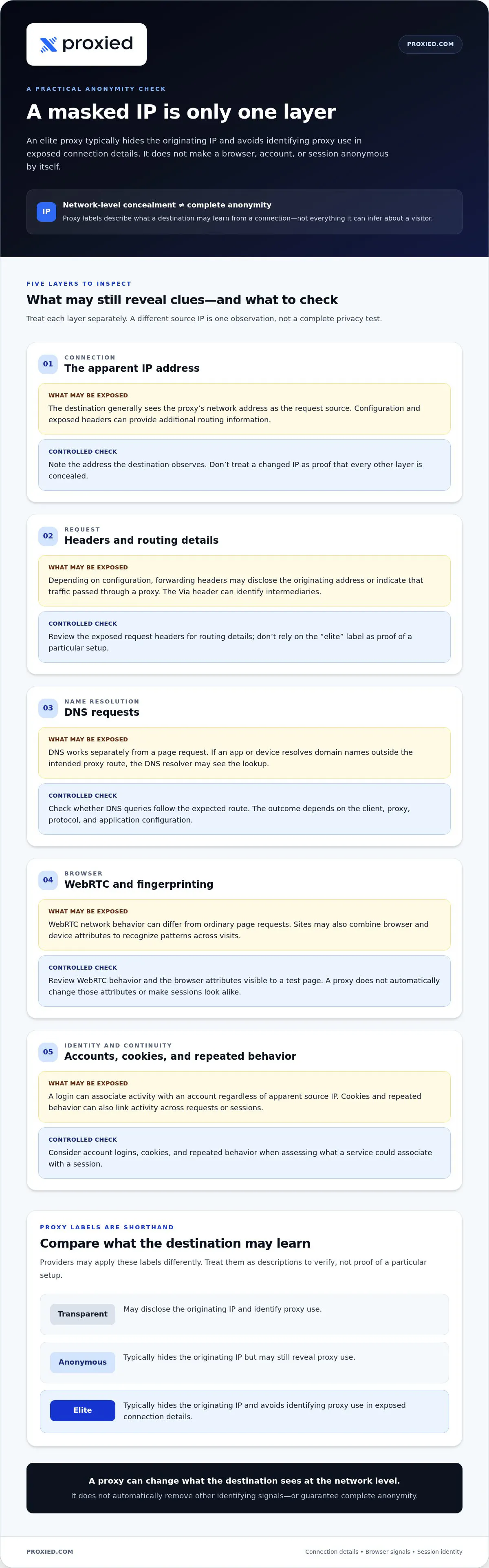
These labels commonly distinguish proxies by whether the destination sees the originating IP or learns that a proxy is involved. They’re useful shorthand, but providers may apply them differently. Treat them as descriptions to verify, not proof of a particular setup.
- Transparent: May disclose the originating IP and identify proxy use.
- Anonymous: Typically hides the originating IP but may still reveal proxy use.
- Elite: Typically hides the originating IP and avoids identifying proxy use in exposed connection details.
The distinction is about disclosure, not trustworthiness. A label doesn’t certify privacy or security, and it says nothing by itself about whether a person’s activity is authorized or lawful.
What a Proxy Changes, and What It Does Not
A proxy sits between a client, such as a browser or application, and a destination server. The client sends a request through the proxy, which forwards it. The destination generally sees the proxy’s network address as the request source, though configuration and exposed headers can provide additional routing information.
That changes one part of what the destination sees, but it doesn’t change who is signed in. If a user logs into an account, the service can associate activity with that account regardless of the apparent source IP. Browser settings, cookies, and other identifying signals can also persist across requests. A proxy doesn’t remove them automatically.
Routing traffic through a proxy also doesn’t automatically encrypt all of it. Encryption depends on the protocols and configuration involved. A proxy is not, by itself, a blanket privacy or security layer. Understanding high anonymity elite proxies means knowing both which connection details a proxy may conceal and which information it leaves untouched. Before relying on a proxy for authorized work, assess those other exposure points too.
How Proxies Can Reveal Identity Beyond the IP Address
A request passes through several layers before a website receives it. The application creates the request, the proxy forwards it, and the destination processes the connection and its accompanying data. Each layer can expose different clues. A masked source IP doesn’t ensure that headers, name lookups, or browser behavior follow the same route.
IP masking changes the address a destination sees; it doesn’t make a browser or account anonymous. This matters in authorized research and data collection, where an IP-only check can give an incomplete picture of a connection.
IP Addresses, Headers, and DNS Requests
The destination can observe the IP address connecting to it, along with request headers sent by the application or intermediary. Depending on the proxy’s configuration, forwarding headers may disclose the originating address or indicate that traffic passed through a proxy. The W3C’s HTTP/1.1 Header Field Definitions - Via describes the Via header, which can identify intermediaries involved in a request.
DNS works separately: it translates a domain name into an IP address. If an application or device resolves domain names outside the intended proxy route, the DNS resolver may see the lookup. This isn’t inevitable. The outcome depends on the client, proxy, protocol, and application configuration, so test the setup you plan to use.
WebRTC and Browser Fingerprinting
WebRTC is browser technology for real-time communication, such as audio or video connections. Its network behavior can differ from ordinary page requests, so browser and connection settings may affect what network information is exposed. A WebRTC disclosure isn’t automatic in every setup; it depends on how the browser and session are configured.
Fingerprinting is different from checking an IP. A site may combine browser and device attributes, such as supported features, settings, and display characteristics, to recognize patterns across visits. A proxy doesn’t automatically change those attributes or make separate browser sessions look alike.
For a controlled check, examine each layer independently instead of treating a different IP as a complete privacy test:
- Connection: Note the address the destination observes.
- Request: Review exposed headers for routing details.
- Name resolution: Check whether DNS queries follow the expected route.
- Browser: Review WebRTC behavior and the attributes visible to a test page.
- Identity: Consider account logins, cookies, and repeated behavior that can link sessions.
This is the practical limit of network-level concealment: a website may assess more than the connection IP. For authorized workflows, Proxied’s proxy infrastructure options offer residential, datacenter, and mobile categories to weigh alongside your application and testing requirements.
Elite Proxies Compared: Residential, Mobile, and Datacenter Options
Proxy categories describe the network an IP address comes from, not a guaranteed level of anonymity. The right fit depends on what an authorized workflow needs to access, how consistent its sessions must be, and how the destination handles different network origins. Use the comparison as a starting point, then test the connection under the conditions your task requires.
- Residential — Network origin: Residential-network IP addresses; Stability considerations: Address availability and session behavior can vary. Individual addresses don’t all behave alike. Suitable authorized workflows: Research requiring access from residential networks or geographic variation.
- Mobile — Network origin: Mobile-network connections; Stability considerations: Connection conditions and session continuity depend on the network and setup. Suitable authorized workflows: Testing or research that specifically requires mobile-network characteristics.
- Datacenter — Network origin: Hosting-based infrastructure; Stability considerations: Can suit repeatable technical workloads, while destinations may identify hosting-network addresses differently. Suitable authorized workflows: Authorized public-data collection or other workloads suited to hosting-based connections.
When Residential or Mobile Proxies May Fit
Residential connectivity may suit research where the task calls for geographically varied access through residential networks. That describes the network context, not how every individual IP will be treated. Mobile proxies may fit work that needs mobile-network characteristics, such as checking how an authorized service responds to mobile-network connections. Neither category guarantees anonymity, acceptance, or protection from access restrictions. Match the category to the research requirement, then evaluate session behavior and connection disclosures in a controlled test.
When Datacenter Proxies May Fit
Datacenter proxies can suit predictable, scalable technical workloads, including authorized collection of public information when the workflow fits hosting-based infrastructure. A destination may classify this network origin differently from residential or mobile access. That can affect how a connection is handled, but it doesn’t determine the outcome in every case. Consider the task, expected session pattern, access authorization, and technical constraints before choosing.
In practical terms, network category is only one part of high anonymity elite proxies explained. The IP type doesn’t prove that proxy use is hidden, that a destination will accept a request, or that browser and account signals are concealed. Test the exact application and route you intend to use, and keep the workflow within the destination’s permitted access.
Proxied offers residential and datacenter proxies, along with dedicated 4G and 5G mobile proxies. These categories provide different network origins to consider for legitimate research and data collection. None should be treated as a guarantee of elite anonymity. Choose based on what your authorized workflow actually requires.
How to Assess Proxy Anonymity Before Using a Service
Assess a proxy against the specific authorized task, not just its label. A repeatable check can show what a destination may observe under one set of conditions. It can’t establish permanent anonymity or prove that every application will behave the same way.
- Define the task. Specify the destination, application, session requirements, and information the workflow is authorized to access. This gives you a baseline for deciding whether a proxy route is appropriate.
- Review service terms. Read the provider’s documentation for relevant information about routing, authentication, and data handling. Check that your intended use respects applicable laws, platform terms, and site access rules.
- Inspect the route. Identify how the client connects to the proxy and how traffic is expected to reach the destination. Note which applications and protocols are included in the test.
- Test disclosures. In a controlled session, check the observed public IP, DNS route, and browser-exposed network details, including WebRTC behavior where relevant. Compare the results with the route you intended to use.
- Document the results. Record the date, browser, operating system, application, proxy settings, and test outcomes. Repeat the checks after configuration changes or when the workflow changes.
Run Controlled Checks for IP, DNS, and WebRTC
Use reputable diagnostic tools in a test environment. First, compare the public IP shown to a destination with the address expected from the proxy route. Then check which DNS resolver handles lookups and whether WebRTC reveals network details outside the intended path. Results can differ by browser, operating system, application, protocol, and configuration. Keep the setup consistent when comparing results, and document changes before drawing conclusions.
Review Use, Access, and Data-Handling Requirements
Technical checks are only part of an assessment. Confirm that the workflow follows applicable laws, the destination’s terms, and its access rules. Review provider documentation for the routing, authentication, and data-handling details relevant to your setup. Keep the scope limited to authorized work. Don’t use proxy infrastructure to evade access controls, bans, identity checks, or security systems. A successful connection doesn’t establish permission to use a service.
A test result is a snapshot of one configuration at one point in time. A different browser, application, route, or setting may expose different details, so don’t treat a clean check as proof of complete privacy. Assess what the connection actually reveals, and keep the limits of each test in view.
For authorized workflows, explore Proxied’s proxy categories to compare residential, datacenter, and dedicated 4G or 5G mobile infrastructure against your task requirements.
Choosing Proxy Infrastructure for a Legitimate Workflow
Choose infrastructure by starting with the work, not with an anonymity label. Define what the workflow needs to access, which network type is relevant, how sessions should behave, and how the work will be authorized and managed. These criteria help you compare options without treating any proxy category as a universal solution.
Match the Proxy Category to the Workload
Network origin helps narrow the choice. Residential proxies provide residential-network connectivity, which may suit authorized research requiring that context. Mobile proxies may fit tasks that specifically depend on mobile-network connections. Datacenter proxies may suit infrastructure-led workloads where hosting-based connectivity meets the technical requirements. No category is automatically best; destinations can handle network types differently.
Use this decision framework before selecting a route:
- Workload: Identify the sites, applications, and data involved, and confirm the work is authorized.
- Network type: Decide whether the task calls for residential, mobile, or hosting-based connectivity.
- Session needs: Consider whether the workflow depends on a consistent session or separate sessions. Test the intended setup rather than assuming how it will behave.
- Scale: Estimate the number of connections and the management effort your team can support. Match infrastructure to actual workload requirements.
- Access boundaries: Respect applicable laws, site access rules, and platform terms. A proxy route doesn’t grant permission to access data.
Proxied offers residential and datacenter proxies, as well as dedicated 4G and 5G mobile proxies. These are distinct categories to compare based on the task’s required network context, not as claims of guaranteed anonymity or access.
Set Realistic Expectations for Anonymity
A proxy choice governs a network-routing decision. It doesn’t replace account security, careful browser configuration, or responsible data practices. A different apparent IP won’t conceal an account login, remove browser identifiers, or ensure a destination accepts a request. Anonymity labels describe only part of a connection, not every signal or outcome.
For teams that want to run their own devices as proxies, Proxied’s proxy hosting platform lets them add devices, manage them in one place and list them on the Proxied marketplace. Evaluate it alongside the workload, session requirements, scale, and access authorization, then test the configuration you plan to use. Keep records of the setup and review them when your workflow changes.
Compare Proxied’s proxy options against your authorized technical requirements, including the network type and session needs your workflow calls for.
Turn Your Proxy Requirements Into a Practical Test
Before choosing infrastructure, write down what your authorized workflow needs: the network context, session behavior, scale, and access boundaries. Use those requirements to guide a controlled test, then review the setup when the task or application changes. Treat high anonymity elite proxies explained as a starting point for informed decisions, not a promise that any connection will be invisible or universally accepted.
Proxied’s options include dedicated 4G and 5G mobile proxies, residential and datacenter proxies, and a proxy hosting platform for adding and managing your own devices. Compare the categories against your actual technical requirements, and choose based on fit rather than an anonymity label.
Explore Proxied’s proxy options and take the next step with a clear, authorized workflow in mind. Define the requirements, test the setup, and choose infrastructure that fits the work.
Frequently Asked Questions
What is a high-anonymity or elite proxy?
A high-anonymity, or elite, proxy is generally configured to conceal the client’s originating IP address and avoid identifying proxy use in connection details visible to a destination. The term describes a commonly used proxy classification, not a certification. The phrase “high anonymity elite proxies explained” points to this distinction: the label describes expected network-level disclosure, not every identifier an application or website might use.
Are elite proxies completely anonymous?
No. An elite proxy may limit what a destination learns from the connection route, but it can’t prevent identification through every channel. Signing in to a personal account, for example, can associate activity with that account even when the connection uses a proxy. Cookies, browser configuration, and information a user chooses to submit can also matter. Treat a proxy as one infrastructure choice, not a complete anonymity system.
What is the difference between an anonymous proxy and an elite proxy?
In common terminology, both types conceal the client’s originating IP address, but an anonymous proxy may still signal that a proxy is involved. An elite proxy is typically described as hiding both the originating IP and proxy use from the destination’s visible connection details. These labels aren’t standardized across every provider, so they don’t replace checking how a particular connection behaves in your application.
Can a proxy hide my IP address from every website?
Not necessarily. A proxy can affect the IP a website sees only for traffic that actually passes through it. If an application uses a separate connection, excludes certain requests from the proxy, or has a different route configured, a site may see another network address. Check each browser or application used in your workflow instead of assuming one successful browser test covers all traffic.
Do elite proxies encrypt internet traffic?
No, the “elite” label refers to anonymity classification, not encryption. Encryption depends on the protocol and connection being used. For example, HTTPS generally protects the contents of a browser session between the browser and destination, while the proxy still handles the connection route. Don’t assume other traffic is encrypted just because it passes through a proxy. Review the protocols used by each application in your workflow.
How can I test whether my proxy is leaking information?
Use a controlled session and compare the public IP shown by a diagnostic page with the route you intended to use. Check DNS resolution and browser network details, including WebRTC behavior where relevant. Run the same checks in each application you rely on, and record the browser, operating system, and settings. Results describe that configuration at that time, so repeat checks after meaningful changes.
Is a residential proxy always more anonymous than a datacenter proxy?
No. Residential and datacenter describe different network origins; neither category guarantees anonymity or acceptance by a destination. A residential IP may be appropriate when a legitimate task requires residential-network connectivity, while datacenter infrastructure may fit a workload designed for hosting-based connections. The right choice depends on the task and its technical constraints. Evaluate the specific route and application instead of ranking proxy types by label alone.