



High performance proxies for data mining: Compare proxy types

David
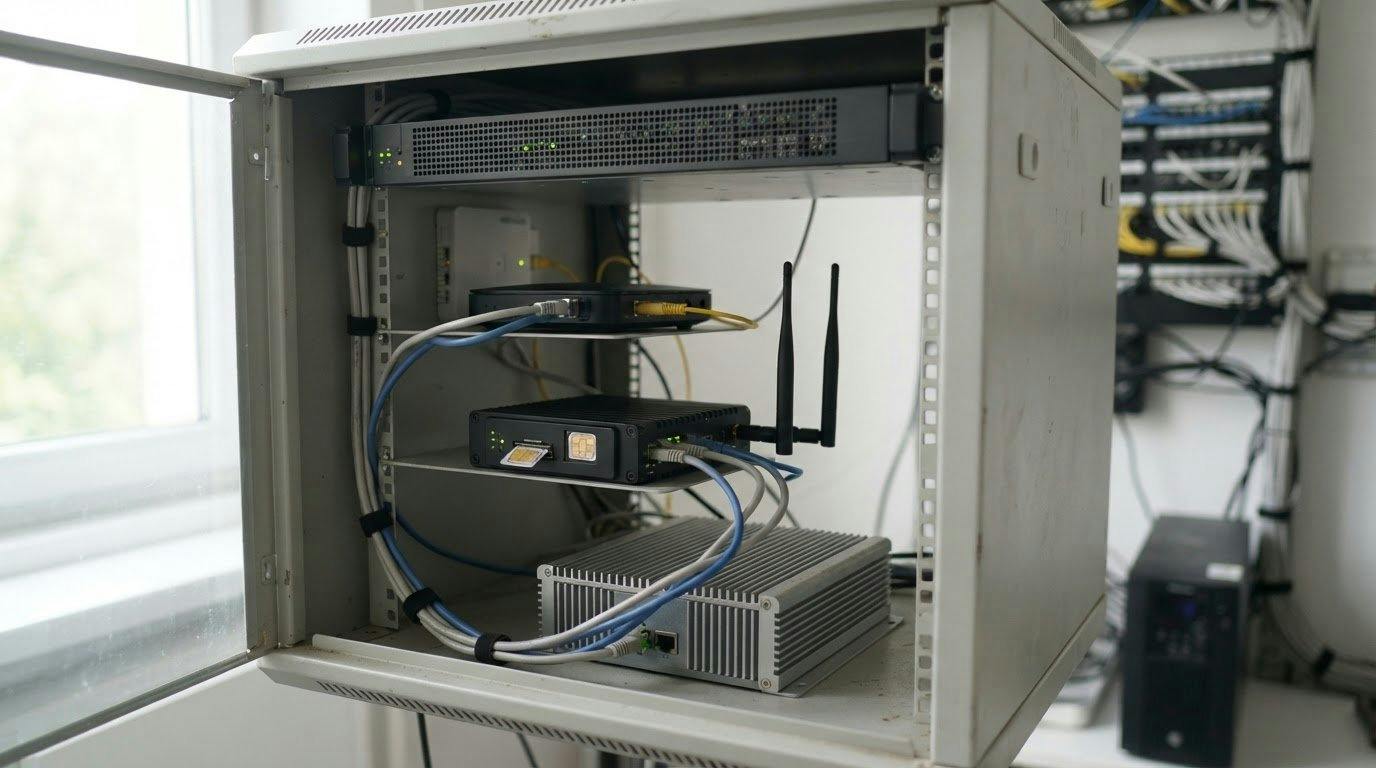
The fastest proxy is not always the best choice for data mining. High performance proxies for data mining depend on the target site: datacenter proxies can suit high-volume tasks on sites with fewer defenses, residential proxies may help when sites block hosting ranges, and mobile proxies are an option for more restrictive endpoints.
It makes sense to focus on speed, but throughput alone won't determine whether a data collection workflow runs reliably. The proxy type also affects how requests appear to a target site, while rotation, session control, retries, and responsible request pacing shape how well a pipeline performs. This comparison explains what proxies do, how residential, mobile, and datacenter options differ, and which other proxy setups may fit specific needs. It also covers practical controls for managing requests at scale, so you can choose based on the target, workload, and level of friction you expect.
Key Takeaways
- Match proxy type to the target site: datacenter proxies suit high-volume, low-defense targets, while residential and mobile options fit different levels of blocking and fingerprinting.
- Choose rotation or a sticky session based on whether your workflow needs varied IPs or a consistent connection across related requests.
- Align proxy protocols with your scraping tools and the traffic they need to handle.
- Track success rates, retries, and cost per record to spot problems before they slow the wider data pipeline.
- Use controlled request pacing, caching, and intelligent retries to keep collection workflows more resilient.
How Important Are Rotation and Session Control in Data Science Workflows?
There is no verified provider ranking for speed and uptime. Datacenter proxies are generally suited to speed-focused work, while residential proxies may fit targets that block hosting ranges. For flight price aggregation, match the proxy type and session behavior to each airline or booking site, then measure results against your collection requirements.
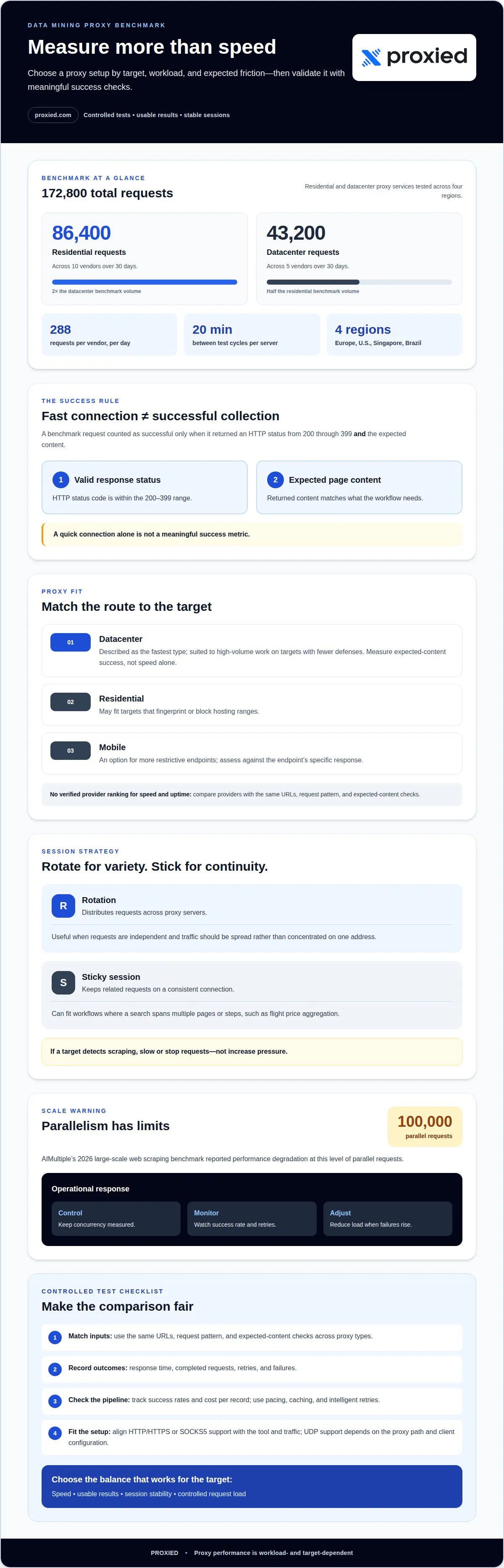
Benchmark figures help frame the comparison, but they don’t predict every scraping job. A residential proxy benchmark generated 86,400 requests across 10 vendors over 30 days. A datacenter benchmark generated 43,200 requests across 5 vendors over 30 days. Each vendor received 288 requests per day, with one test cycle every 20 minutes from each test server. The full benchmark generated 172,800 requests across services tested in Europe, the United States, Singapore, and Brazil.
Test speed and reliability with a controlled workflow before selecting a provider. Run the same URLs, request pattern, and expected-content checks through each proxy type. Record response time, completed requests, retries, and failures. A benchmark request counts as successful when it returns an HTTP status code from 200 through 399 and the expected content. That definition makes a successful response more meaningful than a fast connection alone.
Rotation distributes requests across proxy servers, while sticky sessions keep related requests on a consistent connection. Flight price aggregation may need a stable session when a search spans multiple pages or steps. If requests are independent, rotation can spread traffic and reduce concentration on one address. Apply limits carefully; if Google or another target detects scraping, slow or stop requests rather than increasing pressure.
Infrastructure matters as request volume rises: load balancing distributes work across available proxy servers, while monitoring helps identify overloaded routes. AIMultiple’s 2026 large-scale web scraping benchmark reported performance degradation at 100,000 parallel requests. That finding is a useful warning against assuming parallelism scales indefinitely. Keep concurrency controlled, monitor success rate and retries, and adjust load when failures rise.
Test the same workload on your target with different proxy types, then choose the option that balances speed, usable results, and session stability.
Datacenter proxies can be a fast option, but no individual provider is identified as having the highest speed and uptime. Compare providers with controlled tests that track response times, completed requests, retries, and failures.
Why Do Proxies Matter for Data Science?
A proxy routes a request through another IP address instead of the user’s direct connection. Free public proxies can be insecure or disappear without warning, and a low price alone does not indicate uptime or performance.
Proxy Protocol Support
HTTP and HTTPS proxies handle web requests, making them a common fit for browser-based scraping. SOCKS5 works at a lower network level and can carry different kinds of traffic, depending on the application. UDP support matters for traffic using UDP, including QUIC, but support depends on the proxy path and client configuration. Match the protocol to the software before running a collection job.
Protocol support also affects setup and troubleshooting. A crawler configured for HTTPS requests cannot use a proxy connection that it does not support. Review documentation for supported protocols, authentication steps, connection examples, and error guidance, then test a small request against the intended target. This helps distinguish a protocol mismatch from a target-side response or network problem.
Proxies in Data Mining
In web scraping, a target website sees the proxy’s IP address instead of the user’s original IP. This can help distribute requests across addresses and collect public information from different locations. Rotation changes the address used across requests, while session control can preserve continuity when related requests need to stay connected consistently.
Proxies do not replace careful collection logic. A data pipeline still needs sensible request pacing, retries, and checks that returned pages contain the expected information. For example, if a product page returns an error or incomplete results, the scraper should record that outcome rather than treat it as valid data. Models trained on scraped records depend on the quality of those inputs.
Useful technical support and documentation explain how to configure a connection, interpret errors, and determine whether a failure comes from authentication, the proxy route, or the target. A managed setup can make proxy infrastructure easier to operate, but you still need to monitor request outcomes. Log errors and retries to spot recurring connection issues.
Use a focused evaluation before expanding a data mining workflow:
- Confirm the protocol works with the scraping tool and target.
- Run representative requests and inspect returned content.
- Track errors, retries, and connection stability across the workflow.
- Review documentation for setup and troubleshooting steps.
These checks help distinguish proxy connectivity from application issues. They also show whether the setup fits a single data source or a managed pipeline with several targets. For a practical next step, explore proxy options for data collection and compare them with your workflow’s protocol and session needs.
Rotation, sticky sessions, and retry controls
Rotation, session persistence, cooldowns, and measured retries shape how scraping traffic moves through a proxy network. These controls can reduce repeated request patterns, but CAPTCHA responses also depend on the target site’s behavior.
Rotating and Sticky Sessions
A rotating session changes the proxy IP between requests or at a configured interval. This can distribute data collection across servers, while a sticky session keeps one IP for related actions. For example, a product search followed by pagination may need the same session to preserve site state. A crawler collecting independent pages may instead rotate between requests. Choose according to the workflow, not a blanket rule.
Combining both approaches can suit a job with distinct stages. A scraper might keep a sticky session during a multi-page task, then rotate before starting another. If a session returns an error, record the response before switching addresses. Otherwise, an IP change can obscure a recurring problem with the target, request logic, or network.
Pool Depth and IP Rotation
Pool depth describes the range of proxy IPs available for rotation. A deeper pool gives a high-volume job more addresses to distribute requests across, while a narrow pool can reuse addresses quickly. Datacenter proxies may fit throughput-focused workflows, but rotation still needs to respect the target’s rate limits and response patterns.
Track which IP handled each request and whether it succeeded. If several addresses receive similar errors, the cause may be the request pattern rather than one server. If failures cluster around one address, temporarily exclude it from active rotation. This log helps distinguish pool issues from scraper bugs without blindly increasing request volume.
IP Rotation and Cooldown
A cooldown pauses an IP after a defined event, such as a rate-limit response or repeated connection failure. Unlike rotation alone, cooldown logic keeps the same address from returning immediately to the queue. For example, a scheduler can mark an IP unavailable after a target signals excess traffic, then resume it after the pause.
Set cooldowns according to observed responses, not arbitrary assumptions. A temporary network error may call for a short retry, while a block signal calls for pausing that route and reducing requests. Log the event, IP, and retry outcome. This record helps refine rotation while avoiding repeated requests to a source that is already rejecting them.
Avoiding Blocks and CAPTCHAs
Features that help limit repeated signals include rotation across servers, sticky sessions for multi-step activity, and cooldowns after rate limits. Pair them with careful request pacing. Distributing scraping requests across proxy servers can help manage rate limits, but aggressive volume can still trigger a target’s defenses.
Use a controlled retry policy. Retry transient connection failures after a pause, but do not repeatedly resend requests after a CAPTCHA or clear block response. Reduce the request rate or stop collection when the target detects scraping. This prevents retries from amplifying the same pattern and gives the workflow a clear response to each failure.
How do I keep success rates high at scale?
Keep success rates high by monitoring session stability, valid content, retries, and throughput together. Consumer data mining that processes personal profiles must adhere to regulations including GDPR and CCPA, according to the European Commission and California Privacy Protection Agency.
Session Stability and Success Rates
Keeping related requests on one session can help preserve continuity during a multi-step task. For example, a crawler may need one session to load a search page, follow a result, and retrieve its details. Frequent changes mid-task can interrupt that flow or produce inconsistent records.
Measure session health alongside data validity. A successful connection can still return a block page, an incomplete listing, or stale content. For each batch, record the target, session identifier, response, and expected fields. When failures cluster within one session, pause that route and retry through a fresh session only when appropriate.
Success Rates and Throughput
Throughput measures how quickly a workflow handles requests; success measures how many produce usable records. Increasing request volume can reduce useful output if retries, blocks, or malformed pages increase. An enterprise pipeline should track completed records alongside total requests instead of treating raw request counts as progress.
Run a staged load test before expanding collection. Start with a representative set of pages, confirm the extracted fields, then increase parallel work gradually. Track success, retry frequency, and queue delays at each stage. If errors rise as throughput grows, reduce concurrency and identify whether the cause is session handling, target responses, or network capacity.
Document each source and collection run. Note which page patterns worked, the expected fields, and how the scraper handles errors. This helps teams distinguish a temporary failure from a recurring data-quality issue without blindly repeating requests.
Responsible Request Rates
Responsible request rates protect target sites and help prevent avoidable blocks. Distribute requests carefully, respect rate limits, and avoid traffic that could damage or disrupt a website. If a target detects scraping, slow or stop collection instead of increasing volume or retrying aggressively.
Use backoff when errors occur: pause requests after repeated failures, then resume at a lower rate if responses recover. Cache results so the pipeline does not fetch unchanged pages repeatedly. Set retry limits and ensure one failing source cannot stall unrelated jobs. These controls contain errors instead of multiplying them.
Review performance by source, not just across the entire network. A healthy overall success rate can hide one target returning unusable data. Compare valid records, retries, and queue delays for each source, then adjust its request pace independently. This keeps enterprise workloads responsive while accounting for each website’s behavior.
Residential, mobile, and datacenter proxies
Proxy choice shapes how a data science pipeline reaches each target and how its requests are handled. Residential, mobile, and datacenter proxies use different IP sources, so the best fit depends on the target’s defenses, workload, and detection patterns. Selecting high performance proxies for data mining means matching the connection type to a specific task, not applying one setup to every source.
Residential proxy IP addresses are associated with real computers. This type can suit targets that fingerprint traffic, rate-limit requests, or block hosting ranges. For example, if a product listing scraper receives repeated blocks from hosting ranges, residential IPs may be more suitable for that source. Evaluate the results by checking whether the expected fields arrive, not just whether the connection succeeds.
Datacenter IP addresses come from computer servers rather than physical devices. Datacenter proxies can suit high-volume collection from targets with fewer defenses, where speed is a priority. If a source blocks hosting ranges, continuing to send requests through that route may lead to more failures instead of useful records. Consider this option for sources that respond consistently to hosting-based traffic.
Mobile proxies use IP addresses associated with mobile networks. They may suit tougher endpoints, particularly when residential or datacenter routes encounter stronger detection. ISP proxies can serve as a middle tier for large jobs that need residential trust with higher throughput. These categories differ in IP origin and target fit, so compare them against each source’s behavior.
- Residential: Consider for targets that fingerprint traffic or block hosting ranges.
- Datacenter: Use for high-volume collection when targets have low defenses.
- ISP: Consider for large jobs balancing residential trust and throughput.
- Mobile: Reserve for endpoints where other proxy types meet stronger detection.
A mixed pipeline can assign different proxy types by source. For example, use datacenter proxies for open catalog pages, residential proxies for sources blocking hosting ranges, and mobile proxies for difficult endpoints. Review errors and valid records for each target. If a site starts returning blocks, reduce the request pace or pause collection instead of repeating the same requests.
A practical way to choose high performance proxies for data mining is to match each route to an observed target limitation, then assess whether the collected data remains useful. Explore proxy options for data collection that fit your pipeline’s target mix.
Proxied: Datacenter Proxies
Proxied offers Datacenter Proxies for data collection workflows that prioritize throughput on low-defense targets. They provide a relevant option when your pipeline needs to process requests efficiently and the target isn’t blocking hosting ranges. If a source blocks datacenter IPs, residential or mobile proxies may be more suitable; Proxied also offers Dedicated 4G Mobile Proxies and Dedicated 5G Mobile Proxies for workflows requiring a mobile proxy type.
Choose according to the friction your collection task encounters. Datacenter proxies can suit speed-focused work, while mobile proxies may be appropriate for tougher endpoints. Match the proxy type to your targets, monitor response quality, and adjust the workflow if blocks occur.
Contact Proxied to discuss which proxy option fits your data collection workflow.
Build a proxy strategy that can adapt
Treat proxy selection as an operating decision, not a one-time setting. As source coverage, page behavior, and collection goals change, revisit the routing plan and adjust how each workflow uses its proxy connection. Reviewing new targets can show whether the current setup still fits before a route change affects a larger pipeline. Base decisions on source requirements and the quality of the collected data.
Proxied offers Dedicated 4G Mobile Proxies and Dedicated 5G Mobile Proxies for workflows that need mobile proxy options, as well as Free Virtual Numbers for receiving SMS messages. Choosing high performance proxies for data mining means aligning connectivity with the task, then refining the setup as your data needs evolve.
Contact Proxied about proxy options to discuss a suitable next step for your workflow. A clear, adaptable approach can help you move forward with confidence.
Frequently Asked Questions
What Are Proxies?
A proxy is an intermediary that forwards traffic between your application and a destination website. It gives a data collection workflow a separate network route and can help organize requests by source, session, or task. For example, a team can route product-page requests through one proxy group and search-page requests through another, then compare logs to identify where connection or content problems begin.
How do high-speed proxies differ from regular proxies?
High-speed usually describes a proxy setup selected or configured to reduce delays and handle a workload efficiently; it does not guarantee a particular response time. Actual performance also depends on the destination, network route, request size, and scraping application. For a useful comparison, run the same pages and extraction logic through each setup, then assess response time alongside usable results and errors.
What kind of speeds should I expect?
There is no single expected speed for every data mining task. A lightweight text page and a page with substantial scripts or media place different demands on the connection. The destination’s response time and the route between proxy and site also affect completion time. Test representative URLs with your actual client, recording both elapsed time and whether the expected fields arrived correctly.
What types of proxies are best for high-performance data mining: datacenter, residential, or ISP?
Datacenter proxies can suit high-volume collection when a target has fewer defenses; residential proxies may fit targets that block hosting ranges. ISP proxies can serve as a middle option for large jobs seeking residential trust with stronger throughput. Choose by source, not for an entire project: a pipeline may use datacenter access for open catalog pages and residential access for a more restrictive source.
How many concurrent connections and requests per second can data mining proxies support?
There is no single capacity figure for every proxy, destination, and workload. Proxied’s dedicated mobile proxy listings show a download and upload speed range for each device, and most include unlimited data, while some carry a daily fair-usage limit. The target site and request handling also affect useful throughput. Increase concurrency gradually in a controlled test, and watch for rising errors, slower responses, or incomplete records before expanding a live job.
How do rotating proxies and sticky sessions compare for data mining?
Rotating proxies change the IP used across requests, while sticky sessions retain one IP for a configured duration. Use a sticky session when an application’s workflow depends on continuity, such as navigating search results before opening a detail page. Rotation can suit independent requests. Group work by task, then choose the session behavior that preserves required state without unnecessary repeat requests.
How should I configure proxy pools, rotation, retries, and rate limits for data mining?
Start by grouping requests by target and task, then assign a suitable pool and session behavior to each group. Set a respectful request pace for each source, log responses, and retry only errors that appear temporary. Treat blocks or CAPTCHA pages as signals to pause or reduce collection, not reasons to intensify retries. Cache unchanged results and review valid records alongside connection outcomes.
Which proxy providers offer the highest speeds and uptime for data mining?
Datacenter proxies are described as the fastest type, but no individual provider is identified as having the highest speed and uptime. Compare providers with the same workload, tracking response times, completed requests, retries, and failures.