



How Do Rotating Proxies Work? A Clear Guide to IP Rotation

David

What changes when a proxy rotates: the route, the session, or just the IP a website sees? If you’re asking how do rotating proxies work, the key distinction is simple: a proxy server forwards your request, an IP pool provides possible exit addresses, and rotation determines which exit IP is used and when it changes.
It’s reasonable to worry that a new IP could interrupt a login, cookies, or a sequence of requests. Rotation settings matter because changing the exit IP for every request can suit independent tasks, while keeping one IP for a session can help maintain continuity. Neither pattern is right for every workflow.
This guide traces a request from your device through the proxy to its exit IP, then explains how per-request rotation and sticky sessions affect session behavior. You’ll learn how to match a rotation pattern to your workflow, why proxy type and rotation schedule are separate choices, and where IP rotation has limits. That gives you a practical basis for comparing residential, datacenter, and mobile proxy options without expecting rotation alone to solve every connectivity challenge.
Key Takeaways
- Learn how do rotating proxies work by following a request from your application through the proxy to the website.
- Compare per-request, timed, and sticky rotation to see how each pattern affects IP changes and workflow continuity.
- Plan around session length: cookies and other session identifiers are separate from the network-level exit IP.
- Use a simple workflow assessment to choose rotation behavior that fits your request sequence and session needs.
- Evaluate proxy type and rotation behavior as separate choices when comparing residential, datacenter, and mobile options.
How Do Rotating Proxies Work? Start With the Request Path
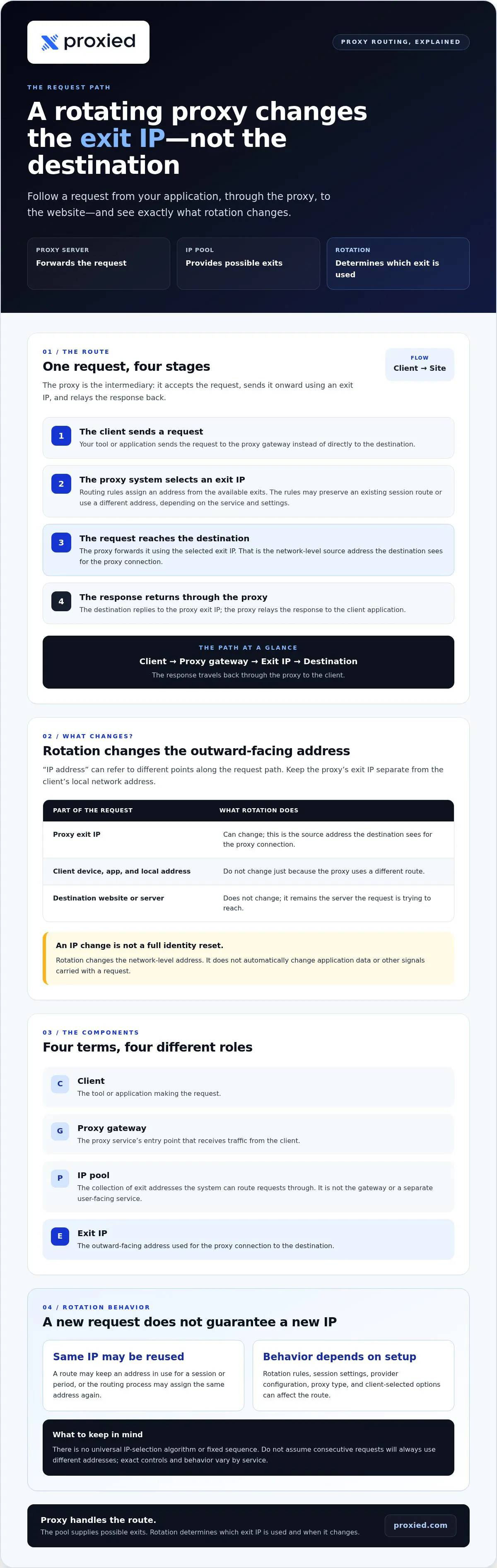
A rotating proxy service can route requests through different exit IP addresses. To understand how do rotating proxies work in practice, follow a request from the application that sends it to the website that receives it. The proxy acts as an intermediary: it accepts the request, sends it onward using an exit IP, then returns the website’s response to the application.
Picture a data collection tool requesting a public product page. The client is the tool or application making the request. The proxy gateway is the service’s entry point. Behind it, an IP pool is the set of exit addresses the system can route through. The selected exit IP is the outward-facing address used for that connection. The destination is the website or server the client wants to reach. A Proxy server provides the intermediary path; rotation determines which available exit address is used.
- The client sends a request to the proxy gateway rather than directly to the destination.
- The proxy system selects an exit IP according to its rotation rules.
- The proxy forwards the request to the destination using that exit IP.
- The destination sends its response back through the proxy, which relays it to the client.
What changes when a proxy rotates its IP?
The exit IP can change. The client’s device, application, and local network address don’t change just because the proxy uses a different route. The destination’s address doesn’t change either: it remains the server the request is trying to reach. What changes is the source address the destination sees for the proxy connection.
That distinction matters because “IP address” can refer to different points in the request path. A device may have a local address within its network, while the proxy uses an exit IP to communicate outward. The destination sees the proxy exit IP for that connection, not the client’s local address. This does not mean the request carries no other identifying information. IP rotation changes the network-level address; it doesn’t automatically change application data or other signals.
What is an IP pool in a rotating proxy?
An IP pool is the collection of exit addresses a proxy system can route requests through. The proxy gateway uses the pool when assigning an exit IP, but the pool itself is not the gateway or a separate user-facing service. Pool size and composition depend on the provider and service, so don’t assume anything about them from the term “rotating proxy” alone.
Rotation rules determine whether a later request uses the same exit IP or another one from the available pool. The precise behavior depends on the configuration, which the next section compares. Keep the key idea in mind: the proxy handles the route, the pool supplies possible exits, and rotation changes which exit IP the destination sees.
Inside the Rotation Process: How Requests Get Assigned an Exit IP
The gateway is the entry point, but it doesn’t necessarily make every routing decision on its own. A proxy system applies routing rules to incoming traffic and assigns an available exit IP. Depending on the service, those rules may be influenced by settings selected by the client, such as a session preference, or managed within the provider’s infrastructure. The exact implementation varies.
In brief: the client sends a request, the proxy routes it, an exit IP is assigned, and the destination’s response returns through the proxy.
- Send the request. The application directs a request to the proxy service using the connection details it has been configured to use.
- Route it through the proxy. The service receives the request and determines how it should travel through its network.
- Assign an exit IP. Routing rules select an address for the outbound connection. The rules may preserve an existing session route or use a different address, depending on the service and settings.
- Forward the response. The destination replies to the proxy exit IP, and the proxy relays the response to the application.
This sequence explains how do rotating proxies work without assuming that every service handles assignment identically. The provider operates the routing infrastructure and determines how its available addresses are used. The client may be able to choose settings that influence the connection, but the available controls depend on the service. Don’t assume that a setting in one proxy system works the same way in another.
How does a proxy choose an IP for a request?
At a high level, the proxy system assigns an exit IP based on its routing setup and the addresses available for that service. There isn’t one universal selection algorithm. Provider configuration, proxy type, and client-selected options can all affect the route. The practical point is to understand which decisions your settings control and which are handled by the provider.
Why can two requests use the same IP?
Rotation doesn’t guarantee a unique exit IP for every request. Rules may keep an address in use for a session or period, or the system may assign the same address again as part of its routing process. Reuse depends on the service’s rotation behavior and session settings. Don’t assume a fixed sequence of IPs or that two consecutive requests will always appear to come from different addresses.
For example, an application could send two separate page requests through the same proxy configuration. Whether the second request uses a new exit IP depends on the active rotation rules, not simply on the fact that another request was made. When planning a workflow, account for this behavior and use client settings to shape it where the service provides that control.
Teams that want to run their own devices as proxies can explore Proxied’s proxy hosting platform, where devices are added, managed in one place and listed on the Proxied marketplace. The next step is to compare rotation patterns and decide how much IP continuity a workflow needs.
Per-Request, Timed, or Sticky: Which Rotation Pattern Fits?
Rotation patterns answer a practical question: does your workflow need a different exit IP for each request, a change after an interval, or one IP held steady for a session? The right choice depends on how requests relate to one another. Separate page checks may not need a continuous connection. A sequence that depends on one session may be disrupted if the exit IP changes partway through.
- Per-request — What changes: The exit IP may change between requests. When it changes: At each request, subject to the service’s rules. Continuity impact: Less suited to a sequence that relies on one consistent connection.
- Timed — What changes: The exit IP changes after a configured interval. When it changes: When the interval or rotation trigger is reached. Continuity impact: Requests may share an IP within the interval, but a change can interrupt a longer workflow.
- Sticky session — What changes: The same exit IP is retained for the session. When it changes: For a defined session or period, according to the service. Continuity impact: Can support continuity while the session remains active.
These labels describe common behaviors, not a universal standard. Services may use different terminology, triggers, and controls. A timed pattern may be based on a configured interval, while the exact session behavior and available duration depend on the service. Check how the setting applies to your requests rather than relying on the label alone.
When does per-request rotation make sense?
Per-request rotation can fit a task made up of independent requests, such as checking separate public pages where each result stands on its own. An IP change between requests can distribute traffic across available exit addresses, but it doesn’t guarantee a unique IP each time. Keep request pacing appropriate and follow the destination website’s rules. Rotation isn’t a substitute for responsible access.
When should a workflow keep the same IP?
Use a consistent session when actions depend on one another, such as signing in, opening an account page, then completing another step. If the exit IP changes mid-sequence, the destination may treat a later request as a new connection, which can complicate continuity. Sticky behavior keeps an exit IP for a defined session or period; its duration and controls vary by service.
To choose, map the workflow before selecting a pattern. If requests are independent, consider per-request rotation. If they form a sequence, prioritize session continuity and assess whether timed rotation could occur during that sequence. If the work runs across separate batches, a timed pattern may be worth testing between batches rather than during a multi-step task. In every case, check whether the chosen behavior preserves the context your process needs.
Plan a Rotating Proxy Workflow Without Losing Session Context
A practical answer to “how do rotating proxies work” is only part of planning. You also need to know whether your task depends on a continuous session. Cookies and other session identifiers belong to the application or website interaction. The exit IP belongs to the network connection. Changing the IP doesn’t automatically erase cookies, but a site may respond differently if the connection changes during a session.
Plan before configuring rotation. This sequence helps identify the behavior your workflow needs:
- Define the task. Separate independent requests, such as collecting individual public pages, from multi-step actions where each request depends on the previous one.
- Assess session length. Note how long a sequence runs and whether it relies on cookies, a login, or other session context.
- Choose rotation behavior. Match per-request, timed, or sticky behavior to the task. Don’t select frequent IP changes if continuity is essential.
- Test and review. Start with a small, permitted workload. Compare observed IP changes and response outcomes before increasing request volume.
What should you decide before configuring rotation?
First, map the request sequence: does each request stand alone, or must the same session carry through several steps? Then estimate request volume and check the destination’s published access limits and applicable terms. Select a location or proxy category only if the workflow has a clear need for it. These choices keep configuration tied to the task rather than adding settings that don’t solve a practical requirement.
Keep session context in view. A cookie can identify an application session, while the exit IP identifies the network route seen by the destination. They’re separate, but the website may consider both when handling requests. If the process depends on a login, test the whole sequence rather than checking only whether a single request reaches the page.
How can you check whether rotation behaves as expected?
Run a controlled test on pages and actions you’re permitted to access. Record each request’s timestamp, the observed exit IP, and the response outcome. This makes it easier to tell whether an IP change followed your rotation settings or whether a response changed for another reason. Keep the test small and within the destination’s access rules.
Review the records together, but don’t treat correlation as proof. A successful response after an IP change doesn’t show that rotation caused the success, and one test can’t guarantee future access. If a multi-step session breaks, check the IP pattern and session context separately before changing the workflow. Respect published limits and terms throughout testing and use.
For proxy options to assess against your workflow, explore Proxied’s proxy services.
Match Proxy Type to Your Rotation Requirements
Proxy type and rotation behavior answer different questions. Proxy type describes the source category of the connection, such as residential, datacenter, or mobile. Rotation behavior determines whether the exit IP changes between requests, after an interval, or during a session. Choose them separately: first consider what kind of connection your workflow needs, then decide how much IP continuity each task requires.
This distinction helps avoid treating a proxy category as a rotation setting. A residential proxy doesn’t automatically rotate per request, and a mobile proxy doesn’t automatically keep one IP for a whole workflow. The available behavior depends on the service and its settings. So, how do rotating proxies work for your specific task? The answer depends on both the routing behavior and the IP source you select.
How do residential, datacenter, and mobile proxies differ?
Residential proxies use residential IP connectivity. Datacenter proxies route traffic through data-center-based connectivity. Mobile proxies use connectivity through mobile networks. These categories describe the connection source, not how a destination will respond. Website handling can vary, so none should be treated as a guarantee of acceptance, anonymity, or uninterrupted access.
How should teams choose a proxy category?
Start with the destination and the workflow. Consider any required location, the session’s continuity needs, and the access conditions that apply. Then compare the IP source category with the rotation schedule as separate decisions. For example, a workflow may require mobile connectivity while also needing a consistent exit IP across a sequence. Neither requirement determines the other.
Use these questions to narrow the options:
- What does the task require? Define the destination, permitted access, and any location or connection-source needs.
- How does the workflow run? Identify whether requests are independent or depend on a continuous session.
- What should rotation do? Choose a pattern that fits the request sequence, then test it without assuming every request will use a unique address.
Proxied offers residential, datacenter, and dedicated 4G and 5G mobile proxy options. Compare those categories against your connection-source needs, then evaluate rotation behavior separately against your workflow and session requirements. This keeps the decision grounded in what the task actually calls for, rather than assuming a proxy type solves every routing or continuity concern.
Once you’ve defined those requirements, explore Proxied’s proxy options and plan a setup that fits your use case.
Put Your Rotation Plan Into Practice
Before expanding a proxy workflow, define what a successful run looks like: the task completes, session context holds where needed, and requests stay within the destination’s access rules. Then test with a controlled workload and use what you observe to refine the setup. That feedback is more useful than choosing a rotation pattern based on assumptions alone.
Understanding how do rotating proxies work gives you a foundation, but the right configuration still depends on the specific destination and process. Treat IP source, session continuity, and rotation behavior as separate decisions. Review them together, then adjust one factor at a time so you can see what changes.
For your next step, explore Proxied’s residential and datacenter proxies, dedicated 4G and 5G mobile proxies, and proxy hosting platform for adding and managing your own devices. Explore Proxied’s proxy options and find a practical starting point for your workflow.
A clear plan makes testing more focused. Start with the requirement that matters most, and build from there.
Frequently Asked Questions
Does rotating a proxy IP change browser cookies?
No. If you’re asking how do rotating proxies work, keep browser state separate from the proxy’s network route. Cookies are usually stored by the browser or application, so the same session cookie may accompany a request sent through a different exit IP. A site can still ask you to sign in again or end a session for its own reasons. When troubleshooting, check cookie storage and proxy routing as separate parts of the setup.
Will a rotating proxy always provide a different IP?
No. A rotating proxy doesn’t promise a distinct address for every request. The same exit IP may appear again because of routing rules, pool availability, or a session setting that keeps traffic on one route. To check what happens, make a controlled series of permitted requests and record timestamps and observed IPs. Treat your results as a snapshot, not a guarantee that later requests will follow the same sequence.
Can websites still identify automated traffic when IPs rotate?
Yes. An IP is only one signal a website may consider. A burst of similar requests, repeated navigation patterns, browser characteristics, or site access controls can still affect how traffic is handled after the exit IP changes. For example, requests that exceed published rate limits may be restricted regardless of rotation. Use an appropriate pace, follow applicable terms, and don’t treat an IP change as a guarantee of access or anonymity.
Is a rotating proxy the same as a VPN?
No. A rotating proxy and a VPN are different services, although both can route traffic through another network address. A proxy commonly handles traffic configured to pass through its gateway, while a VPN commonly establishes an encrypted connection for device or network traffic. Exact behavior varies by service. Choose based on which traffic needs routing and what security properties the specific service provides, not simply on whether its IP changes.
Do rotating proxies encrypt internet traffic?
No, rotation itself describes IP changes, not encryption. For example, HTTPS encrypts data between the client and destination, while a proxy’s own connection and data handling depend on its protocols and implementation. Don’t assume all traffic is protected just because it passes through a proxy. Use HTTPS where supported, and protect credentials and sensitive information within your application.
Does using a rotating proxy make web scraping compliant?
No. Using a rotating proxy doesn’t by itself make scraping compliant. Whether a collection task is permitted depends on applicable law, the website’s terms, the data involved, and how it’s accessed and used. Before running a job, review those conditions and design requests around published access limits. If a workflow involves login access or personal data, assess the relevant permissions and privacy obligations rather than relying on IP rotation.