



How to Configure a Proxy in Python Requests with Credentials

Hannah

A proxy URL is only part of the setup: Python Requests needs a proxy mapping for the traffic you want to route, and any credentials must be formatted correctly. This guide explains how to configure a proxy in Python Requests by passing a proxies dictionary to a request, with separate http and https entries that point to the proxy URL. If a username or password contains reserved characters, URL-encode them before adding the credentials to the URL.
A URL can look valid and still fail because environment settings override your code, or an SSL error may appear to point to the proxy. Isolate each layer instead of guessing or turning off certificate checks as your first response.
This guide covers a working Requests setup, authenticated proxy URLs, and configuration for a single request or a reusable session. You’ll also learn how HTTP_PROXY and HTTPS_PROXY affect your settings, how to diagnose common authentication and connection errors, and what to do when SSL verification fails. The goal is to make proxy requests easy to understand and troubleshoot, not just provide a snippet that happens to run.
Key Takeaways
- Set a proxy with a Requests mapping, using separate entries for HTTP and HTTPS traffic.
- Format authenticated proxy URLs carefully, and URL-encode special characters in usernames or passwords.
- Use environment variables for shared proxy settings, but remember they can override values set in your code.
- Diagnose connection, authentication, and SSL errors separately before changing certificate verification settings.
- Choose per-request settings for one-off calls or a Session when you want proxy settings to persist across requests.
Authenticated proxy URLs and URL-encoding credentials
Keep proxy credentials out of your source code. Load them from protected environment variables or a secrets store when the application starts. Provide the authenticated proxy URL for both HTTP and HTTPS traffic, then test the credentials and proxy address together.
Configure Username and Password Authentication
Build the proxy URL with its scheme, username, password, host, and port, in that order. For example, use http://USER:PASSWORD@proxy.example:8080, replacing each placeholder with the values supplied for your proxy. Add the completed URL to the HTTP and HTTPS entries in the Requests proxy mapping. Avoid placing real credentials in committed scripts or shared logs.
Format Credentials in Proxy URLs
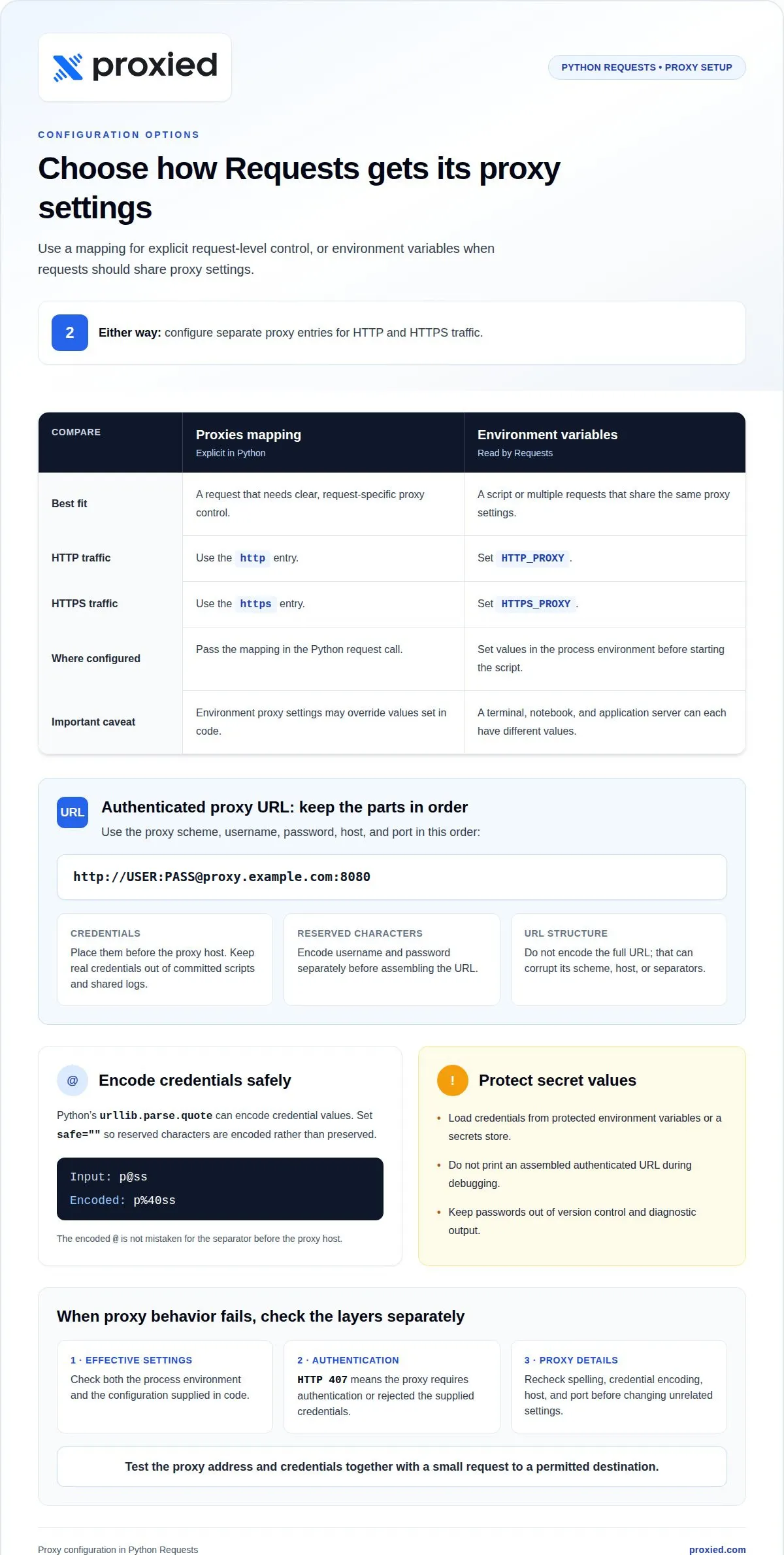
URL-encode reserved characters in each credential before inserting them into the URL. For example, encode the @ in p@ss as %40, so it isn’t mistaken for the separator before the proxy host. Apply encoding to the username and password separately, then assemble the URL and inspect its delimiters. Encoding the full URL can corrupt its scheme, host, or separators.
- Use Python’s urllib.parse.quote method to encode credential values. Set safe="" so reserved characters are encoded rather than preserved. For example, quote("p@ss", safe="") produces p%40ss. Keep the original credential available only in protected runtime configuration; don’t print the assembled URL during debugging, because it contains the password.
- Match the URL scheme and host to the proxy details you received. In a proxy URL, credentials come before the host and are separated from it by @; the port follows the host after a colon. In a Requests mapping, use separate http and https keys for the corresponding destination traffic. Don’t add a colon after the protocol in those mapping keys.
- Check authentication failures by separating the proxy response from the destination response. HTTP 407 indicates that the proxy requires authentication or rejected the supplied credentials. Authentication errors can have different causes, so check the proxy configuration before changing unrelated request settings. Recheck spelling, encoding, host, and port before changing unrelated request settings.
- Preserve provider-specific session IDs exactly when they form part of the proxy username. Some proxy configurations use a session identifier in the username to associate requests with a session. Treat it as credential text: encode reserved characters, retain required punctuation, and avoid spaces. Don’t assume the session ID belongs in the password or host.
- After assembling the mapping, send a small test request to a destination your application is permitted to access. Keep the username and password out of version control, and restrict access to runtime secrets and diagnostic output. If authentication still fails, verify that the proxy address accepts the configured credentials instead of exposing them in error reports.
HTTP_PROXY and HTTPS_PROXY environment variables
Use environment variables when a Python script should reuse proxy settings. Requests reads these values automatically for HTTP and HTTPS traffic.
Set HTTP and HTTPS Proxy Variables
Set HTTP_PROXY to a proxy URL for HTTP traffic and HTTPS_PROXY to one for HTTPS traffic. Each value should use the URL format required by your proxy server. Keep the variables distinct: setting one does not configure the other. Avoid putting credentials in shared scripts or logs, as environment values can expose sensitive configuration.
Use Proxy Environment Variables
Set the variables in the process environment before starting your Python script. Requests can then use them without a proxies dictionary on each request. For an authenticated proxy, include credentials in each variable’s proxy URL, with reserved characters URL-encoded. If a request unexpectedly bypasses the intended proxy, check the process environment.
- Use the exact variable names HTTP_PROXY and HTTPS_PROXY. The first applies to HTTP requests; the second applies to HTTPS requests. Give each a complete proxy URL, including its scheme and proxy server address. A missing value or incomplete URL can prevent Requests from connecting through the intended route.
- Choose environment variables when multiple requests share the same proxy settings. This keeps configuration outside request logic and avoids repeating the same dictionary throughout a script. For a request that needs a different proxy, pass its own mapping explicitly. When debugging proxy behavior, it can be useful to check both environment settings and supplied configuration.
- Make sure the variable values match your proxy’s authentication method. If the proxy requires a username and password, include them in the URL’s credential section. URL-encode reserved characters in each value before building the URL. For example, encode an at sign in a password so it isn’t mistaken for the separator before the proxy host.
- Check the effective settings in the same process that sends the request. A terminal, notebook, and application server can each have a different environment. If a script works in one place but fails in another, compare the HTTP_PROXY and HTTPS_PROXY values available to those processes. Don’t print full authenticated URLs while investigating.
- Use a proxies dictionary when you need clear, request-specific control. Environment variables suit shared configuration, while a dictionary makes the chosen proxy explicit in the Python call. Don’t assume a dictionary always takes precedence: Requests may apply environment proxy settings over supplied values. Test the exact execution environment and request path.
- For a larger setup where proxy settings need centralized management, explore proxy infrastructure management as a related next step.
SSL certificate verification and proxy errors
Before changing settings, distinguish connection failures from certificate failures. Requests verifies SSL certificates by default for HTTPS requests.
Troubleshoot Proxy Errors
Start by catching the specific exception raised by the failed request. A ProxyError points to a connection through the proxy, while ConnectTimeout indicates that the connection attempt timed out. Check the proxy address, port, authentication, and environment variables before changing SSL settings. An unavailable or incorrect proxy can prevent the request from connecting.
- Inspect the response separately from Python exceptions. A 403 Forbidden response can mean the destination website rejected the request; it doesn’t by itself prove the proxy connection failed. A 429 Too Many Requests response can indicate requests are arriving too frequently. For web scraping, treat those responses as destination signals, not automatic reasons to bypass restrictions or increase traffic.
Verify Proxy Use and Check Your Public IP
Send a test request to an IP-checking service that returns the address it sees, then compare that response with a direct request. If the addresses differ, the request is reaching the service through a different exit IP. Check the response body, and remember that a destination may use the X-Forwarded-For header to identify a client’s real IP address.
- Confirm the effective proxy settings in the same Python process. Requests can read the HTTP_PROXY and HTTPS_PROXY environment variables, which may override values supplied in code. Test an HTTP request and an HTTPS request separately. If only one fails, check that its corresponding proxy setting is present and correctly formatted.
- Handle request failures with a focused exception block. Catch requests.exceptions.RequestException to cover Requests errors, then log the exception type and a redacted message. Calling raise_for_status() on a response with an HTTP error status can raise HTTPError. Don’t log authenticated proxy URLs, as they can expose usernames and passwords.
- Resolve certificate errors without first disabling verification. Requests accepts a custom CA bundle through REQUESTS_CA_BUNDLE or CURL_CA_BUNDLE. Use the bundle that matches your network’s certificate setup, then retry the HTTPS request. Avoid verify=False for routine scraping because it turns off certificate checks and can expose traffic to interception.
- Use a controlled comparison to isolate the cause. Retry the same permitted destination without a proxy and then through the configured proxy, keeping the URL and request method unchanged. If only the proxied request fails, investigate the proxy connection or certificate path. If both fail, inspect the destination response and request settings instead.
Basic proxy configuration with Requests
Pass a proxy dictionary to a Requests call, or configure a session for repeated traffic. Before sending a request, match each mapping key to the destination scheme.
Set a Proxy for a Single Request
To see how to configure a proxy in Python Requests for one call, add a proxies dictionary to requests.get(). For example, use requests.get(url, proxies=proxy_map, timeout=10) when only that request needs the proxy. Separate HTTP and HTTPS entries when the endpoint handles both schemes. A timeout prevents a stalled connection from blocking the script.
- Keep the mapping structure precise. Define proxy_map with http and https keys, each pointing to its proxy URL. Requests also accepts scheme-and-host-specific keys, such as https://api.example.com, when a destination needs different routing. This lets the script select proxy settings by destination instead of applying the same choice everywhere.
Configure a Proxy for a Session
Create a requests.Session() when several calls share settings. Assign the mapping to session.proxies, then send requests through that session. This avoids passing the same dictionary repeatedly and keeps configuration in one place. A session can retain cookies and settings across requests while reusing connections.
- Keep each session scoped to the workflow that needs it. Use one session for calls to the same application, then create another if a separate task needs different proxy values or cookies. For example, an application API and an internal service may require distinct routing. Separate sessions make each configuration easier to trace.
- Check environment settings when a mapping behaves unexpectedly. Requests can read HTTP_PROXY and HTTPS_PROXY, and environment values may override proxy values supplied in configuration. Compare the environment with the single-request or session mapping. Identify which source controls the route before changing request logic.
- Handle failures at the scope of the request. Wrap a one-off call in its own exception handling; for a session, handle errors around each call. Catch requests.exceptions.RequestException to process Requests failures. Keep diagnostic messages useful, but redact credentials from any logged proxy URL.
- Test both patterns against the same permitted destination. Send one call with a request-level mapping, then repeat it through a session. Compare the response and confirm that each uses the intended settings. This controlled test helps distinguish configuration differences from changes to the destination or request data.
- If you’re deciding how to configure a proxy in Python Requests as part of a larger deployment, consider whether managing proxy infrastructure centrally fits your workflow. Explore proxy hosting options for centralized proxy infrastructure management.
How to set a proxy for a single requests request versus a Session
Choose per-request settings for one-off routing. Use a Session when multiple calls share proxy settings, cookies, or connection handling.
- Pass the proxy mapping directly to a single request. For example, call requests.get(url, proxies=proxy_map, timeout=10) when only that call needs the proxy. This keeps routing local to the request, so unrelated calls remain unaffected. Use separate HTTP and HTTPS entries when the proxy handles both destination schemes.
- Make the mapping clear before passing it. Define proxy_map with http and https keys, each pointing to its proxy URL. Requests accepts proxy settings in a dictionary. Its keys identify the traffic scheme, while each value identifies the proxy endpoint for that traffic.
- Create a requests.Session() when the same configuration applies across several calls. Assign the mapping to session.proxies, then use session.get(url) or session.post(url). This avoids passing the same dictionary repeatedly and keeps the session settings together. A session can also retain cookies and reuse connections across requests.
- Keep session settings scoped to the work that needs them. Use one session for a consistent workflow, such as requests to the same application. Create a separate session when another workflow needs different proxy values or cookies. This makes routing easier to follow and reduces accidental sharing of session state between tasks.
- Check environment settings when an explicit mapping behaves unexpectedly. Requests can use HTTP_PROXY and HTTPS_PROXY, and environment proxy settings may override values supplied in configuration. Compare the environment with the single-call or Session mapping. If the route differs, identify which configuration source applies before changing request logic.
- Handle failures at the same scope as the request. Wrap a one-off call in its own exception handling; for a Session, handle errors around each call. Catch requests.exceptions.RequestException to process Requests failures consistently. Keep error messages useful, but redact credentials from any logged proxy URL.
- Test both patterns with the same destination and request method. First send a single proxied call, then repeat it through a Session. Compare the returned status and response, and confirm that both use the intended proxy settings. This isolates configuration differences from changes in the destination or request data.
- If your workflows need centralized proxy infrastructure management, explore proxy hosting options for managing proxy infrastructure.
Proxied: Proxy Hosting Platform
Proxied’s Proxy Hosting Platform is a natural next step when managing your own proxy infrastructure becomes part of your workflow. It is designed to help manage and scale that infrastructure, while this guide focuses on configuring Requests to use a proxy. The platform may suit teams moving beyond settings maintained separately across Python scripts.
If you need proxy connectivity rather than infrastructure management, Proxied also offers Dedicated 4G Mobile Proxies and Dedicated 5G Mobile Proxies. Choose the option that matches your project’s needs, then configure its proxy details in Requests using the methods covered above.
Contact Proxied to discuss the Proxy Hosting Platform or dedicated mobile proxies.
Make proxy configuration part of your next deployment
Knowing how to configure a proxy in Python Requests is a useful starting point. Next, make proxy settings easier to manage as your application changes. Keep environment-specific configuration separate from request logic, and plan how your team will update credentials without editing every script. This makes changes easier to track and reduces the risk of exposing sensitive values in code or logs.
When your needs extend beyond configuring an endpoint, Proxied’s Proxy Hosting Platform helps manage and scale proxy infrastructure. Proxied also offers Free Virtual Numbers for receiving SMS messages. Choose the connectivity or infrastructure option that suits your planned work, rather than adding complexity your workflow doesn’t need.
Contact Proxied to discuss the next step for your proxy setup. A clear configuration today gives your team a practical foundation to build on.
Frequently Asked Questions
How to configure an HTTP proxy with Python requests?
Pass an HTTP proxy URL in the proxies dictionary when you make the request. For example: requests.get("http://example.com", proxies={"http": "http://proxy.example.com:8080"}, timeout=(5, 20)). The http key applies to HTTP destination URLs. Set a timeout so the request won’t wait indefinitely if the proxy is unreachable or slow. Replace the example hostname and port with the endpoint provided for your proxy.
How to configure an HTTPS proxy with Python requests?
Set the https key in the proxies dictionary for HTTPS destinations, for example: requests.get("https://example.com", proxies={"https": "http://proxy.example.com:8080"}, timeout=(5, 20)). The http:// prefix can be correct here: Requests uses the HTTP proxy to establish a tunnel to the HTTPS website. Use an https:// proxy URL only when the proxy endpoint itself supports TLS connections.
What format should proxy URLs use in the requests proxies dictionary?
Use a URL with a scheme, hostname, and port, such as http://proxy.example.com:8080, as the value for the relevant http or https key. The key identifies the destination protocol; the URL scheme identifies how Requests connects to the proxy. Check the endpoint details you were given, since a SOCKS proxy uses a different scheme and requires the compatible Requests dependency.
How do I add username and password authentication to a requests proxy?
Include the credentials in the proxy URL: http://username:password@proxy.example.com:8080. If the username or password contains characters such as @, :, or /, URL-encode those values before building the URL so they aren’t mistaken for URL separators. Keep authenticated proxy URLs out of shared source code and logs, since they contain credentials that could grant access to the proxy.
How do I configure proxies with HTTP_PROXY and HTTPS_PROXY environment variables?
Set HTTP_PROXY and HTTPS_PROXY in the environment before starting the Python process, using a complete proxy URL such as http://proxy.example.com:8080. Requests reads these environment variables for matching destination schemes, so you can call requests.get() without passing a proxies dictionary each time. Use NO_PROXY for hostnames that should connect directly, such as an internal service.
How do I handle proxy connection errors, timeouts, and SSL certificate errors in requests?
Check the proxy hostname, port, credentials, and network access first; connection errors often indicate an unreachable endpoint or rejected authentication. Set a timeout, for example timeout=(5, 20), to limit connection and response waiting time. For SSL errors, confirm the destination certificate is valid and your CA certificates are current. If your network uses a custom CA, configure its certificate path with verify="/path/to/ca.pem"; don’t disable verification as a routine fix.