



How to Use Proxies with Node.js Axios, Fetch, and Undici

Hannah

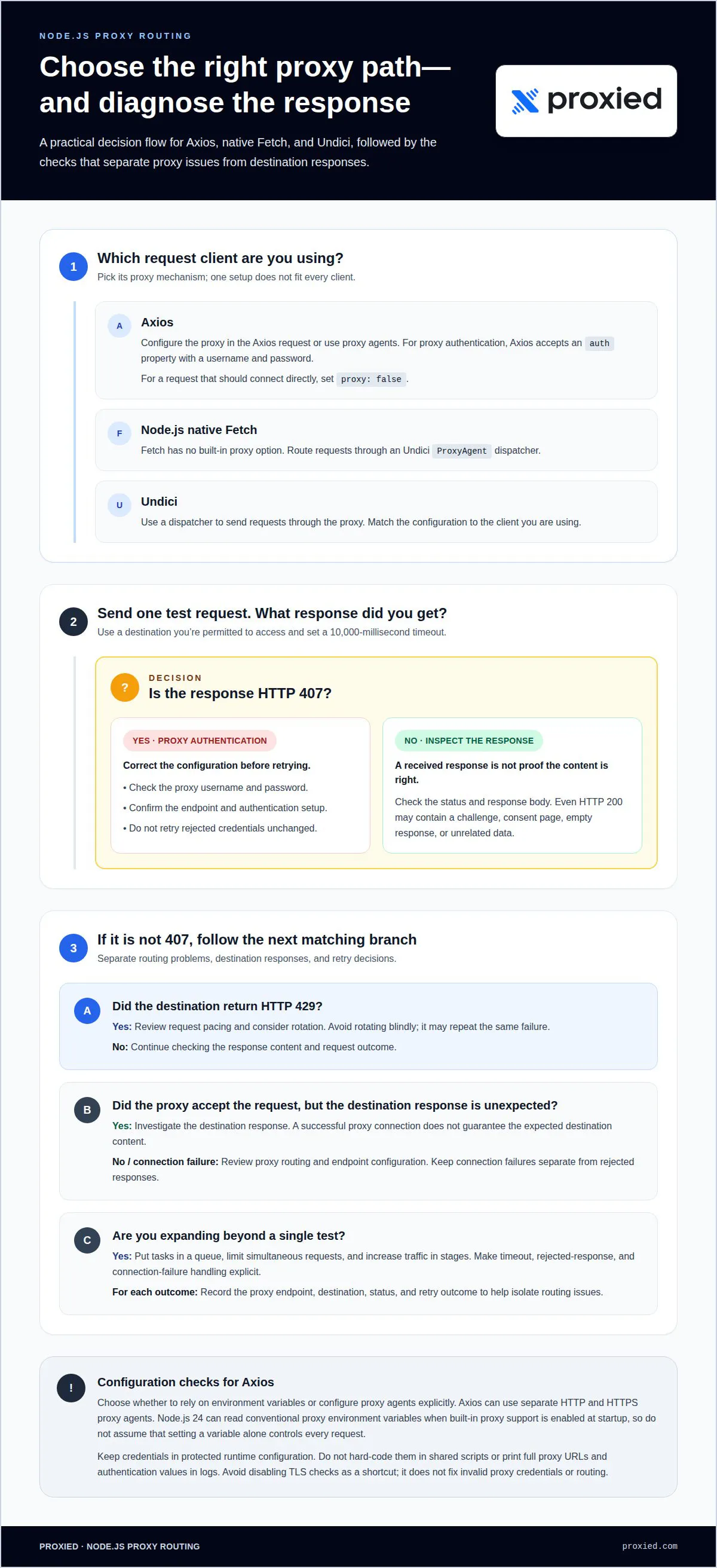
A proxy setup that works with Axios will not automatically work with Fetch or Undici. To understand how to use proxies with Node.js Axios, configure the proxy in the Axios request or agent. For Node.js native Fetch, route requests through an Undici ProxyAgent dispatcher, since Fetch has no built-in proxy option. Undici also uses a dispatcher to send requests through a proxy.
Each client handles proxy configuration a little differently, so a single setup won’t fit every request library. This guide walks through the practical configurations for Axios, Fetch, and Undici, then shows how to add proxy authentication, diagnose a 407 response, and rotate through a proxy list when a request fails. You’ll also see how to test the connection and distinguish a proxy connection issue from a response returned by the destination. Follow the steps that match your client, then adapt the rotation approach to your request workflow.
Key Takeaways
- Choose the proxy mechanism that matches your request client, since Axios, Fetch, and Undici handle proxy routing differently.
- Recognize a 407 response as a proxy-authentication issue, then correct the credentials or configuration before retrying.
- Match your Node.js setup and package versions to the proxy tools you plan to use.
- Build proxy rotation around clear failure handling so a failed request can try a different endpoint.
- Understand how environment variables and explicit proxy agents affect Axios requests.
How Should You Run Proxied Node.js Requests at Scale?
- Install Node.js, npm, and Axios before configuring the proxy. Use Node.js v24.7.0 and npm 11.6.0 as example versions for confirming installation. Run node --version and npm --version in your terminal, then install Axios with npm install axios. If you're deciding how to use proxies with Node.js Axios, start by separating dependency setup from request routing. Axios gives the script an HTTP client, but installing the package alone doesn’t send traffic through a proxy. Keep the project dependency record so other environments can reproduce the setup.
- Use proxy servers when requests need a different network exit. A direct request exposes the connection’s IP address to the destination. A proxied request passes through an intermediary that forwards it using its own exit connection. This can help separate scraping activity from an application’s regular traffic or distribute web scraping across configured endpoints. An HTTP proxy URL example may use port 80, while another example endpoint uses port 8002. These are example ports, not universal settings. Match the endpoint scheme and port to the proxy configuration you’re using.
- Test one Axios request before expanding the script. Configure the proxy on a single request and send it to a destination you’re permitted to access. Set a 10000-millisecond timeout to limit how long a stalled test occupies the script. Inspect the response status and content, not just whether Axios received a response. An HTTP 200 response can still contain a challenge, consent page, empty response, or unrelated data. A 429 HTTP status code can prompt you to review pacing and consider rotation. Log the endpoint and outcome to help isolate routing issues.
- Scale with controlled concurrency and clear failure handling. Put scraping tasks into a queue and limit how many requests run simultaneously. For teams asking how to use proxies with Node.js Axios at scale, the key is to make request handling explicit: separate timeouts, rejected responses, and connection failures. Record the proxy endpoint, destination, status, and retry outcome. A 429 can inform rotation decisions, but rotating blindly may repeat the same failure. Increase traffic in stages and review response content and error patterns at each stage before expanding the workload.
Authenticated proxies and 407 errors
Configure proxy authentication in Axios, then diagnose failures before retrying. When troubleshooting, distinguish proxy-routing problems from responses returned by the destination.
Configure Proxy Authentication and Address 407 Errors
Add the proxy endpoint and credentials to the Axios request configuration. Axios accepts an auth property containing a username and password for proxy authentication. A 407 HTTP status code means the proxy requires authentication, and the request has not supplied acceptable credentials. Check the username, password, endpoint, and authentication setup. Don’t retry rejected credentials unchanged; correct the configuration first.
Check Axios Proxy Environment Variable Behavior
Decide whether your application will rely on environment variables or configure proxy agents explicitly. Axios can use separate HTTP and HTTPS proxy agents, with both agents set for a request. Node.js 24 can read conventional proxy environment variables when built-in proxy support is enabled at startup. Don’t assume setting a variable alone controls every request; check how the runtime and Axios configuration handle routing.
- Bypass the proxy for specific hosts when direct access is required. Set proxy: false in the Axios configuration for requests that should bypass proxy routing. Use this setting only for requests intended to connect directly, and keep the regular proxy configuration for other destinations. For example, separate request configurations can route external hosts through a proxy while connecting directly to a designated internal host. This makes the exception explicit in your application code.
- Protect credentials throughout the application. Don’t hard-code proxy usernames or passwords in a script shared with others, and don’t print full proxy URLs or authentication values in logs. Load credentials from the application’s protected runtime configuration, then keep error logs focused on the endpoint, status, and failure type. This helps diagnose a 407 without exposing secrets in console output or saved logs.
- Separate proxy failures from destination failures. Test the authenticated proxy with one request, then inspect the response status and body. A successful proxy connection doesn’t guarantee the destination will return the expected content. If Axios receives 407, investigate proxy credentials or authentication configuration. If the proxy accepts the request but the destination responds differently, troubleshoot the destination response instead. Avoid disabling TLS checks as a shortcut; it doesn’t correct invalid proxy credentials or routing.
Requirements and package versions
- Confirm the Node.js runtime and npm before adding dependencies. Use Node.js v24.7.0 and npm 11.6.0 as example versions for installation checks. Run node --version and npm --version from the project terminal. Then create or open the application’s package directory. A matching runtime helps keep Axios, Fetch, and Undici examples consistent across development and deployment. Native Fetch is available in Node.js from version 18 onward. If a project uses an earlier runtime, choose its request library deliberately instead of assuming native Fetch exists.
- Install the packages required by the request client. To use Axios and the Undici dispatcher, run npm install axios undici. If Axios must send requests through a SOCKS proxy, install the SOCKS agent package with npm install socks-proxy-agent. Keep dependency declarations in package.json so the project setup can be reproduced in another environment. Axios uses its own request configuration, while Undici’s ProxyAgent acts as a dispatcher. Native Fetch uses this Undici dispatcher for proxy routing rather than a built-in proxy option.
- Match the proxy protocol to the client’s agent or dispatcher. HTTP and HTTPS proxy endpoints need compatible routing configuration; SOCKS5 also requires a compatible dispatcher or agent. For Axios with SOCKS, use socks-proxy-agent, which supports SOCKS4 and SOCKS5, with or without authentication. A SOCKS5 example connects on port 1080. Use the exact endpoint scheme supplied for the proxy, since the scheme tells the agent which protocol to negotiate. Don’t treat an HTTP endpoint as a SOCKS endpoint or assume the port alone identifies the protocol.
- Test package wiring with one target before expanding the script. Configure the selected library, send a single request, and check that it reaches the intended target through the expected network path. For an HTTP proxy, use its actual endpoint and port rather than copying an example into production. For a SOCKS setup, make sure the agent matches the endpoint scheme. Keep Axios and Undici configuration separate in your code. Successfully installing a package confirms only that the dependency is set up; it does not prove that proxy requests are routed correctly.
SOCKS5 requires a compatible dispatcher or agent for the three clients, and the provider's exact endpoint scheme should be used.
Rotating proxies from a list
- Store compatible proxy endpoints in one list. Each entry should include the protocol, host, and port required by Axios. Keep credentials out of source code and logs. Import Axios and define endpoints in configuration rather than scattering settings across requests. For example, a list can contain HTTP proxy objects with a consistent structure. This lets the script select another server without changing the request logic. Confirm that each endpoint works with the destination and request type before adding it to the rotation pool.
- Select a proxy for each request. Axios can use a randomly selected proxy by choosing one from a list. A simple selection function keeps that choice separate from the request:
import axios from 'axios';

const proxies = [
  { protocol: 'http', host: 'proxy-a.example', port: proxyPortA },
  { protocol: 'http', host: 'proxy-b.example', port: proxyPortB },
];

function chooseProxy(excludedHost) {
  const available = proxies.filter(proxy => proxy.host !== excludedHost);
  return available[Math.floor(Math.random() * available.length)];
}
Replace the example hostnames and port variables with working endpoint settings. Random selection spreads HTTP requests across the listed servers, but does not automatically respect a destination’s request limits. Handle request pacing separately in your script.
- Retry a failed request once through a different proxy. Save the first proxy’s host, then exclude it from the next selection. The rotation example retries a failed request once with a different proxy. Limit the retry to the failure types your application intends to handle. For example, a 429 response may prompt a rotation decision, while an invalid request should be corrected instead. Don’t create an unlimited retry loop. Repeated attempts can add load without resolving the cause, especially when every endpoint receives the same response.
- Track endpoint health and pause repeated failures. Record the selected proxy, destination, status, and retry result for each request. A circuit-breaker example closes a proxy after 3 consecutive failures, then waits 5 request ticks before testing that proxy again. This gives your script a defined recovery path instead of repeatedly sending traffic through an endpoint that is failing. Keep the health state per proxy, and resume only after the scheduled test. Rotation works best when paired with controlled request pacing and clear failure records.
Does Axios automatically use HTTP_PROXY and HTTPS_PROXY environment variables in Node.js?
- Choose explicit proxy configuration when behavior must be predictable. Do not assume that setting HTTP_PROXY and HTTPS_PROXY will automatically route every Axios request. Axios can use separate HTTP and HTTPS proxy agents, both configured for the request. This makes the routing choice visible in your application code and helps when a destination needs a different proxy or a direct connection. Match each agent to its protocol, and do not treat environment variables as a substitute for request-level configuration.
- Check the Node.js runtime before relying on environment-based routing. Node.js 24 can read conventional proxy environment variables when built-in proxy support is enabled at startup. That runtime behavior depends on enabling the support; the version number alone doesn’t mean every process uses those variables. Confirm how the application starts, then test a request through the intended route. A command-line process, worker, or service may have different startup settings, so test the same entry point used in deployment.
- Configure separate agents for HTTP and HTTPS requests. Use an HTTP agent for HTTP destinations and an HTTPS agent for HTTPS destinations, then pass both in the Axios request configuration. Give each agent a matching proxy endpoint and scheme. This explicit setup is useful when requests need distinct routing or environment-based behavior is unavailable. Keep the agent configuration in one place instead of rebuilding it for every request. This also makes later changes easier to audit.
- Test each protocol and inspect the result. Send one HTTP request and one HTTPS request through the configured setup. Compare the expected proxy exit with the observed response, and check both the destination content and its status. Connecting successfully to a proxy does not prove that the destination returned useful data. If one protocol fails, review its agent, endpoint scheme, and credentials separately. Change one agent at a time so configuration errors are easier to identify.
- Keep environment settings and request overrides consistent. Document which layer controls routing for each request: Node.js startup configuration, Axios agents, or an explicit request option. Conflicting settings can make debugging difficult, especially when an application handles both HTTP and HTTPS targets. Use one clear source of proxy configuration wherever possible. If a request should bypass proxy routing, set that exception deliberately instead of changing the environment for every request. After adjusting the configuration, test the affected destination again.
Proxied: Dedicated 4G Mobile Proxies
Proxied offers Dedicated 4G Mobile Proxies for teams that need mobile proxy connectivity in Node.js workflows. They can fit applications that already configure Axios, Fetch, or Undici and need a mobile proxy endpoint for their requests. The proxy still needs to match your client’s protocol and authentication setup, so keep the endpoint details aligned with your request configuration.
Choose this option when a dedicated mobile proxy suits your application’s network requirements. For other needs, Proxied also offers Dedicated 5G Mobile Proxies and a Proxy Hosting Platform for managing proxy infrastructure. The right fit depends on your workflow and how you plan to route requests.
Contact Proxied to discuss Dedicated 4G Mobile Proxies for your Node.js setup.
Build a Proxy Setup You Can Maintain
Make proxy routing part of your application’s operating design, not a one-off request setting. Decide how your script will handle endpoint changes, protect credentials, and record request outcomes. Keep these decisions close to the code that creates requests so future changes remain clear to the team maintaining the application.
Shape the setup around your workload. A small integration may need a single configured endpoint, while an application with changing traffic may need a managed rotation process. As you refine how to use proxies with Node.js Axios, Fetch, or Undici, align the client’s requirements with your proxy configuration. Clear ownership makes troubleshooting easier as the application evolves.
Proxied offers Dedicated 4G Mobile Proxies, Dedicated 5G Mobile Proxies, and Free Virtual Numbers for receiving SMS messages. If you’re planning your next setup, start a conversation about your proxy requirements. A considered configuration gives your team a practical foundation to build on.
Frequently Asked Questions
How Do You Use Proxies in Node.js With Fetch, Axios, and Undici?
Configure each client through its own proxy interface. Axios accepts proxy settings or compatible agents, while Undici routes requests through a dispatcher. Node.js native Fetch uses Undici internally, so pass it a ProxyAgent dispatcher. If an application uses all three clients, it can share endpoint details while creating separate client-specific configurations. Keep those settings centralized to reduce mismatches when an endpoint changes.
How Do You Use a Proxy With Axios?
Set the proxy details in the Axios request configuration or provide a compatible agent. For example, an HTTP proxy configuration specifies its protocol, host, and port, and Axios routes that request through the endpoint. Keep request-specific settings beside the request that needs them, or use a shared Axios instance for consistent routing. This makes it easier to apply different proxy settings to separate destinations.
Does Node.js support SOCKS5 proxies?
Yes. Node.js applications can use SOCKS5 through a compatible agent or dispatcher, rather than treating it as an HTTP proxy. For Axios, install and configure socks-proxy-agent; it supports SOCKS4 and SOCKS5 endpoints, with or without authentication. Match the agent to the endpoint’s scheme, then attach it to the Axios request. The same protocol-specific principle applies when configuring Fetch or Undici.
How Do You Validate the Proxy Exit and Returned Data?
Send a test request to a service that returns the apparent client IP, then compare the result with the expected proxy exit. Next, inspect the destination response body, content type, and status. For example, an HTML page returned to a script expecting structured data may indicate a challenge or an unrelated result. Validate both the network route and the content your application needs before processing a larger batch.
How to configure an HTTP proxy in Axios for Node.js?
Provide an HTTP proxy endpoint in Axios’s request configuration, including its protocol, hostname, and port. For example, configure an Axios instance for a specific task, then send requests through that instance. Match the proxy scheme to the endpoint, and do not confuse the proxy address with the destination URL. A separate instance clarifies the routing choice when other requests should use a different connection.
How to configure an HTTPS proxy with Axios in Node.js?
For HTTPS destinations, configure Axios with a compatible HTTPS proxy agent or proxy settings appropriate to the endpoint. A proxy connection alone does not guarantee that the destination will return a successful response. If setup fails, troubleshoot the proxy endpoint, tunnel negotiation, and destination response separately rather than treating them as one error. A test request to a controlled HTTPS target can help identify which stage needs attention.
How to use Axios proxy settings with proxy authentication?
Add the proxy username and password to Axios’s proxy authentication configuration, or use the authentication options supported by the selected agent. Store credentials in protected runtime configuration instead of committing them to source files. For example, load them when the application starts and avoid printing full proxy settings in error logs. If authentication fails, correct the credentials or endpoint configuration before retrying.
How to use an HTTP or SOCKS proxy with Axios and a Node.js agent?
Choose an agent that matches the proxy protocol, then attach it to Axios using the appropriate HTTP or HTTPS agent option. HTTP proxy agents handle HTTP proxy connections; SOCKS endpoints require a compatible agent such as socks-proxy-agent. For an HTTPS destination, ensure the selected agent supports the required tunnel behavior. Keep each agent’s endpoint and credentials in configuration, separate from the application’s request logic.