



See proxies
See proxies
Purchase
Select Country
Listings will appear after a country has been selected.
Automating Tasks with Mobile Proxies: A Practical Workflow Guide

David
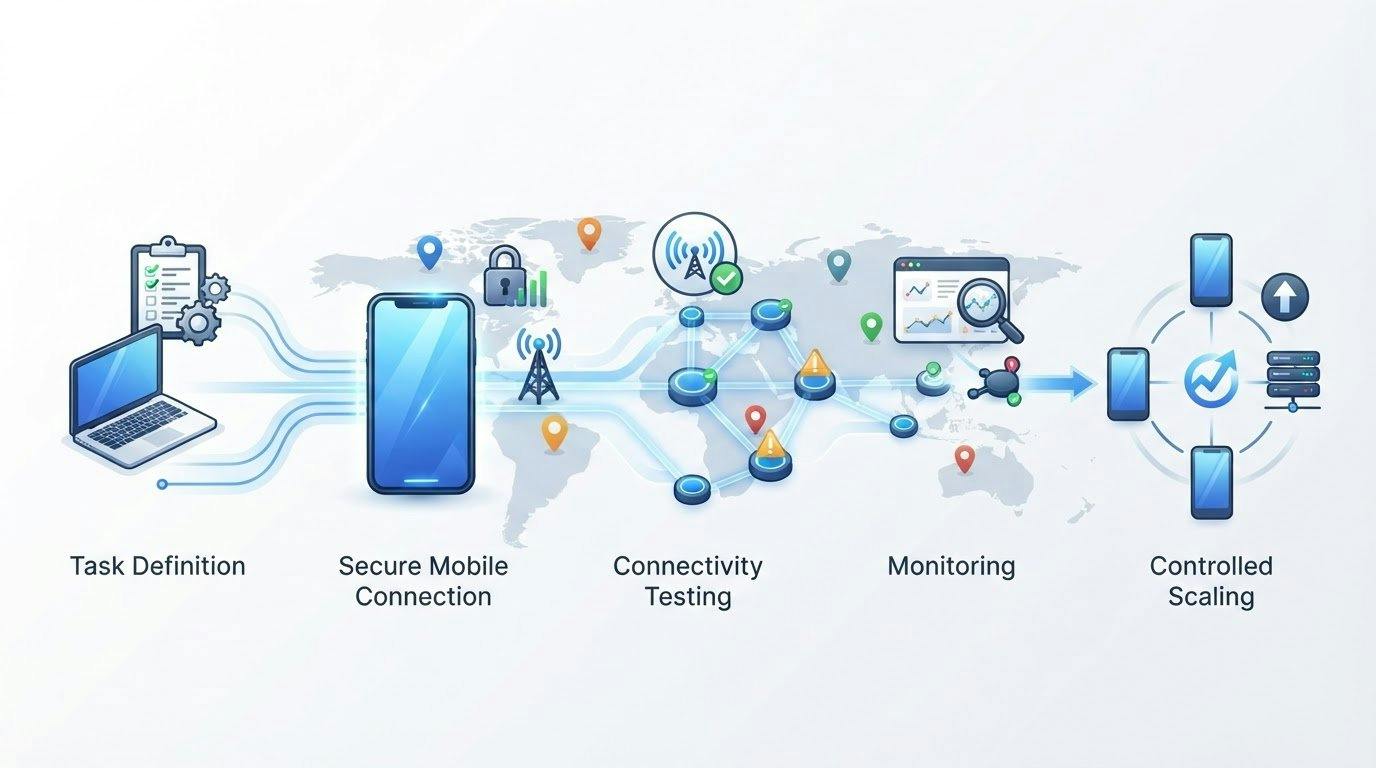
Reliable mobile-proxy automation depends on more than rotating IPs. When you’re automating tasks with mobile proxies, choosing a proxy is only one step. The task, session requirements, and the proxy’s place in your automation stack all affect whether requests behave consistently.
It’s understandable to focus on rotation, location, and connection settings first. But changing IPs won’t fix a workflow that hasn’t been matched to its task or tested before scaling. A deliberate setup helps you identify issues early and keep automation aligned with the target site’s rules.
This guide shows you how to map a mobile proxy to a specific, legitimate task, configure and test connectivity with an appropriate tool, then monitor results before expanding. You’ll learn when a consistent session matters, when rotation may fit, and how location settings relate to your requirements. We’ll also cover where dedicated 4G or 5G mobile proxies fit in an automation stack, so you can choose an approach based on the work, not guesswork.
Key Takeaways
- Match the proxy type to the task’s network context and session needs. Mobile, residential, and datacenter proxies suit different workflows.
- When automating tasks with mobile proxies, define the task and check permissions before configuring a connection.
- Test one authorized task first, then review connection availability, response codes, task completion, and data quality before scaling.
- Use bounded retries, conservative timeouts, and backoff to handle temporary failures without destabilizing the workflow.
- Dedicated 4G and 5G mobile proxies can fit tasks that need mobile connectivity, while a proxy hosting platform can support teams managing proxy infrastructure.
What Does Automating Tasks with Mobile Proxies Actually Mean?
Task automation is software carrying out repeatable actions according to rules set by a person. Examples include checking your own public pages for changes or running an authorized test of how a service responds under different network conditions. The automation tool decides what to do and when. A mobile proxy handles one part of the connection by routing the tool’s internet traffic through an IP address associated with a mobile network.
That distinction matters. Automating tasks with mobile proxies doesn’t mean the proxy runs a script, controls a browser, or processes collected information. It’s a connectivity component in a larger workflow. A general explanation of how an intermediary proxy works is available in What is a Proxy Server?
Which repeatable tasks can mobile proxies support?
Consider tasks where mobile-network context is relevant and the activity is authorized. A team might check its own website or app from permitted locations, monitor public information within a site’s rules, or test how a page responds under different network conditions. The software repeats the defined checks. People set the scope, review results, and decide what action to take.
Keep the boundaries clear. Routine monitoring and authorized testing are different from spam, credential misuse, or attempts to evade access controls. A proxy doesn’t make an otherwise disallowed task acceptable.
What a mobile proxy does, and does not do
The request path is straightforward: an automation script or browser sends a request to the proxy, the proxy forwards it to the destination, and the response returns through the proxy to the tool. The mobile proxy routes traffic through a mobile-network IP. The automation software determines what to request, while a browser automation tool handles browser actions and separate code may validate or store returned data.
Think of these as distinct workflow components:
- Automation logic defines the task, timing, and conditions.
- Proxy connectivity routes requests through the selected network path.
- Browser and data tools interact with pages or interpret results, when the task requires them.
A mobile IP doesn’t guarantee that a destination will grant access, make activity undetectable, or remove the need to follow site terms. The practical value comes from matching the network route to an authorized task and keeping the workflow within its permitted scope. Treat the proxy as one configurable part of the system, not a shortcut around the destination’s rules.
How to Build a Mobile-Proxy Automation Workflow Step by Step
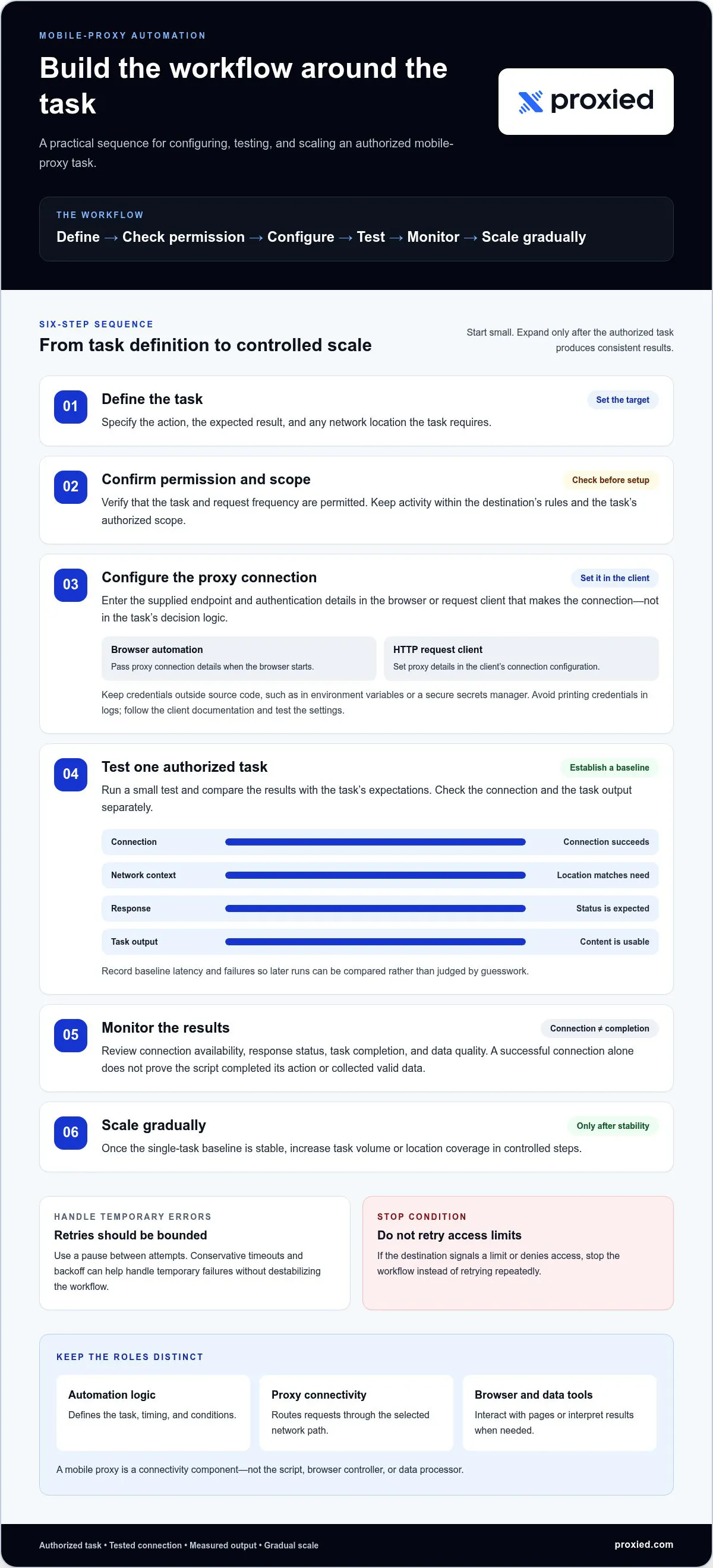
Build the workflow around the task, not around the proxy setting. A clear sequence helps you identify whether a problem comes from the script, the connection, or the destination. When automating tasks with mobile proxies, start small and expand only after the authorized task produces consistent results.
Workflow: Define the task → confirm permission and scope → configure the proxy → test one task → monitor results → scale gradually.
- Define: Specify the action, expected result, and any required network location.
- Check: Confirm that the task and request frequency are permitted.
- Configure: Enter the proxy connection settings in the client that sends requests.
- Test: Run one authorized task and compare its output with expectations.
- Monitor and scale: Record performance first, then increase task volume or coverage in controlled steps.
Configure the proxy in an automation tool
Proxy settings generally belong in the browser or request client that makes the connection, rather than in the task’s decision logic. For example, a browser automation setup using Selenium or Playwright can pass proxy connection details to the browser when it starts. A script using an HTTP request client typically sets them in that client’s connection configuration. Fortinet’s Proxy Server Definition and Use Cases explains the intermediary role a proxy plays in a request path.
Use the endpoint and authentication details supplied for your proxy access. Keep credentials outside source code, such as in environment variables or a secure secrets manager, and avoid printing them in logs. Configuration steps vary by tool, so follow the client’s documentation and test the settings before relying on them in a scheduled workflow.
Test connectivity and task output before scaling
Run a small test against a destination and task you’re authorized to access. Check that the connection succeeds, the observed location matches the task requirement, the response status is expected, and the returned content is usable. Record baseline latency and failures so you can compare later runs rather than guess whether performance has changed.
Separate connection checks from task checks. A successful connection doesn’t prove that the script completed its action or collected valid data. Use bounded retries for transient errors, with a pause between attempts. If the destination signals a limit or denies access, stop the workflow instead of retrying repeatedly. Add concurrency or broader location coverage only after the single-task baseline is stable.
Teams managing their own proxy infrastructure can explore a proxy hosting platform as part of the setup and management layer.
How to Choose Rotation, Sessions, and Proxy Type for the Task
Choose a connection pattern based on what the task needs to preserve and which network context it requires. For automating tasks with mobile proxies, decide whether related requests need to share a session, whether mobile-network routing is relevant, and what task volume your workflow can manage responsibly.
When does a task need a persistent session or rotation?
Use a persistent session when related requests depend on continuity, such as a permitted workflow that needs to retain its own authenticated state. Rotation changes the IP used for connections, so set its frequency only when it fits the task’s legitimate requirements. It isn’t a way to get around limits. Follow the destination’s documented terms and request limits, and stop if access is denied.
Mobile, residential, or datacenter proxies: what differs?
Each proxy type provides a different network context. Mobile proxies route connections through mobile-network IPs. For background on the cellular networks behind that context, see How Mobile Networks Work. Residential and datacenter proxies use different network environments. The right choice depends on authorization, task design, and operational needs, not a universal ranking.
- Mobile — Network context: Mobile-network IP connectivity; Session and workflow considerations: Consider it when the task specifically requires a mobile-network context. Decide whether related requests need session continuity or an appropriate rotation pattern.
- Residential — Network context: Residential network context; Session and workflow considerations: May suit workflows that need this network context. Set session behavior according to the task and destination requirements.
- Datacenter — Network context: Datacenter infrastructure; Session and workflow considerations: Consider it when that connection context fits the workflow. Evaluate task volume, session needs, and destination rules before deployment.
Session persistence and proxy type are related decisions, but they aren’t interchangeable. A workflow may need a particular network context and still require either continuity or rotation, depending on how its requests relate to one another. Confirm how the proxy configuration handles sessions before building task logic around it.
Keep the decision practical: identify the required network context, determine whether the task needs a consistent session, and align request frequency with the destination’s stated limits. Then select the proxy type and session pattern that meet those conditions. No proxy type or rotation setting guarantees access, and changing IPs doesn’t override site terms or access controls.
How to Keep Mobile-Proxy Automation Reliable and Responsible
Reliable automation depends on more than a working connection. A request can succeed while the task fails, or the task can finish with incomplete or inaccurate data. Track these outcomes separately to identify the source of a problem instead of treating every failure as a proxy issue. This is especially useful when automating tasks with mobile proxies across repeated runs.
What should teams monitor in a proxy-based workflow?
Keep logs useful enough to troubleshoot, but limited to what the workflow needs. Record timestamps, the relevant proxy configuration, response outcomes, and exceptions. Avoid storing credentials. Remove sensitive personal data unless retaining it is authorized and necessary for the task.
Review distinct measures rather than relying on a single “success” count:
- Connection availability: Could the automation client establish a connection through the proxy?
- Response outcomes: What status or error did the destination return?
- Task completion: Did the script finish the intended action?
- Data quality: Are results complete, current, and in the expected format?
For example, a request may return a successful status but contain a partial page or an unexpected response. Comparing task completion and data quality with connection and response metrics helps reveal that distinction.
How should automation respond to errors or restrictions?
Set timeouts that give ordinary requests room to complete without letting stalled tasks run indefinitely. Use bounded retries with backoff for temporary connection failures, and investigate configuration or connectivity issues before trying again. Repeated requests aren’t a fix for every error.
If the destination denies access, returns a restriction, or asks for less activity, pause the workflow and review the task against the site’s published limits and terms. Respect robots guidance where applicable, privacy obligations, and platform rules. Treat blocks, CAPTCHAs, and rate limits as signals to stop or reassess, not obstacles to evade. Responsible automation protects the quality of your results and makes the workflow easier to monitor.
Proxied mobile proxies can be one component of an automation setup alongside task logic, monitoring, and secure credential handling. The Proxied mobile proxy options include dedicated mobile connectivity for workflows that require it.
When Proxied Mobile Proxies Fit: How to Get Started
A dedicated mobile proxy may fit when an authorized workflow specifically needs mobile-network connectivity and the team can operate it responsibly. Base the decision on four factors: the network context the task requires, whether its requests need session continuity, the destination’s rules, and your capacity to monitor the workflow. Automating tasks with mobile proxies is most practical when those needs are clear before deployment.
Is a dedicated mobile proxy a practical fit?
Match the proxy category to the task rather than selecting it by default. Proxied offers dedicated 4G and 5G mobile proxies for workflows that need mobile-network connectivity, alongside residential and datacenter options for other network contexts. A proxy handles routing. It can’t repair faulty scripts, poor data handling, or an unauthorized task.
Start with a small, measurable pilot. Confirm that the task is permitted, set a limited scope, and review connection behavior and output quality before expanding. If the task doesn’t require a mobile-network context, another proxy category may be a better fit.
What should a team prepare before deployment?
Write down the task’s purpose, authorized destinations, expected request volume, session needs, and conditions that require the workflow to stop. Decide how you’ll monitor connection outcomes and data quality, and store credentials securely before configuring the automation. These details give the team a baseline for evaluating whether a pilot is ready to grow.
Use the pilot to answer practical questions: Does the workflow complete the intended action? Is the returned data usable? Are errors handled without excessive retries? Can the team respond if a destination denies access or requests reduced activity? Scale only when the pilot meets your reliability, data-quality, and compliance requirements. If it doesn’t, adjust the workflow or keep its scope limited.
For teams managing their own proxy infrastructure, Proxied’s proxy hosting platform can support deployment and management as part of that setup. Keep it distinct from the automation logic itself: your scripts still define tasks, and your monitoring process still determines when to pause or expand operations.
Use these criteria to choose a starting point for your workflow. Proxied proxy solutions include mobile, residential, and datacenter proxy options, along with proxy hosting for infrastructure management.
Build a Workflow You Can Scale with Confidence
Reliable automation with mobile proxies starts with a clear, authorized task, not a rotation setting. Match the proxy and session behavior to the network context and continuity the workflow actually needs. Then test one task, monitor connection outcomes and data quality separately, and expand only when results are consistent and the process respects destination rules.
Proxied offers dedicated 4G and 5G mobile proxies for workflows that need mobile connectivity, as well as residential and datacenter proxy options for other network contexts. Teams managing their own infrastructure can also use the proxy hosting platform for deployment and management. Each option is one component of the automation stack, alongside task logic, monitoring, and secure credential handling.
Start with the requirements you’ve documented, then choose an approach that fits. Explore Proxied proxy solutions to review the available proxy and infrastructure options. A measured pilot gives you a practical foundation for improving and scaling your workflow responsibly.
Frequently Asked Questions
How do you automate tasks with mobile proxies?
Start by defining an authorized task, its destination, and the result you expect. Configure the mobile proxy in the request client or browser your automation uses, then run a small test. Check connectivity, response status, task completion, and data quality separately. Set conservative timeouts and bounded retries, and pause if the destination denies access or signals a limit. Expand only after the pilot works consistently and follows the destination’s terms.
Can mobile proxies be used with Selenium or Playwright?
Yes. Selenium and Playwright can use proxy settings in their browser configuration, routing browser traffic through the selected proxy. The exact setup depends on the tool and proxy connection details. Keep authentication credentials in environment variables or a secure secrets manager rather than in scripts or logs. The proxy handles the connection path; Selenium or Playwright still controls browser actions, while your code defines the task and processes results.
Is a mobile proxy better than a residential proxy for automation?
Neither is universally better. Mobile proxies route connections through mobile-network IPs, while residential proxies provide a residential network context. Choose based on the authorized task’s requirements, including its network context, session behavior, expected request volume, and operational needs. If mobile connectivity isn’t relevant to the task, a residential proxy may be more suitable. Neither proxy type guarantees access or overrides a destination’s rules.
What happens if an automated task gets blocked while using a mobile proxy?
A block or denial means the destination isn’t allowing that request under current conditions. Pause the workflow instead of changing IPs or increasing retries to get around the restriction. Review the response, check for configuration or connectivity errors, and confirm that the task and request frequency follow the destination’s terms and published limits. If access remains denied, stop the task or seek an authorized way to proceed.
Should I use rotating or sticky mobile proxies for automation?
Choose session behavior according to the task. A sticky, or persistent, session can suit related requests that need continuity, such as an authorized workflow maintaining its own login state. Rotation may fit tasks that don’t depend on a continuous session, but it isn’t a way to bypass restrictions. Follow the destination’s limits and terms, and test the selected behavior with a small, authorized task before expanding.
How can I check whether a mobile-proxy automation workflow is working?
Track connection availability, response codes, task completion, and data quality as separate measures. For each run, log useful details such as timestamps, proxy configuration, outcomes, and exceptions without exposing credentials or unnecessary sensitive data. Compare results with a small-test baseline: did the intended action finish, and is the returned information complete and correctly formatted? A successful connection alone doesn’t prove the automation produced a valid result.
Do mobile proxies make automated activity anonymous?
No. A mobile proxy routes a connection through a mobile-network IP, but it doesn’t guarantee anonymity or make activity undetectable. Websites may use other signals to evaluate requests, and proxy use doesn’t remove account, browser, or task-level identifiers. It also doesn’t exempt you from site terms, access controls, or privacy responsibilities. Use proxies for authorized workflows, and treat connectivity as one part of the automation setup, not a promise of anonymity.