



See proxies
See proxies
Purchase
Select Country
Listings will appear after a country has been selected.
How to Manage Proxy Infrastructure: A Practical Operations Guide

Hannah
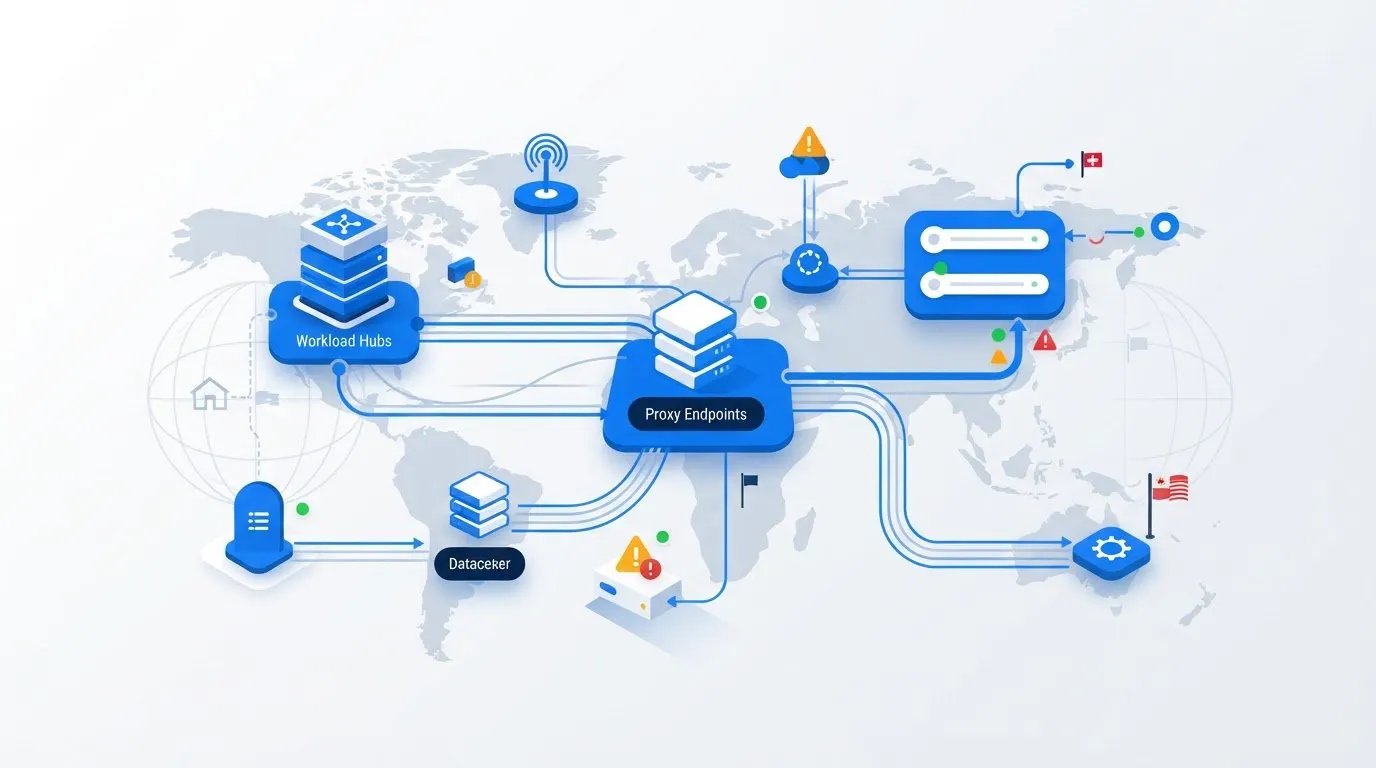
More proxy endpoints won’t fix an operation no one can see. To manage proxy infrastructure reliably, teams need control over the full lifecycle of each resource, not just a growing list of IPs.
When endpoints, credentials, and workload settings are hard to track, a failure can interrupt dependent workflows. Unclear ownership also makes performance changes harder to investigate. Rather than adding infrastructure blindly, build an operating model around what each workload needs and how the team will maintain it.
This guide explains how to create a useful proxy inventory, assign ownership, monitor reliability, and scale with fewer surprises. You’ll learn how workload requirements can inform your choice of dedicated mobile, residential, or datacenter proxies, and how to compare self-managed infrastructure with hosted proxy operations. Proxied provides a hosting platform where teams add their own devices, manage them in one place and can list them on the Proxied marketplace.
A practical process helps your team spot issues sooner, respond with clearer accountability, and make better-informed decisions as proxy capacity grows.
Key Takeaways
- Proxy infrastructure management covers endpoints, access, routing, monitoring, and change processes, not just IP counts.
- Trace how requests move from workloads through proxy endpoints to destinations to identify where configuration or access issues may arise.
- Compare self-managed, hosted, and managed proxy models by control, maintenance ownership, scaling approach, and integration effort.
- Use a repeatable workflow to manage proxy infrastructure, with clear records, owners, observations, and review decisions at each step.
- Match proxy access to workload needs, and consider a proxy hosting platform when centralized infrastructure operations fit your team.
What Does It Mean to Manage Proxy Infrastructure?
Proxy infrastructure management is the coordinated operation of proxy endpoints, access permissions, routing, monitoring, and configuration changes so workloads can use proxy resources consistently and issues can be traced to an owner. It’s ongoing operational work, not a one-time purchase. Buying proxy access provides endpoints or capacity. Managing it means keeping current records of how resources are configured, which workloads use them, who is responsible, and what happens when something changes or fails.
Define the scope by separating the proxy layer from the systems that depend on it. A team may manage endpoint availability, credentials, routing rules, and change records, while another team owns the application, request logic, and data workflow. These responsibilities connect, but they aren’t interchangeable. A proxy can be reachable while an application fails because of its own settings. An application can also be healthy while its configured proxy endpoint is unavailable.
A basic understanding of what a Proxy server does helps clarify that boundary: proxy servers handle requests between clients and destinations, while infrastructure management governs the resources and controls supporting that traffic.
Which Components Belong in a Proxy Infrastructure Inventory?
Build an inventory that lets someone understand each resource without searching through scripts, chats, and old tickets. Record enough operational context to identify how it is used and where to investigate:
- Endpoint details: address, proxy category, region, and supported protocol.
- Purpose and accountability: intended workload, technical owner, and escalation owner.
- Access controls: credential reference, authorized users or systems, and permission scope. Store secrets in an approved secret manager, not in a shared spreadsheet.
- Dependencies: applications using the endpoint and the location of relevant configuration, such as a deployment setting or application environment variable.
Keep sensitive values out of broadly shared records. The inventory should point authorized staff to where they can retrieve a credential without exposing the credential itself. Include a status or review date so the team can spot entries that may be stale, such as an endpoint still assigned to a workload that has changed.
Why Do Teams Need an Operating Model?
Without named ownership, a timeout can trigger guesswork: the application team checks code, an infrastructure engineer changes routing, and nobody knows who should coordinate the investigation. Documenting responsibilities and escalation paths gives each issue a clear starting point. Recording where configurations live also helps teams find drift, such as one workload still using an endpoint that was replaced elsewhere.
An operating model connects three decisions:
- Business requirements: what the workload needs, such as access from a particular region or consistent request routing.
- Technical controls: who can access endpoints, how credentials are stored, and how changes are reviewed.
- Acceptable-use boundaries: which activities are permitted and what limits teams must follow.
Review the inventory when workloads, owners, permissions, or configurations change. This gives teams a practical basis for troubleshooting and capacity planning. Endpoint counts alone won’t show whether resources are assigned correctly or whether the setup is manageable.
How Proxy Infrastructure Works Across Requests, Access, and Monitoring
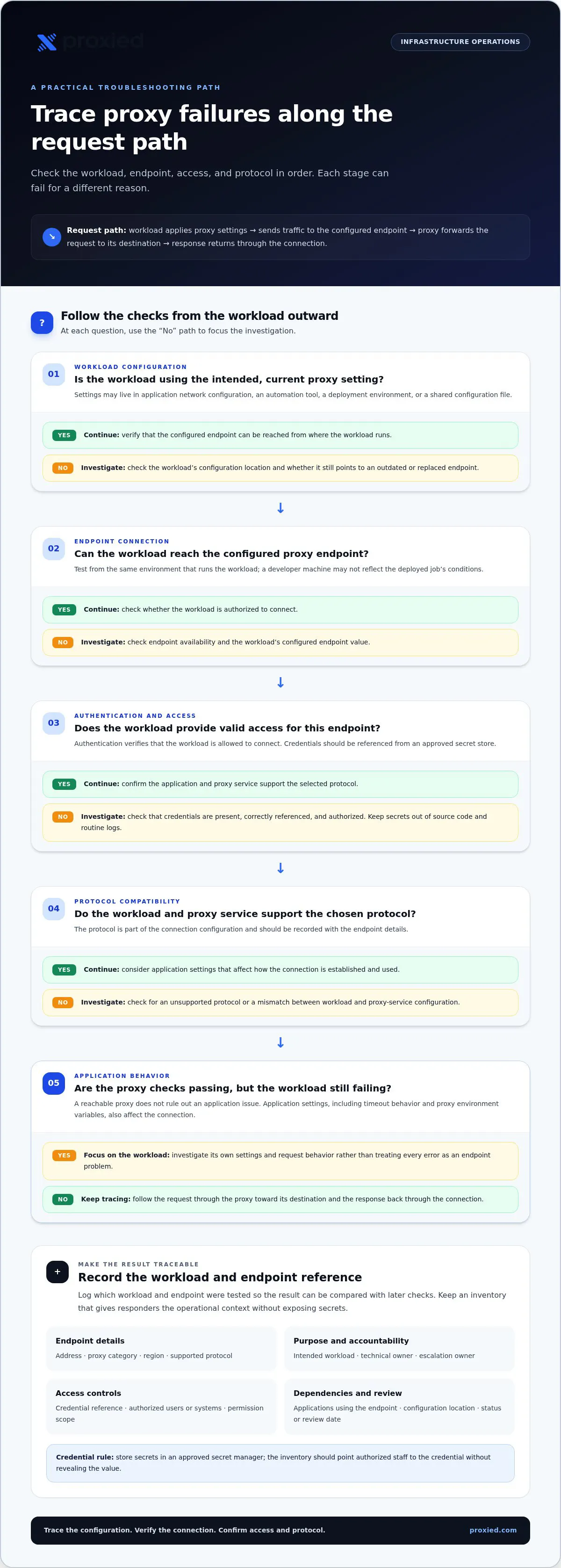
A proxy request follows a path. An application or automation job creates a request, applies its proxy settings, and sends traffic to the configured endpoint. The proxy handles the request onward to its destination, and a response travels back through the connection. Each stage can fail for a different reason. Tracing the path helps teams identify where to investigate instead of treating every error as an endpoint problem.
Routing configuration determines which endpoint a workload uses and may specify a particular proxy or a selection rule. Authentication verifies that the workload is allowed to connect. The application and proxy service must also support the chosen protocol. Application settings, including timeout behavior and proxy environment variables, affect how the workload establishes and uses the connection. Track these dependencies together so responders can check the complete request path.
How Does a Workload Use a Proxy Endpoint?
Proxy settings may live in an application’s network configuration, an automation tool, a deployment environment, or a shared configuration file. The workload reads those settings when it sends a request. Depending on the setup, it may also provide credentials and specify a protocol. Keep credentials in an approved secret store, then reference them from the workload instead of placing them in source code or routine logs.
Configuration details vary by application and proxy service. Test the connection from the same environment that runs the workload. This can reveal differences between a developer’s machine and a deployed job, such as missing credentials, an unsupported protocol, or an outdated endpoint value. When testing, record the workload and endpoint reference so the result can be compared with later checks.
Which Signals Help Reveal Infrastructure Problems?
Observe both the connection and the workload’s outcome. Useful signals include endpoint availability, connection failures, timeout patterns, response latency, error rates, and resource use where it can be measured. Interpret them together. A rise in timeouts may coincide with an application change, a routing update, or a change in endpoint behavior. One measurement alone doesn’t prove the cause.
Set a baseline for normal behavior for each workload, then compare changes against it. Record timestamps, endpoint references, application or job context, and relevant error details. Avoid logging passwords, tokens, or sensitive request data. These records give responders enough context to compare incidents while limiting exposure.
A healthy proxy endpoint does not prove that the user’s task completed successfully. The endpoint may accept connections while the application encounters a destination error, receives an unexpected response, or fails to process the result. Monitor both proxy-level signals and task-level outcomes to distinguish transport problems from workflow problems.
For teams that want to centralize proxy operations, Proxied’s proxy hosting platform provides a way to deploy and manage proxy infrastructure. Match proxy access to each workload’s requirements as part of that setup.
Which Proxy Infrastructure Management Model Fits Your Team?
The right model depends on who should operate the proxy layer and how much control the workload requires. A team with strict configuration needs and in-house network expertise may prefer to run infrastructure itself. A team seeking centralized administration may use proxy hosting. Managed proxy access shifts more responsibility for the proxy pool to a provider, while the customer still configures how its applications use that access.
Compare the operational trade-offs before choosing. “Hosted” describes where infrastructure is deployed and administered. It doesn’t automatically mean the team gives up control or transfers every operational responsibility.
- Self-managed infrastructure — Control: Highest direct control over configuration; Maintenance ownership: Team handles maintenance, monitoring, security, and incidents; Scaling approach: Team provisions and maintains added capacity; Integration effort: Team connects applications and manages configuration
- Hosted proxy infrastructure — Control: Control depends on the platform and operating setup; Maintenance ownership: Responsibilities are divided between the team and platform; Scaling approach: Infrastructure is managed through the hosting approach; Integration effort: Depends on deployment needs and existing workflows
- Managed proxy access — Control: Less control over underlying proxy infrastructure, with control over workload configuration; Maintenance ownership: Provider operates proxy access; team manages its own applications and usage; Scaling approach: Access is adjusted through the provider relationship; Integration effort: Team configures applications to use the supplied access
When Does Self-Managed Proxy Infrastructure Make Sense?
Self-management can suit teams that need direct configuration control and have the people and processes to support it. Count the ongoing work, not just the initial setup: maintaining servers, monitoring availability, protecting credentials, reviewing access, and responding to incidents. If a critical job fails outside a planned maintenance window, someone still needs a clear diagnostic path. Control is useful only when the team can sustain the responsibilities that come with it.
When Can Hosted Proxy Management Reduce Operational Load?
A proxy hosting platform provides a centralized way to deploy and manage proxy infrastructure. It can suit a team that wants a consolidated operating approach while still managing its own proxy network. Before adopting a hosted model, map responsibilities against your requirements: what your team must configure, what it needs to control directly, how the setup fits existing processes, and who owns each operational task. Proxied provides a proxy hosting platform for teams using this approach.
Workload sensitivity matters too. If a workflow depends on tightly controlled routing or access, weigh that need against the team’s capacity to operate the supporting infrastructure. If the main requirement is proxy access for applications, managed access may reduce the underlying infrastructure the team maintains. Neither choice removes the need to own application settings, permissions, and acceptable-use decisions.
To manage proxy infrastructure reliably, choose the model whose ongoing responsibilities match your available skills and required control. Revisit the decision when workloads, internal capacity, or operational requirements change.
How to Manage Proxy Infrastructure: A Repeatable Operations Workflow
To manage proxy infrastructure reliably, put each resource through a repeatable cycle: record it, assign responsibility, control access, observe behavior, review changes, and improve the process. Each step should leave evidence the next person can use, such as an updated inventory, a named owner, or a documented incident decision.
- Inventory resources. Create or update a record for each endpoint, including its category, region, protocol, intended workload, configuration location, and dependencies. Keep credential values out of the inventory; store a secure reference instead. Output: a current resource record.
- Assign ownership. Name the person or team responsible for endpoint records, access decisions, and escalation. Identify who owns each dependent application’s proxy configuration. Output: a clear owner and escalation path.
- Configure access. Grant each user or workload only the permissions it needs. Store secrets in an approved secret manager, restrict who can retrieve them, and keep them out of source code, shared documents, and logs. Define a credential rotation policy based on sensitivity and operational requirements, including how to rotate credentials after a suspected exposure or ownership change. Output: documented permissions and rotation rules.
- Observe behavior. Track endpoint availability, connection failures, timeouts, and response behavior alongside workload outcomes. Set alerts around meaningful deviations from the workload’s baseline rather than treating a single error as proof of an outage. Output: actionable alerts with workload context.
- Review the setup. Reconcile inventory entries with active workloads and configuration locations. Review permissions when roles or workloads change, and remove access that’s no longer needed. Output: a record of reviewed resources and access.
- Improve the process. Use incident findings and review notes to adjust routing, access procedures, monitoring, or escalation steps. Record the decision and who approved the change. Output: an auditable change and an updated operating procedure.
How Should Teams Handle Access and Configuration Changes?
Treat changes as traceable events. A change record should state what is changing, which workloads may be affected, who owns the change, and when it was made. Keep endpoint records, credential references, and application configuration under their respective owners, with a clear handoff when responsibility moves. Review permissions whenever a role or workload changes. Don’t leave old access in place simply because it still works.
What Should a Proxy Incident Runbook Include?
Start by defining the scope: list affected workloads, endpoints, regions, symptoms, and recent configuration changes. Then test the request path in stages. Check whether the workload can connect to the proxy, whether the proxy connection succeeds, and whether the destination or application is responsible for the failure. Record timestamps and relevant error details, but exclude credentials and sensitive request data.
Document the resolution, the cause if known, and any follow-up owner. Update alerts or runbook steps when an incident reveals a gap. Documented ownership shortens the path from incident detection to the person who can act. Teams can centralize deployment and management through Proxied’s proxy hosting platform.
How Proxied Supports Proxy Infrastructure Management
Once a team has defined its operating responsibilities, the next step is choosing infrastructure that fits them. Proxied provides a hosting platform where teams add and manage their own devices in one place and can list them on the Proxied marketplace, giving teams a centralized option for operating their own proxy networks. Use the platform as part of the operating model: identify what the team needs to control, what it can maintain internally, and how its workloads use proxy access.
Centralization can make infrastructure operations easier to organize, but it doesn’t remove the need for clear ownership. Teams still need to manage who can access resources, document workload dependencies, and decide how to observe and respond to issues. Assess how the platform fits your deployment needs and existing processes, rather than assuming hosting automatically handles every operational task.
How Does Proxy Hosting Fit an Infrastructure Strategy?
Proxy hosting suits teams seeking a platform to deploy and manage proxy networks, particularly when maintaining every infrastructure component internally would stretch available capacity. Consider the trade-off between direct control and operational load. A workload with specific configuration or governance needs may call for closer internal oversight, while a team prioritizing centralized infrastructure operations can use a hosting approach.
Before deciding how to use the platform, map the hosting model to your workload design. Identify which responsibilities remain with your team, how the setup fits application configuration, and who owns access governance and monitoring. Hosting changes how infrastructure is operated; it doesn’t replace the processes needed to use proxy access responsibly and investigate failures.
How Can Teams Match Proxied Services to Their Workloads?
Proxy access categories aren’t interchangeable. Proxied offers dedicated 4G and 5G mobile proxies, residential proxies, and datacenter proxies. Start with the workload’s requirements rather than choosing a category by default. Consider the destinations and regions involved, the application’s connection behavior, and the level of control the team needs over the workflow. Then assess the available proxy category against those requirements.
- Workload requirements: Define the task, expected request patterns, and any relevant regional needs.
- Operational fit: Decide how the team will configure access, assign responsibility, and respond to problems.
- Category choice: Evaluate mobile, residential, or datacenter access against the workload rather than assuming one type suits every task.
Compare your infrastructure needs with Proxied’s platform and proxy access categories. Explore Proxied’s proxy hosting platform and identify which proxy options align with your workloads.
Build a Proxy Operation That Can Grow With You
Your next step doesn’t need to be a large infrastructure change. Choose one workload and use it to test how well your current approach supports clear decisions, consistent access, and useful incident records. A focused review can reveal unclear ownership or gaps in the process before you expand it across more workloads.
As requirements change, revisit the operating model rather than letting yesterday’s setup become the default. A deliberate approach helps your team manage proxy infrastructure with greater confidence while keeping control and operational effort in view.
If centralized infrastructure operations suit your team, explore Proxied’s proxy hosting platform and compare its proxy access options with your workload requirements. Explore Proxied’s platform to take the next step.
Frequently Asked Questions
Is proxy infrastructure difficult to manage?
Proxy infrastructure is easier to manage when responsibilities and records are kept together. It gets harder as workloads multiply, integrations differ, or endpoint details live in separate team tools. To manage proxy infrastructure without creating excess process, start with a maintained record for active resources and a named contact for each workload. For example, a small team can begin by documenting its production endpoints and who can approve changes, then expand the process as usage grows.
Can proxy infrastructure management be automated?
Yes, teams can automate repeatable work such as configuration deployment, basic health checks, alert routing, and inventory updates. Start with a low-risk task, such as checking whether a configured endpoint accepts a connection, and confirm the result is useful before expanding automation. Keep changes reviewable, protect credentials in a secret store, and route failures to an owner. Avoid automatic endpoint changes unless the team has tested their effect on dependent applications.
How often should proxy infrastructure be reviewed?
Set a regular review cadence that reflects your risk and workload, then review sooner after a meaningful change. A new application, a team member changing roles, repeated timeouts, or a configuration migration can all make existing records or permissions inaccurate. During each review, compare active usage with the documented setup and note unresolved gaps. The goal is a review rhythm the team can maintain, not a calendar rule that ignores operational change.
What happens if a proxy endpoint fails?
An endpoint failure can prevent dependent applications from connecting, leading to timeouts or interrupted jobs. First check whether the issue affects one workload or several, then compare the failure time with application logs and recent changes. If only one application is affected, its configuration or network path may be involved. Follow the team’s approved recovery steps, record what restored service, and use the incident to refine alert thresholds or escalation ownership.
Can one proxy infrastructure setup support multiple workloads?
Yes, a shared setup can serve multiple workloads if teams account for differences in access, configuration, and resource demand. For example, two jobs may use the same infrastructure but need separate credentials so access can be changed for one without disrupting the other. Track each workload’s dependencies and observe its behavior independently. Separate resources when isolation, control requirements, or application behavior make shared access difficult to manage safely.
Does proxy infrastructure management require coding?
No. Teams can manage proxy settings through application interfaces or a hosting platform, depending on the environment. Coding becomes useful when teams want to automate repeated deployments, checks, or inventory updates through scripts or APIs. Even without custom code, establish a clear process for approving configuration changes and protecting credentials. A simple, documented manual process is more dependable than automation nobody owns or knows how to troubleshoot.
How can teams manage proxy infrastructure responsibly?
Define approved workloads and make sure proxy use follows applicable laws, destination-site terms, and access controls. Give credentials only to authorized users or applications, and avoid storing sensitive request data in routine logs. For example, a team can review unusual usage against its approved workload list and escalate activity it can’t explain. Responsible operations also require a clear response process for misuse or security concerns, rather than treating proxies as a way to evade controls.